Sign In Start Free Trial
Account

Add to playlist

Create a Playlist

Modal Close icon
You need to login to use this feature.
  • Book Overview & Buying Practical Data Analysis Cookbook
  • Table Of Contents Toc
Practical Data Analysis Cookbook

Practical Data Analysis Cookbook

By : Drabas
4.8 (5)
close
close
Practical Data Analysis Cookbook

Practical Data Analysis Cookbook

4.8 (5)
By: Drabas

Overview of this book

Data analysis is the process of systematically applying statistical and logical techniques to describe and illustrate, condense and recap, and evaluate data. Its importance has been most visible in the sector of information and communication technologies. It is an employee asset in almost all economy sectors. This book provides a rich set of independent recipes that dive into the world of data analytics and modeling using a variety of approaches, tools, and algorithms. You will learn the basics of data handling and modeling, and will build your skills gradually toward more advanced topics such as simulations, raw text processing, social interactions analysis, and more. First, you will learn some easy-to-follow practical techniques on how to read, write, clean, reformat, explore, and understand your data—arguably the most time-consuming (and the most important) tasks for any data scientist. In the second section, different independent recipes delve into intermediate topics such as classification, clustering, predicting, and more. With the help of these easy-to-follow recipes, you will also learn techniques that can easily be expanded to solve other real-life problems such as building recommendation engines or predictive models. In the third section, you will explore more advanced topics: from the field of graph theory through natural language processing, discrete choice modeling to simulations. You will also get to expand your knowledge on identifying fraud origin with the help of a graph, scrape Internet websites, and classify movies based on their reviews. By the end of this book, you will be able to efficiently use the vast array of tools that the Python environment has to offer.
Table of Contents (13 chapters)
close
close
12
Index

Exploring the data with Open Refine

Understanding your data is the first step to build successful models. Without intimate knowledge of your data, you might build a model that performs beautifully in the lab but fails gravely in production. Exploring the dataset is also a great way to see if there are any problems with the data contained within.

Getting ready

To follow this recipe, you need to have OpenRefine and virtually any Internet browser installed on your computer. See the Opening and transforming data with OpenRefine recipe's Getting ready subsection to see how to install OpenRefine.

We assume that you followed the previous recipe so your data is already loaded to OpenRefine and the data types are now representative of what the columns hold. No other prerequisites are required.

How to do it…

Exploring data in OpenRefine is easy with Facets. An OpenRefine Facet can be understood as a filter: it allows you to quickly either select certain rows or explore the data in a more straightforward way. A facet can be created for each column—just click on the down-pointing arrow next to the column and, from the menu, select the Facet group.

There are four basic types of facet in OpenRefine: text, numeric, timeline, and scatterplot.

Tip

You can create your own custom facets or also use some more sophisticated ones from the OpenRefine arsenal such as word or text lengths facets (among others).

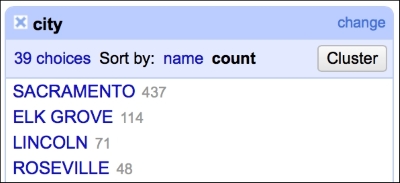
The text facet allows you to get a sense of the distribution of text columns from your dataset quickly. For example, we can see which city in our dataset had the most sales between May 15, 2008 and May 21, 2008. As expected, since we analyze data from the Sacramento area, the city tops the list, followed by Elk Grove, Lincoln, and Roseville, as shown in the following screenshot:

How to do it…

This gives you a very easy and straightforward insight on whether the data makes sense or not; you can readily determine whether the provided data is what it was supposed to be.

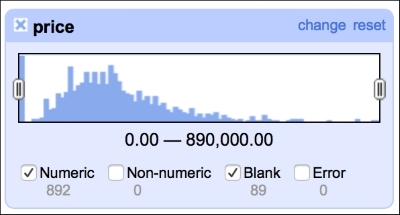
The numeric facet allows you to glimpse the distribution of your numeric data. We can, for instance, check the distribution of prices in our dataset, as shown in the following screenshot:

How to do it…

The distribution of the prices roughly follows what we would expect: left (positive) skewed distribution of sales prices makes sense, as one would expect less sales at the far right end of the spectrum, that is, people having money and willingness to purchase a 10-bedroom villa.

This facet reveals one of the flaws of our dataset: there are 89 missing observations in the price column. We will deal with these later in the book, in the Imputing missing observations recipe.

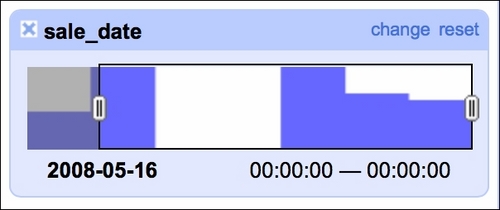
It is also good to check whether there are any blanks in the timeline of sales, as we were told that we would get seven days of data (May 15 to May 21, 2008):

How to do it…

Our data indeed spans seven days but we see two days with no sales. A quick check of the calendar reveals that May 17 and May 18 was a weekend so there are no issues here. The timeline facet allows you to filter the data using the sliders on each side; here, we filtered observations from May 16, 2008 onward.

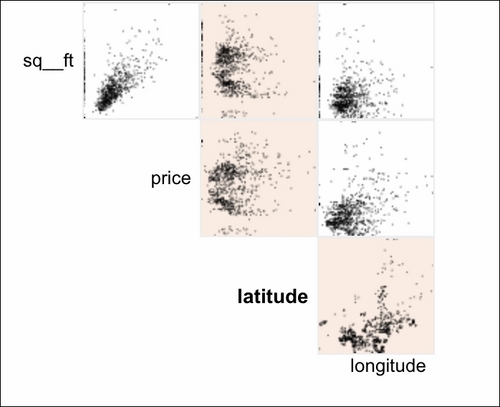
The scatterplot facet lets you analyze interactions between all the numerical variables in the dataset:

How to do it…

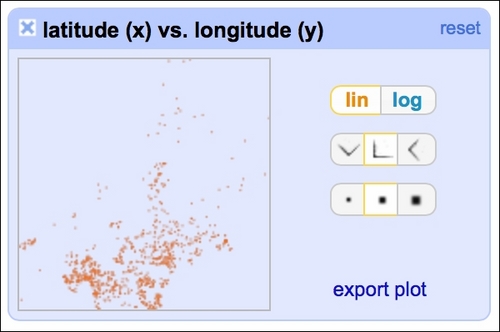
By clicking at the particular row and column, you can analyze the interactions in greater detail:

How to do it…
Visually different images
CONTINUE READING
83
Tech Concepts
36
Programming languages
73
Tech Tools
Icon Unlimited access to the largest independent learning library in tech of over 8,000 expert-authored tech books and videos.
Icon Innovative learning tools, including AI book assistants, code context explainers, and text-to-speech.
Icon 50+ new titles added per month and exclusive early access to books as they are being written.
Practical Data Analysis Cookbook
notes
bookmark Notes and Bookmarks search Search in title playlist Add to playlist font-size Font size

Change the font size

margin-width Margin width

Change margin width

day-mode Day/Sepia/Night Modes

Change background colour

Close icon Search
Country selected

Close icon Your notes and bookmarks

Confirmation

Modal Close icon
claim successful

Buy this book with your credits?

Modal Close icon
Are you sure you want to buy this book with one of your credits?
Close
YES, BUY

Submit Your Feedback

Modal Close icon
Modal Close icon
Modal Close icon