Sign In Start Free Trial
Account

Add to playlist

Create a Playlist

Modal Close icon
You need to login to use this feature.
  • Book Overview & Buying PowerShell for SQL Server Essentials
  • Table Of Contents Toc
PowerShell for SQL Server Essentials

PowerShell for SQL Server Essentials

By : Donabel Santos
3.8 (5)
close
close
PowerShell for SQL Server Essentials

PowerShell for SQL Server Essentials

3.8 (5)
By: Donabel Santos

Overview of this book

This book is written for SQL Server administrators and developers who want to leverage PowerShell to work with SQL Server. Some background with scripting will be helpful but not necessary.
Table of Contents (9 chapters)
close
close
7
A. Implementing Reusability with Functions and Modules
8
Index

Getting help

PowerShell used to come bundled with help documentation. If you've worked with *nix systems, it's similar to the man page.

Starting with PowerShell v3, however, the help files/system were not installed with PowerShell. One of the chronic problems with a help system that comes bundled with an application is that the contents get outdated right away. Applications are continuously being patched, improved, and changed, and thus the documentation needs to be updated. You will need to consciously download and install the help files when you are ready.

Once ready, run PowerShell as an administrator and just type in the following command:

Update-Help

This will connect you to a Microsoft server to download the most recent version of PowerShell help:

Getting help

When you need to look for syntaxes or examples from the help system, you can use Get-Help and then the cmdlet name. For example, if you want to get ChildItem, you can use the following command:

Get-Help Get-ChildItem

Other switches available for Get-Help that you might find useful are as follows:

  • Get-Help Get-ChildItem -Detailed
  • Get-Help Get-ChildItem -Examples
  • Get-Help Get-ChildItem -Full

Note

Get-Help can also be simply referred to as help.

Sometimes you may prefer to open the local help system in a different window, in which case you can use the following command:

Get-Help Get-ChildItem -ShowWindow

The result is shown in the following screenshot:

Getting help

Having the help document in a different window allows you to do simultaneous tasks, that is, write your script and refer to the syntaxes and examples. The help window also allows for searching and highlighting keywords.

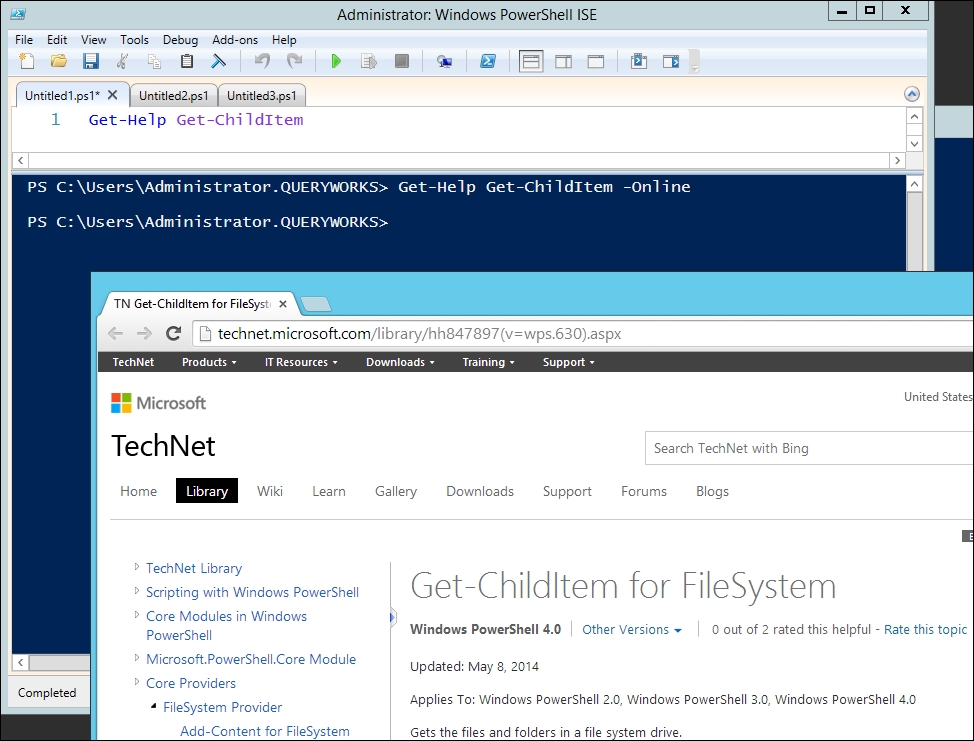
If what you prefer is to view the help online and get the most recent version to date, you can use the following command instead:

Get-Help Get-ChildItem -Online

This will open the corresponding Microsoft TechNet entry in your default browser:

Getting help

Getting help from other cmdlets

In addition to Get-Help, there are two other trusty cmdlets you should know if you want to know PowerShell a lot better. If you need to use a command but only remember the name or part of the name or if you want to get a list of commands based on parameters, you can use Get-Command. For example, as introduced earlier in the chapter, you can get log-related cmdlets using the following command:

Get-Command –Name "*Log*"

If you need to know what properties and methods are available for an object—for example, a variable or the result returned by a cmdlet—you can use Get-Member, as shown in the following example:

$message = "Hello World!"
$message | Get-Member

Since a message is a string, the preceding snippet returns all the properties and methods supported for a string data type.

Two risk-mitigation parameters that you should also get acquainted with are -WhatIf and -Confirm. You can add these two parameters to most cmdlets, and they can help you avoid really stressful "oops" situations.

The -WhatIf parameter describes the effect of a command instead of executing it. The -Confirm parameter forces a prompt before executing the command. It pays to be careful before you run scripts in your environment. It pays to be extra careful; as much as possible, test your scripts in a test environment first.

Tip

Downloading the example code

You can download the example code files for all Packt books you have purchased from your account at http://www.packtpub.com. If you purchased this book elsewhere, you can visit http://www.packtpub.com/support and register to have the files e-mailed directly to you.

Visually different images
CONTINUE READING
83
Tech Concepts
36
Programming languages
73
Tech Tools
Icon Unlimited access to the largest independent learning library in tech of over 8,000 expert-authored tech books and videos.
Icon Innovative learning tools, including AI book assistants, code context explainers, and text-to-speech.
Icon 50+ new titles added per month and exclusive early access to books as they are being written.
PowerShell for SQL Server Essentials
notes
bookmark Notes and Bookmarks search Search in title playlist Add to playlist font-size Font size

Change the font size

margin-width Margin width

Change margin width

day-mode Day/Sepia/Night Modes

Change background colour

Close icon Search
Country selected

Close icon Your notes and bookmarks

Confirmation

Modal Close icon
claim successful

Buy this book with your credits?

Modal Close icon
Are you sure you want to buy this book with one of your credits?
Close
YES, BUY

Submit Your Feedback

Modal Close icon
Modal Close icon
Modal Close icon