Sign In Start Free Trial
Account

Add to playlist

Create a Playlist

Modal Close icon
You need to login to use this feature.
  • Book Overview & Buying Troubleshooting Puppet
  • Table Of Contents Toc
Troubleshooting Puppet

Troubleshooting Puppet

By : Thomas Uphill
4 (1)
close
close
Troubleshooting Puppet

Troubleshooting Puppet

4 (1)
By: Thomas Uphill

Overview of this book

Puppet is a configuration management system written for system administrators to manage a large number of systems efficiently and help maintain order. Deploying Puppet becomes more complex as you increase the number of nodes in your environment. The Puppet tool is an intelligent solution that increases the automation footprint for the proactive management of server infrastructures. Puppet's simple programming language is usable on most operating systems and is portable on different deployment environments. We begin by looking at the puppet.conf server configuration file, and talk about possible problems that can occur. What does puppet really do in the background and what options does it provide for troubleshooting? This is what we will explore. Moving on, we will be troubleshooting errors made in modules and templates, finding the best solutions. We will be writing code that will helping us in identify errors. Then we will explain how several ENCs do their job and how puppet communicates with them. We will learn how PuppetDB collects data generated by Puppet. It also enables advanced Puppet features like exported resources, and can be the foundation for other applications that use Puppet’s data. By the end of the book we will have learned the best debugging tips for Puppet and PuppetServer.
Table of Contents (13 chapters)
close
close
11
11. What's Next?
12
Index

Chapter 4. Gaze-based Control

Gaze-based Control

Up to this point, our diorama is a third-person virtual reality experience. When you go into it, you're like an observer or a third-person camera. Sure, you can look around and add controls that let you move the camera's viewpoint. However, any action in the scene is from a third-person perspective.

In this chapter, we'll pretty much stay in the third-person mode, but we'll get a little more personally involved. We will explore the techniques that can be used to control objects in your virtual world by looking and staring. Our character, Ethan, will be under your control, responding to where you look. Furthermore, we'll start programming the Unity scripts. Along the way, we will discuss the following topics:

  • Adding AI (short for artificial intelligence) and NavMesh to our third-person character, Ethan
  • Unity programming in C#
  • Using our gaze to move a 3D cursor
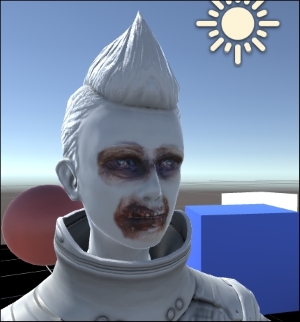
  • Shooting and killing Ethan, the zombie, to good effect
CONTINUE READING
83
Tech Concepts
36
Programming languages
73
Tech Tools
Icon Unlimited access to the largest independent learning library in tech of over 8,000 expert-authored tech books and videos.
Icon Innovative learning tools, including AI book assistants, code context explainers, and text-to-speech.
Icon 50+ new titles added per month and exclusive early access to books as they are being written.
Troubleshooting Puppet
notes
bookmark Notes and Bookmarks search Search in title playlist Add to playlist font-size Font size

Change the font size

margin-width Margin width

Change margin width

day-mode Day/Sepia/Night Modes

Change background colour

Close icon Search
Country selected

Close icon Your notes and bookmarks

Confirmation

Modal Close icon
claim successful

Buy this book with your credits?

Modal Close icon
Are you sure you want to buy this book with one of your credits?
Close
YES, BUY

Submit Your Feedback

Modal Close icon
Modal Close icon
Modal Close icon