
Sign In Start Free Trial
Account

Add to playlist

Create a Playlist

Modal Close icon
You need to login to use this feature.
  • Book Overview & Buying Learning Microsoft Azure Storage
  • Table Of Contents Toc
  • Feedback & Rating feedback
Learning Microsoft Azure Storage

Learning Microsoft Azure Storage

By : Mohamed Waly
5 (1)
close
close
Learning Microsoft Azure Storage

Learning Microsoft Azure Storage

5 (1)
By: Mohamed Waly

Overview of this book

Microsoft Azure Storage is the bedrock of Microsoft's core storage solution offering in Azure. No matter what solution you are building for the cloud, you'll find a compelling use for Azure Storage. This book will help you get up-to-speed quickly on Microsoft Azure Storage by teaching you how to use the different storage services. You will be able to leverage secure design patterns based on real-world scenarios and develop a strong storage foundation for Azure virtual machines. You will start this book with an introduction to Microsoft Azure storage and how it can be used to build large-scale, real-world applications using Azure storage services such as blob, table, queue, and file. This book will also teach you about the different types of Azure Storage. You will then find out the best practices for designing your Azure VM storage, whether it is Windows based or Linux based and how to migrate your storage in different scenarios. You will learn also how to plan and implement your SQL database solution on Azure, and how to build your SQL database in different service models (IaaS/PaaS). Moreover, you will also learn best practices for dealing with Azure Backup, the role of Azure Site Recovery, and the solutions they offer in different scenarios. Finally, you will use StorSimple to unlock the maximum value from all of your data, and some tools that will help you manage your storage on-and off-premise (Azure), such as AzCopy and Storage Explorer. Monitoring your storage in no laughing matter, so you will learn to monitor, diagnose and troubleshoot it.
Table of Contents (9 chapters)
close
close

Creating an Azure SQL Database

To create an Azure SQL Database via the Azure portal, perform the following steps:

  1. Navigate to the Azure portal, then to More services, and search for SQL Databases, as shown in the following screenshot:
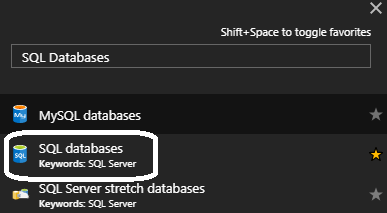
Figure 4.1: Searching for Azure SQL Database
  1. When you open SQL databases, a new blade pops up, and if there're any SQL Databases that you created earlier, they will be displayed here. But since no SQL Databases have been created so far, it will be blank, as shown in the following screenshot:
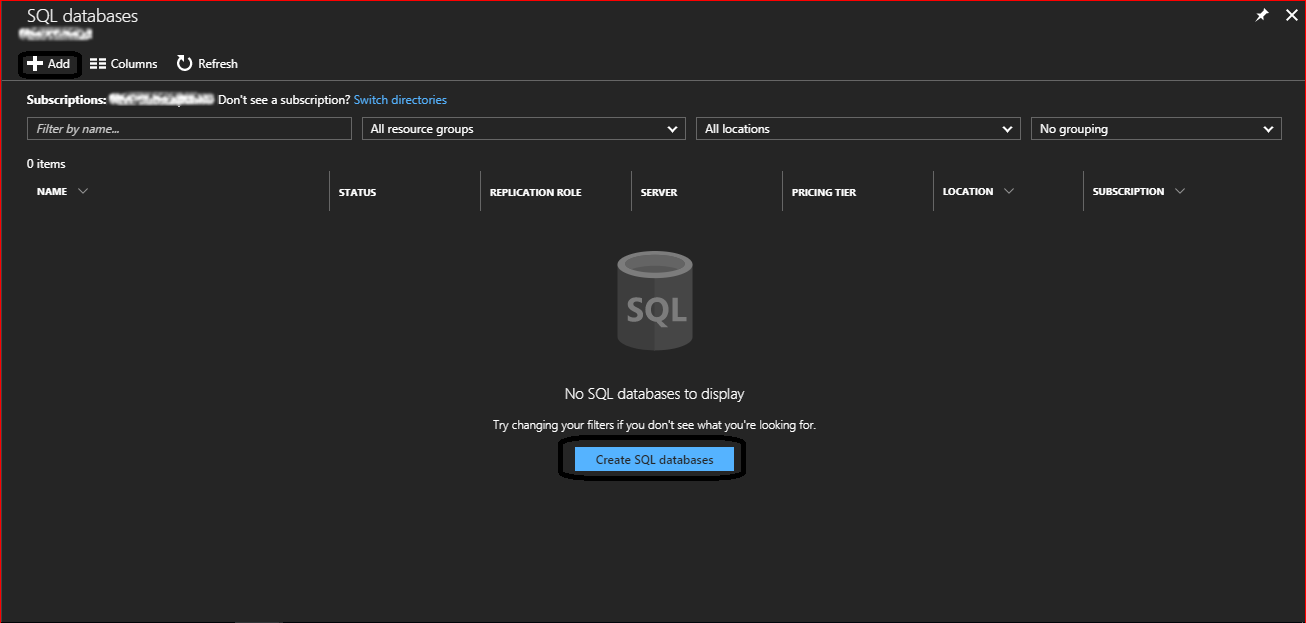
Figure 4.2: Azure SQL Database blade
  1. To create a new Azure SQL Database, click on Add, or Create SQL databases.

  1. Once you have done so, a new blade will pop up, as shown in the following screenshot:
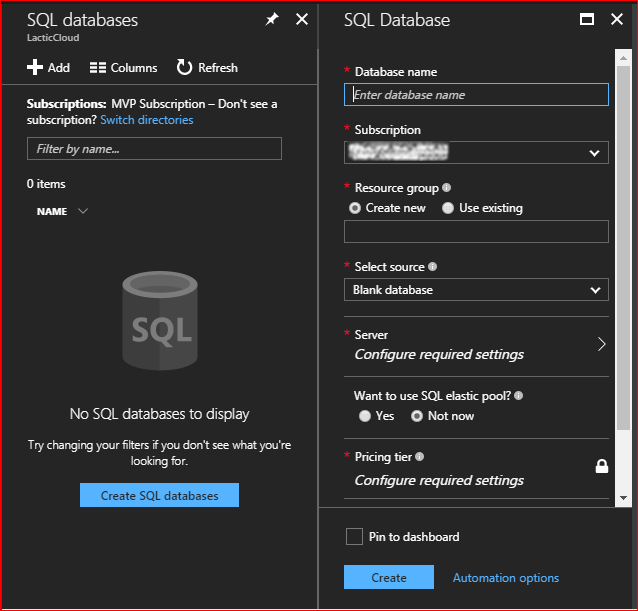
Figure 4.3: Creating a new SQL Database

The fields in this demonstration will be filled in as follows:

    • Database name: PacktPubDB.
    • Subscription...
Visually different images
CONTINUE READING
83
Tech Concepts
36
Programming languages
73
Tech Tools
Icon Unlimited access to the largest independent learning library in tech of over 8,000 expert-authored tech books and videos.
Icon Innovative learning tools, including AI book assistants, code context explainers, and text-to-speech.
Icon 50+ new titles added per month and exclusive early access to books as they are being written.
Learning Microsoft Azure Storage
notes
bookmark Notes and Bookmarks search Search in title playlist Add to playlist font-size Font size

Change the font size

margin-width Margin width

Change margin width

day-mode Day/Sepia/Night Modes

Change background colour

Close icon Search
Country selected

Close icon Your notes and bookmarks

Confirmation

Modal Close icon
claim successful

Buy this book with your credits?

Modal Close icon
Are you sure you want to buy this book with one of your credits?
Close
YES, BUY

Submit Your Feedback

Modal Close icon
Modal Close icon
Modal Close icon
