Sign In Start Free Trial
Account

Add to playlist

Create a Playlist

Modal Close icon
You need to login to use this feature.
  • Book Overview & Buying Nagios Core Administration Cookbook Second Edition
  • Table Of Contents Toc
  • Feedback & Rating feedback
Nagios Core Administration Cookbook Second Edition

Nagios Core Administration Cookbook Second Edition - Second Edition

By : Tom Ryder
5 (2)
close
close
Nagios Core Administration Cookbook Second Edition

Nagios Core Administration Cookbook Second Edition

5 (2)
By: Tom Ryder

Overview of this book

Nagios Core is an open source monitoring framework suitable for any network that ensures both internal and customer-facing services are running correctly and manages notification and reporting behavior to diagnose and fix outages promptly. It allows very fine configuration of exactly when, where, what, and how to check network services to meet both the uptime goals of your network and systems team and the needs of your users. This book shows system and network administrators how to use Nagios Core to its fullest as a monitoring framework for checks on any kind of network services, from the smallest home network to much larger production multi-site services. You will discover that Nagios Core is capable of doing much more than pinging a host or to see whether websites respond. The recipes in this book will demonstrate how to leverage Nagios Core's advanced configuration, scripting hooks, reports, data retrieval, and extensibility to integrate it with your existing systems, and to make it the rock-solid center of your network monitoring world.
Table of Contents (13 chapters)
close
close
12
Index

Creating a new hostgroup

In this recipe, you'll learn how to create a new hostgroup; in this case, to group two web servers together. It is useful to have distinct groups of hosts that might have different properties, such as being monitored by different teams or running different types of monitored services. It also allows us to view a group breakdown in the Nagios Core web interface and to apply a single service to a whole group of hosts rather than doing so individually. This means that all we would have to do to get a new host monitored in the same way as all the other hosts would be to add it to the group, rather than having to specify the configuration manually.

Getting ready

You should have a working Nagios Core 4.0 or better server running with a web interface.

You should also have at least two hosts that form a meaningful group; perhaps they're similar kinds of servers, such as web servers, or are monitored by the same team, or both at a physical location.

In this example, we have two web servers, sparta.example.net and athens.example.net, and we're going to add them to a group called webservers.

How to do it...

We can add our new hostgroup webservers to the Nagios Core configuration as follows:

  1. Create a new file called /usr/local/nagios/etc/objects/hostgroups.cfg, if it doesn't already exist:
    # cd /usr/local/nagios/etc/objects
    # vi hostgroups.cfg
    
  2. Write the following code into the new file, substituting the names in bold to suit your own layout:
    define hostgroup {
     hostgroup_name  webservers
     alias           Webservers with Greek names
    }
  3. Move a directory up and then edit the nagios.cfg file:
    # cd ..
    # vi nagios.cfg
    
  4. Add this line to the end of the file:
    cfg_file=/usr/local/nagios/etc/objects/hostgroups.cfg
  5. For each of the hosts we want to add to the group, find their definitions and add a hostgroups directive to put them into the new hostgroup. In this case, our definitions for sparta.example.net and athens.example.net ends up looking like this:
    define host {
        use         linux-server
        host_name   sparta.example.net
        alias       sparta
        address     192.0.2.21
        hostgroups  webservers
    }
    define host {
        use         linux-server
        host_name   athens.example.net
        alias       athens
        address     192.0.2.22
        hostgroups  webservers
    }
  6. Restart Nagios:
    # /etc/init.d/nagios reload
    

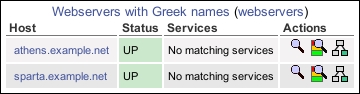
We should now be able to visit the Host Groups section of the web interface and see a new hostgroup with two members:

How to do it...

How it works...

The preceding configuration that we have added includes a new file with a new hostgroup into the Nagios Core configuration and inserts appropriate hosts into the group. The hostgroup creates a separate section in the web interface for us to get a quick overview of only the hosts in that particular group.

There's more...

The way we've added hosts to the preceding groups is actually not the only way to do it. If we prefer, we can instead name the hosts for the group inside the group definition, using the members directive, so we could have something like the following:

define hostgroup {
    hostgroup_name  webservers
    alias           Webservers with Greek names
    members         athens.example.net,sparta.example.net
}

We can also make a hostgroup that always includes every single host, if we find that useful:

define hostgroup {
    hostgroup_name  all
    alias           All hosts
    members         *
}

If we're going to be using hostgroups extensively in our Nagios Core configuration to add hosts to groups, we should use whichever of the two methods we think is going to be easiest for us to maintain.

It's worth noting that a host can be in more than one group and there is no limit on the number of groups we can declare, so we can afford to be quite liberal with how we group our hosts into any sort of useful categories. examples of hostgroups could be organizing servers by a function, manufacturer, or colocation customer or organizing routers by BGP or OSPF usage; it all depends on what kind of network we're monitoring.

See also

  • The Creating a new host section in this chapter
  • The Running a service on all hosts in a group section in this chapter
  • Using inheritance to simplify a configuration, Chapter 9, Managing Configuration
Visually different images
CONTINUE READING
83
Tech Concepts
36
Programming languages
73
Tech Tools
Icon Unlimited access to the largest independent learning library in tech of over 8,000 expert-authored tech books and videos.
Icon Innovative learning tools, including AI book assistants, code context explainers, and text-to-speech.
Icon 50+ new titles added per month and exclusive early access to books as they are being written.
Nagios Core Administration Cookbook Second Edition
notes
bookmark Notes and Bookmarks search Search in title playlist Add to playlist font-size Font size

Change the font size

margin-width Margin width

Change margin width

day-mode Day/Sepia/Night Modes

Change background colour

Close icon Search
Country selected

Close icon Your notes and bookmarks

Confirmation

Modal Close icon
claim successful

Buy this book with your credits?

Modal Close icon
Are you sure you want to buy this book with one of your credits?
Close
YES, BUY

Submit Your Feedback

Modal Close icon
Modal Close icon
Modal Close icon