Sign In Start Free Trial
Account

Add to playlist

Create a Playlist

Modal Close icon
You need to login to use this feature.
  • Book Overview & Buying OpenVPN Cookbook
  • Table Of Contents Toc
OpenVPN Cookbook

OpenVPN Cookbook - Second Edition

By : Jan Just Keijser
4 (1)
close
close
OpenVPN Cookbook

OpenVPN Cookbook

4 (1)
By: Jan Just Keijser

Overview of this book

OpenVPN provides an extensible VPN framework that has been designed to ease site-specific customization, such as providing the capability to distribute a customized installation package to clients, and supporting alternative authentication methods via OpenVPN’s plugin module interface. This book provides you with many different recipes to help you set up, monitor, and troubleshoot an OpenVPN network. You will learn to configure a scalable, load-balanced VPN server farm that can handle thousands of dynamic connections from incoming VPN clients. You will also get to grips with the encryption, authentication, security, extensibility, and certifications features of OpenSSL. You will also get an understanding of IPv6 support and will get a demonstration of how to establish a connection via IPv64. This book will explore all the advanced features of OpenVPN and even some undocumented options, covering all the common network setups such as point-to-point networks and multi-client TUN-style and TAP-style networks. Finally, you will learn to manage, secure, and troubleshoot your virtual private networks using OpenVPN 2.4.
Table of Contents (11 chapters)
close
close

Linux - using pull-resolv-conf


One of the most common pitfalls when setting up a VPN connection on Linux is when the OpenVPN server pushes out new DNS settings. In the previous recipe, we saw that the NetworkManager-openvpn plugin also updated the system configuration file that contained the DNS setting, /etc/resolv.conf. If the command line is used, this is not done automatically. By default, OpenVPN comes with two scripts to add and remove DNS servers from the /etc/resolv.conf file. This recipe will show how to use these scripts.

Getting ready

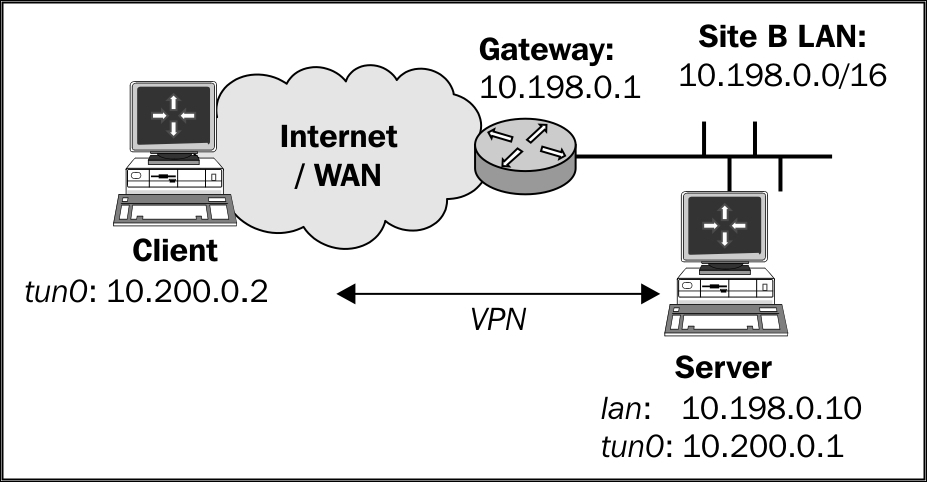
We will use the following network layout:

Set up the client and server certificates using the first recipe from Chapter 2Client-server IP-only Networks. For this recipe, the server computer was running CentOS 6 Linux and OpenVPN 2.3.11. The client was running Fedora 22 Linux and OpenVPN 2.3.11. Keep the basic-udp-server.conf configuration file from the Server-side routing recipe from Chapter 2Client-server IP-only Networks, as well as the  basic...

CONTINUE READING
83
Tech Concepts
36
Programming languages
73
Tech Tools
Icon Unlimited access to the largest independent learning library in tech of over 8,000 expert-authored tech books and videos.
Icon Innovative learning tools, including AI book assistants, code context explainers, and text-to-speech.
Icon 50+ new titles added per month and exclusive early access to books as they are being written.
OpenVPN Cookbook
notes
bookmark Notes and Bookmarks search Search in title playlist Add to playlist font-size Font size

Change the font size

margin-width Margin width

Change margin width

day-mode Day/Sepia/Night Modes

Change background colour

Close icon Search
Country selected

Close icon Your notes and bookmarks

Confirmation

Modal Close icon
claim successful

Buy this book with your credits?

Modal Close icon
Are you sure you want to buy this book with one of your credits?
Close
YES, BUY

Submit Your Feedback

Modal Close icon
Modal Close icon
Modal Close icon