Sign In Start Free Trial
Account

Add to playlist

Create a Playlist

Modal Close icon
You need to login to use this feature.
  • Book Overview & Buying ServiceNow Application Development
  • Table Of Contents Toc
  • Feedback & Rating feedback
ServiceNow Application Development

ServiceNow Application Development

By : Gupta
4.1 (10)
close
close
ServiceNow Application Development

ServiceNow Application Development

4.1 (10)
By: Gupta

Overview of this book

ServiceNow provides service management for every department in the enterprise, including IT, Human Resources, Facilities, Field Service, and more. This book focuses on all the steps required to develop apps and workflows for any of your business requirements using ServiceNow. You will start with the first module, which covers the basics of ServiceNow and how applications are structured; how you can customize the dashboard as required; and also how to create users. After you get used to the dashboard, you will move on to the next module, Applications and Tables, where you will learn about working with different tables and how you can create a scope other than the global scope for your application. The next module is Scripting and APIs, where you will learn Scripting in ServiceNow and use powerful APIs to develop applications. The final module, Administration Essentials, covers debugging, advanced database features, and scheduled script creation. By the end of the book you will have mastered creating organized and customer-friendly applications
Table of Contents (15 chapters)
close
close
Lock Free Chapter
1
Introduction to ServiceNow

Creating a table


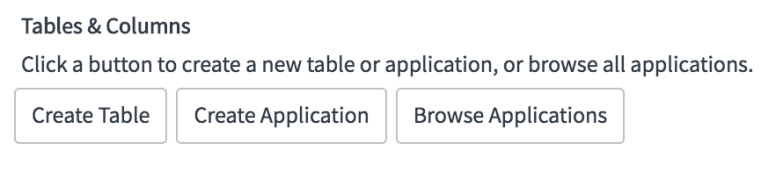
Let us now create a custom table using the Tables & Columns module. There are multiple ways to create a new table. Either open the Tables module and click on the Newbutton on the top, or open the Tables & Columns module and click on the Create Table button in the top section, as shown in the following screenshot:

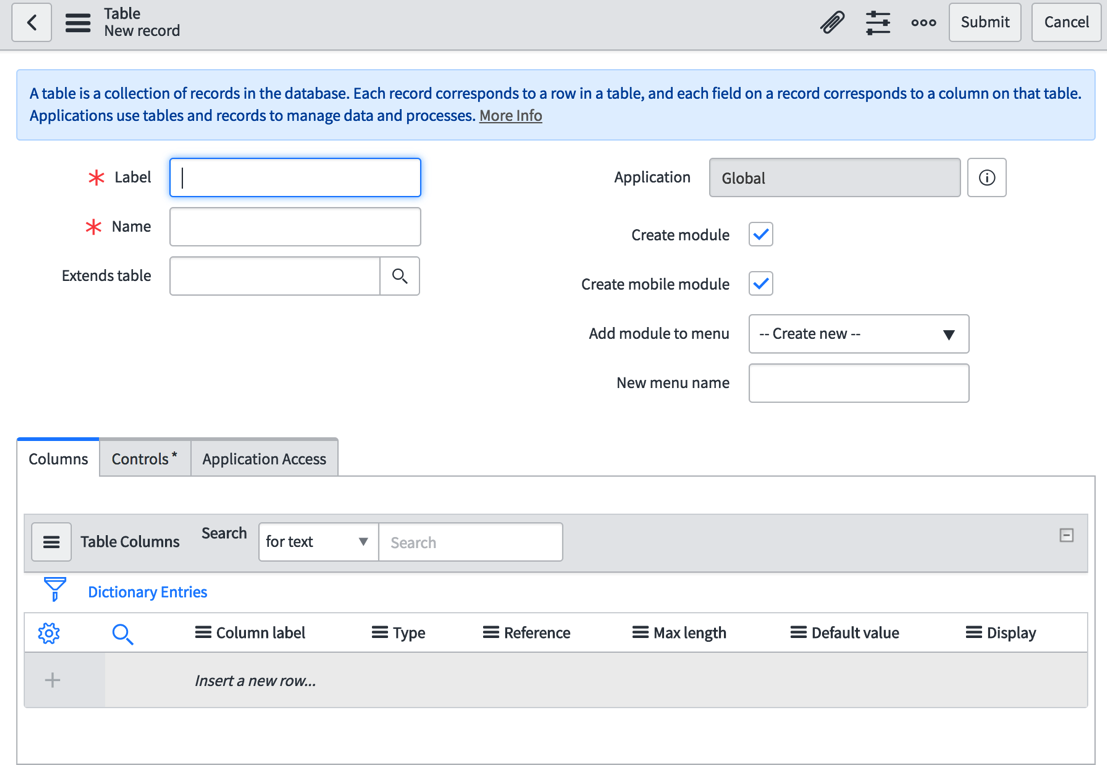
You will be presented with a New record form for the Table. To be clear, we are inserting a new record, using the following form, into a system-defined (out-of-the-box) table labeled Table (with the system name sys_db_object) to create a new table in our instance:

Let us populate the form fields with the following values to create our first custom table:

  1. In the Label field, enter the label we want to give to our new table-that is, POS Location.
  2. The Name field will be automatically populated for you when enter a value in the Label field and focus out of it. Note that the u_ prefix will be added to the system name of your table. This is useful for distinguishing...
Visually different images
CONTINUE READING
83
Tech Concepts
36
Programming languages
73
Tech Tools
Icon Unlimited access to the largest independent learning library in tech of over 8,000 expert-authored tech books and videos.
Icon Innovative learning tools, including AI book assistants, code context explainers, and text-to-speech.
Icon 50+ new titles added per month and exclusive early access to books as they are being written.
ServiceNow Application Development
notes
bookmark Notes and Bookmarks search Search in title playlist Add to playlist font-size Font size

Change the font size

margin-width Margin width

Change margin width

day-mode Day/Sepia/Night Modes

Change background colour

Close icon Search
Country selected

Close icon Your notes and bookmarks

Confirmation

Modal Close icon
claim successful

Buy this book with your credits?

Modal Close icon
Are you sure you want to buy this book with one of your credits?
Close
YES, BUY

Submit Your Feedback

Modal Close icon
Modal Close icon
Modal Close icon