Sign In Start Free Trial
Account

Add to playlist

Create a Playlist

Modal Close icon
You need to login to use this feature.
  • Book Overview & Buying Cisco ACI Cookbook
  • Table Of Contents Toc
Cisco ACI Cookbook

Cisco ACI Cookbook

By : Fordham
3.1 (7)
close
close
Cisco ACI Cookbook

Cisco ACI Cookbook

3.1 (7)
By: Fordham

Overview of this book

Cisco Application Centric Infrastructure (ACI) is a tough architecture that automates IT tasks and accelerates data-center application deployments. This book focuses on practical recipes to help you quickly build, manage, and customize hybrid environment for your organization using Cisco ACI. You will begin by understanding the Cisco ACI architecture and its major components. You will then configure Cisco ACI policies and tenants. Next you will connect to hypervisors and other third-party devices. Moving on, you will configure routing to external networks and within ACI tenants and also learn to secure ACI through RBAC. Furthermore, you will understand how to set up quality of service and network programming with REST, XML, Python and so on. Finally you will learn to monitor and troubleshoot ACI in the event of any issues that arise. By the end of the book, you will gain have mastered automating your IT tasks and accelerating the deployment of your applications.
Table of Contents (11 chapters)
close
close

Configuring Syslog


While the GUI does a great job of showing us the issues and events in the fabric, many people use third-party tools to aggregate data. Setting up a Syslog server is very beneficial for the aggregation of logs.

How to do it...

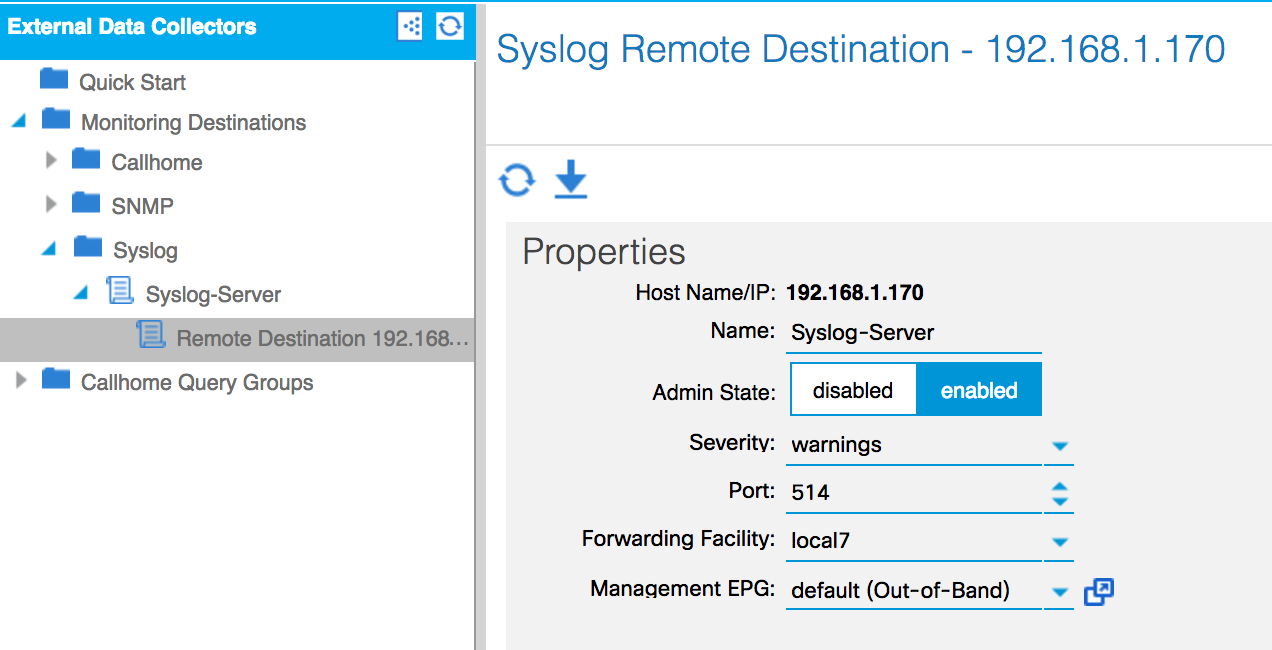
Setting up Syslog is very similar to setting up Call Home and SNMP, but with fewer steps required. 

  1. Create a new external data collector (AdminExternal Data Collectors | Monitoring Destinations) by right-clicking on Syslog and selecting Create Syslog Monitoring Destination Group:
  1. Navigate to Fabric | Fabric Policies | Monitoring Policies | Default.
  2. Create a Syslog entry for the default and Common policies, by clicking on CallHome/SNMP/Syslog, selecting Syslog as the source type in the work pane, and clicking on the plus sign. Select the data collector created in step 1:
  1. Repeat the process for the Access Policies, creating the Syslog object in the default policy.

How it works...

The logs should start to come into the Syslog server (in this case, Kiwi Syslog...

CONTINUE READING
83
Tech Concepts
36
Programming languages
73
Tech Tools
Icon Unlimited access to the largest independent learning library in tech of over 8,000 expert-authored tech books and videos.
Icon Innovative learning tools, including AI book assistants, code context explainers, and text-to-speech.
Icon 50+ new titles added per month and exclusive early access to books as they are being written.
Cisco ACI Cookbook
notes
bookmark Notes and Bookmarks search Search in title playlist Add to playlist font-size Font size

Change the font size

margin-width Margin width

Change margin width

day-mode Day/Sepia/Night Modes

Change background colour

Close icon Search
Country selected

Close icon Your notes and bookmarks

Confirmation

Modal Close icon
claim successful

Buy this book with your credits?

Modal Close icon
Are you sure you want to buy this book with one of your credits?
Close
YES, BUY

Submit Your Feedback

Modal Close icon
Modal Close icon
Modal Close icon