Sign In Start Free Trial
Account

Add to playlist

Create a Playlist

Modal Close icon
You need to login to use this feature.
  • Book Overview & Buying Mastering Wireshark 2
  • Table Of Contents Toc
Mastering Wireshark 2

Mastering Wireshark 2

By : Andrew Crouthamel
close
close
Mastering Wireshark 2

Mastering Wireshark 2

By: Andrew Crouthamel

Overview of this book

Wireshark, a combination of a Linux distro (Kali) and an open source security framework (Metasploit), is a popular and powerful tool. Wireshark is mainly used to analyze the bits and bytes that flow through a network. It efficiently deals with the second to the seventh layer of network protocols, and the analysis made is presented in a form that can be easily read by people. Mastering Wireshark 2 helps you gain expertise in securing your network. We start with installing and setting up Wireshark2.0, and then explore its interface in order to understand all of its functionalities. As you progress through the chapters, you will discover different ways to create, use, capture, and display filters. By halfway through the book, you will have mastered Wireshark features, analyzed different layers of the network protocol, and searched for anomalies. You’ll learn about plugins and APIs in depth. Finally, the book focuses on pocket analysis for security tasks, command-line utilities, and tools that manage trace files. By the end of the book, you'll have learned how to use Wireshark for network security analysis and configured it for troubleshooting purposes.
Table of Contents (13 chapters)
close
close
Lock Free Chapter
1
Installing Wireshark 2

Running tshark


In this section, we'll take a look at how to run the terminal version of Wireshark, so that it only has a command-line interface instead of opening up the GUI.

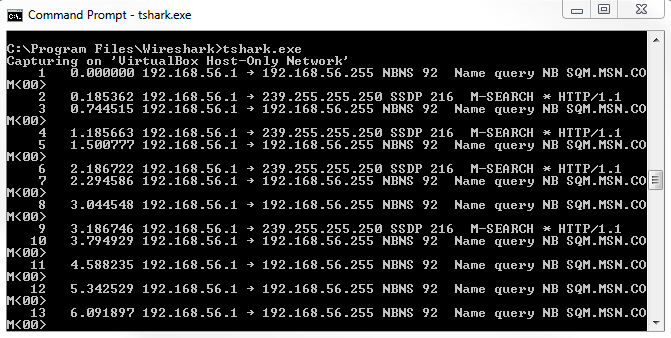
In order to run tshark, you have to open up the command window, and once it's up, we have to browse to where Wireshark is installed because as I've explained, unless you have it in your system path, it'll not be available. So we'll browse again to where Wireshark lives, and we'll do a directory listing. We'll see that we have tshark.exe. This is installed by default with Wireshark. In order to run tshark, all you have to do is, of course, run tshark.exe. If you do so, it automatically begins capturing on your default interface:

You'll notice that it shows the packets that it's capturing directly to the command-line interface, directly to stdout. It does so because it does not have a graphical interface; there's nothing for it to display except for the screen that it's currently using, which is the command interface. You...

CONTINUE READING
83
Tech Concepts
36
Programming languages
73
Tech Tools
Icon Unlimited access to the largest independent learning library in tech of over 8,000 expert-authored tech books and videos.
Icon Innovative learning tools, including AI book assistants, code context explainers, and text-to-speech.
Icon 50+ new titles added per month and exclusive early access to books as they are being written.
Mastering Wireshark 2
notes
bookmark Notes and Bookmarks search Search in title playlist Add to playlist font-size Font size

Change the font size

margin-width Margin width

Change margin width

day-mode Day/Sepia/Night Modes

Change background colour

Close icon Search
Country selected

Close icon Your notes and bookmarks

Confirmation

Modal Close icon
claim successful

Buy this book with your credits?

Modal Close icon
Are you sure you want to buy this book with one of your credits?
Close
YES, BUY

Submit Your Feedback

Modal Close icon
Modal Close icon
Modal Close icon