Sign In Start Free Trial
Account

Add to playlist

Create a Playlist

Modal Close icon
You need to login to use this feature.
  • Book Overview & Buying Practical Data Analysis Cookbook
  • Table Of Contents Toc
Practical Data Analysis Cookbook

Practical Data Analysis Cookbook

By : Drabas
4.8 (5)
close
close
Practical Data Analysis Cookbook

Practical Data Analysis Cookbook

4.8 (5)
By: Drabas

Overview of this book

Data analysis is the process of systematically applying statistical and logical techniques to describe and illustrate, condense and recap, and evaluate data. Its importance has been most visible in the sector of information and communication technologies. It is an employee asset in almost all economy sectors. This book provides a rich set of independent recipes that dive into the world of data analytics and modeling using a variety of approaches, tools, and algorithms. You will learn the basics of data handling and modeling, and will build your skills gradually toward more advanced topics such as simulations, raw text processing, social interactions analysis, and more. First, you will learn some easy-to-follow practical techniques on how to read, write, clean, reformat, explore, and understand your data—arguably the most time-consuming (and the most important) tasks for any data scientist. In the second section, different independent recipes delve into intermediate topics such as classification, clustering, predicting, and more. With the help of these easy-to-follow recipes, you will also learn techniques that can easily be expanded to solve other real-life problems such as building recommendation engines or predictive models. In the third section, you will explore more advanced topics: from the field of graph theory through natural language processing, discrete choice modeling to simulations. You will also get to expand your knowledge on identifying fraud origin with the help of a graph, scrape Internet websites, and classify movies based on their reviews. By the end of this book, you will be able to efficiently use the vast array of tools that the Python environment has to offer.
Table of Contents (13 chapters)
close
close
12
Index

Opening and transforming data with OpenRefine

OpenRefine originated as GoogleRefine. Google later open sourced the code. It is a great tool to sift through the data quickly, clean it, remove duplicate rows, analyze distributions or trends over time, and more.

In this and the following recipes, we will deal with the realEstate_trans_dirty.csv file that is located in the Data/Chapter1 folder. The file has several issues that, over the course of the following recipes, we will see how to resolve.

First, when read from a text file, OpenRefine defaults the types of data to text; we will deal with data type transformations in this recipe. Otherwise, we will not be able to use facets to explore the numerical columns. Second, there are duplicates in the dataset (we will deal with them in the Remove duplicates recipe). Third, the city_state_zip column, as the name suggests, is an amalgam of city, state, and zip. We prefer keeping these separate, and in the Using regular expressions and GREL to clean up data recipe, we will see how to extract such information. There is also some missing information about the sale price—we will impute the sale prices in the Imputing missing observations recipe.

Getting ready

To run through these examples, you need OpenRefine installed and running on your computer. You can download OpenRefine from http://openrefine.org/download.html. The installation instructions can be found at https://github.com/OpenRefine/OpenRefine/wiki/Installation-Instructions.

OpenRefine runs in a browser so you need an Internet browser installed on your computer. I tested it in Chrome and Safari and found no issues.

Note

The Mac OS X Yosemite comes with Java 8 installed by default. OpenRefine does not support it. You need to install Java 6 or 7—see https://support.apple.com/kb/DL1572?locale=en_US.

However, even after installing legacy versions of Java, I still experienced some issues with version 2.5 of OpenRefine on Mac OS X Yosemite and El Capitan. Using the beta version (2.6), even though it is still in development, worked fine.

No other prerequisites are required.

How to do it…

First, you need to start OpenRefine, open your browser, and type http://localhost:3333. A window similar to the following screenshot should open:

How to do it…

The first thing you want to do is create a project. Click on Choose files, navigate to Data/Chapter1, and select realEstate_trans_dirty.csv. Click OK, then Next, and Create Project. After the data opens, you should see something similar to this:

How to do it…

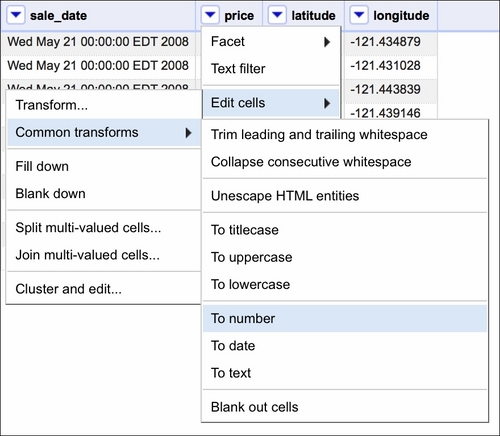
Note that the beds, baths, sq__ft, price, latitude, and longitude data is treated as text and so is sale_date. While converting the former is easy, the format of sale_date is not as easy to play with in OpenRefine:

How to do it…

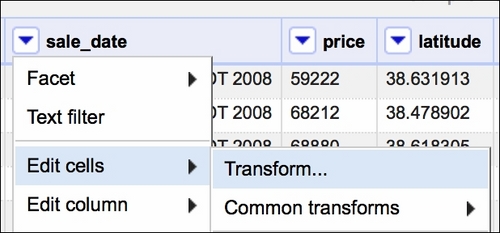
If the text data was in a format resembling, for example, 2008-05-21, we could just use the Google Refine Expression Language (GREL) method .toDate() and OpenRefine would convert the dates for us. In our case, we need to use some trickery to convert the dates properly. First, we select a Transform option, as shown in the following screenshot:

How to do it…

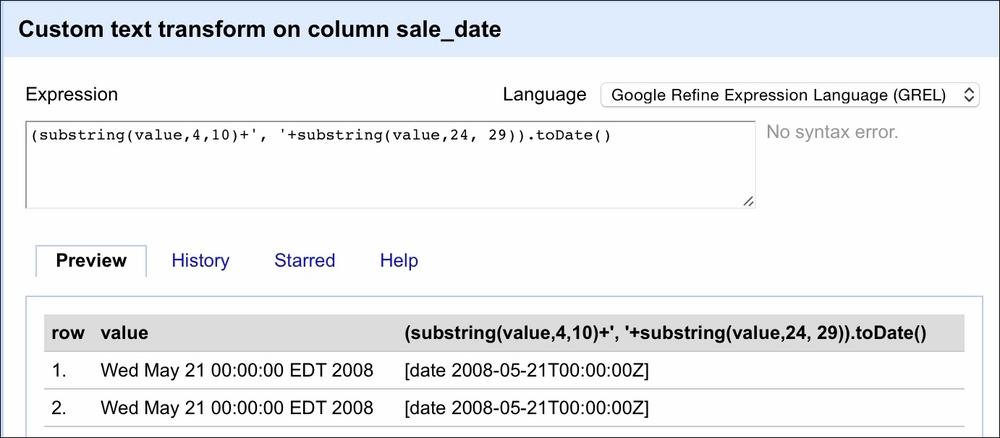
Then, in the window that opens, we will use GREL to convert the dates as follows:

How to do it…

The value variable here represents the value of each cell in the selected column (sale_date). The first part of the expression extracts the month and day from the value, that is, we get in return May 21 by specifying that we want to retrieve a substring starting at the fourth character and finishing at the tenth character. The second substring(...) method extracts the year from the string. We separate the two by a comma using the ...+', '+... expression. The resulting value will result in the May 21, 2008 string pattern. Now OpenRefine can deal with this easily. Thus, we wrap our two substring methods inside parentheses and use the .toDate() method to convert the date properly. The Preview tab in the right column shows you the effect of our expression.

See also

A very good introduction and deep dives into the various aspects of OpenRefine can be found in the Using OpenRefine book by Ruben Verborgh and Max De Wilde at https://www.packtpub.com/big-data-and-business-intelligence/using-openrefine.

CONTINUE READING
83
Tech Concepts
36
Programming languages
73
Tech Tools
Icon Unlimited access to the largest independent learning library in tech of over 8,000 expert-authored tech books and videos.
Icon Innovative learning tools, including AI book assistants, code context explainers, and text-to-speech.
Icon 50+ new titles added per month and exclusive early access to books as they are being written.
Practical Data Analysis Cookbook
notes
bookmark Notes and Bookmarks search Search in title playlist Add to playlist font-size Font size

Change the font size

margin-width Margin width

Change margin width

day-mode Day/Sepia/Night Modes

Change background colour

Close icon Search
Country selected

Close icon Your notes and bookmarks

Confirmation

Modal Close icon
claim successful

Buy this book with your credits?

Modal Close icon
Are you sure you want to buy this book with one of your credits?
Close
YES, BUY

Submit Your Feedback

Modal Close icon
Modal Close icon
Modal Close icon