Sign In Start Free Trial
Account

Add to playlist

Create a Playlist

Modal Close icon
You need to login to use this feature.
  • Book Overview & Buying Practical Data Analysis Cookbook
  • Table Of Contents Toc
Practical Data Analysis Cookbook

Practical Data Analysis Cookbook

By : Drabas
4.8 (5)
close
close
Practical Data Analysis Cookbook

Practical Data Analysis Cookbook

4.8 (5)
By: Drabas

Overview of this book

Data analysis is the process of systematically applying statistical and logical techniques to describe and illustrate, condense and recap, and evaluate data. Its importance has been most visible in the sector of information and communication technologies. It is an employee asset in almost all economy sectors. This book provides a rich set of independent recipes that dive into the world of data analytics and modeling using a variety of approaches, tools, and algorithms. You will learn the basics of data handling and modeling, and will build your skills gradually toward more advanced topics such as simulations, raw text processing, social interactions analysis, and more. First, you will learn some easy-to-follow practical techniques on how to read, write, clean, reformat, explore, and understand your data—arguably the most time-consuming (and the most important) tasks for any data scientist. In the second section, different independent recipes delve into intermediate topics such as classification, clustering, predicting, and more. With the help of these easy-to-follow recipes, you will also learn techniques that can easily be expanded to solve other real-life problems such as building recommendation engines or predictive models. In the third section, you will explore more advanced topics: from the field of graph theory through natural language processing, discrete choice modeling to simulations. You will also get to expand your knowledge on identifying fraud origin with the help of a graph, scrape Internet websites, and classify movies based on their reviews. By the end of this book, you will be able to efficiently use the vast array of tools that the Python environment has to offer.
Table of Contents (13 chapters)
close
close
12
Index

Using regular expressions and GREL to clean up data

When cleaning up and preparing data for use, we sometimes need to extract some information from text fields. Occasionally, we can just split the text fields using delimiters. However, when a pattern of data does not allow us to simply split the text, we need to revert to regular expressions.

Getting ready

To follow this recipe, you need to have OpenRefine and virtually any Internet browser installed on your computer.

We assume that you followed the previous recipes and your data is already loaded to OpenRefine and the data types are now representative of what the columns hold. No other prerequisites are required.

How to do it…

First, let's have a look at the pattern that occurs in our city_state_zip column. As the name suggests, we can expect the first element to be the city followed by state and then a 5-digit ZIP code. We could just split the text field using a space character as a delimiter and be done with it. It would work for many records (for example, Sacramento) and they would be parsed properly into city, state, and ZIP. There is one problem with this approach—some locations consist of two or three words (for example, Elk Grove). Hence, we need a slightly different approach to extract such information.

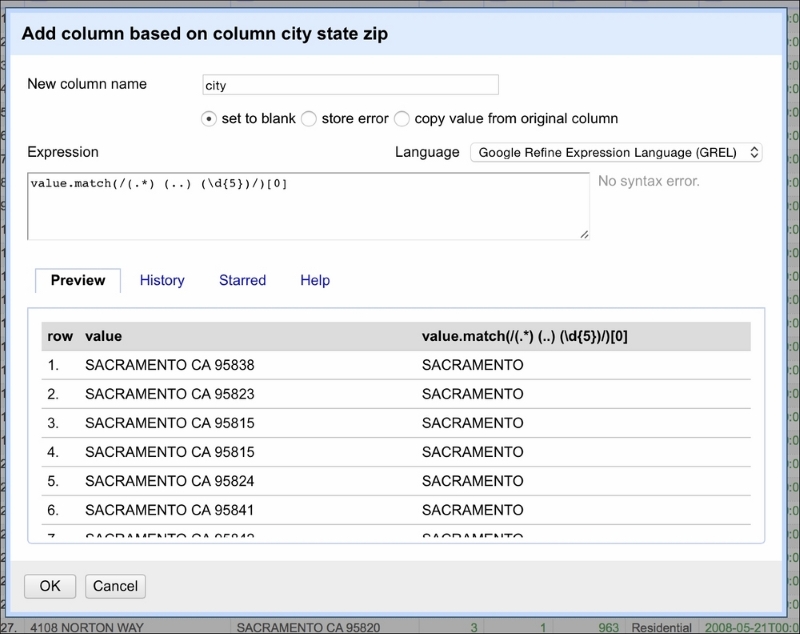
This is where regular expressions play an invaluable role. You can use regular expressions in OpenRefine to transform the data. We will now split city_state_zip into three columns: city, state, and zip. Click on the downward button next to the name of the column and, from the menu, select Edit column and Add column based on this column. A window should appear, as shown in the following screenshot:

How to do it…

As before, the value represents the value of each cell. The .match(...) method is applied to the cell's value. It takes a regular expression as its parameter and returns a list of values matched given the expressed pattern. The regular expression is encapsulated between /.../. Let's break the regular expression down step by step.

We know the pattern of the city_state_zip column: first is the name of the city (can be more than one word), followed by a two-character state acronym, and ending with a 5-digit ZIP code. The regular expression to match such a pattern will be as follows:

(.*) (..) (\d{5})

It is easier to read this expression starting from the end. So, reading from the right, first we extract the ZIP code using (\d{5}). The \d indicates any digit (and is equivalent to stating ([0-9]{5})) and {5} selects five digits from the back of the string. Next, we have (..)¬. This expression extracts the two-character acronym of the state identified by two dots (..). Note that we used ¬ in place of a space character just for readability purposes. This expression extracts only two characters and a space from the string—no less, no more. The last (reading from the right) is (.*) that can be understood as: extract all the characters (if any) that will not be matched by the other two expressions.

In entirety, the expression can be translated into English as follows: extract a string (even if empty) until a two-character acronym of the state is encountered (preceded by a space character) followed by a space and five digits indicating the ZIP code.

The .match(...) method generates a list. In our case, we will get back a list of three elements. To extract city, we select the first element from that list [0]. To select state and ZIP, we will repeat the same steps but select [1] and [2] respectively.

Now that we're done with splitting the city_state_zip column, we can export the project to a file. In the top right corner of the tool, you will find the Export button; select Comma-separated value. This will download the file automatically to your Downloads folder.

See also

I highly recommend reading the Mastering Python Regular Expressions book by Felix Lopez and Victor Romero available at https://www.packtpub.com/application-development/mastering-python-regular-expressions.

Visually different images
CONTINUE READING
83
Tech Concepts
36
Programming languages
73
Tech Tools
Icon Unlimited access to the largest independent learning library in tech of over 8,000 expert-authored tech books and videos.
Icon Innovative learning tools, including AI book assistants, code context explainers, and text-to-speech.
Icon 50+ new titles added per month and exclusive early access to books as they are being written.
Practical Data Analysis Cookbook
notes
bookmark Notes and Bookmarks search Search in title playlist Add to playlist font-size Font size

Change the font size

margin-width Margin width

Change margin width

day-mode Day/Sepia/Night Modes

Change background colour

Close icon Search
Country selected

Close icon Your notes and bookmarks

Confirmation

Modal Close icon
claim successful

Buy this book with your credits?

Modal Close icon
Are you sure you want to buy this book with one of your credits?
Close
YES, BUY

Submit Your Feedback

Modal Close icon
Modal Close icon
Modal Close icon