Sign In Start Free Trial
Account

Add to playlist

Create a Playlist

Modal Close icon
You need to login to use this feature.
  • Book Overview & Buying Hadoop Real-World Solutions Cookbook- Second Edition
  • Table Of Contents Toc
Hadoop Real-World Solutions Cookbook- Second Edition

Hadoop Real-World Solutions Cookbook- Second Edition - Second Edition

By : Deshpande
4.3 (4)
close
close
Hadoop Real-World Solutions Cookbook- Second Edition

Hadoop Real-World Solutions Cookbook- Second Edition

4.3 (4)
By: Deshpande

Overview of this book

Big data is the current requirement. Most organizations produce huge amount of data every day. With the arrival of Hadoop-like tools, it has become easier for everyone to solve big data problems with great efficiency and at minimal cost. Grasping Machine Learning techniques will help you greatly in building predictive models and using this data to make the right decisions for your organization. Hadoop Real World Solutions Cookbook gives readers insights into learning and mastering big data via recipes. The book not only clarifies most big data tools in the market but also provides best practices for using them. The book provides recipes that are based on the latest versions of Apache Hadoop 2.X, YARN, Hive, Pig, Sqoop, Flume, Apache Spark, Mahout and many more such ecosystem tools. This real-world-solution cookbook is packed with handy recipes you can apply to your own everyday issues. Each chapter provides in-depth recipes that can be referenced easily. This book provides detailed practices on the latest technologies such as YARN and Apache Spark. Readers will be able to consider themselves as big data experts on completion of this book. This guide is an invaluable tutorial if you are planning to implement a big data warehouse for your business.
Table of Contents (12 chapters)
close
close
11
Index

Performing benchmarking on a Hadoop cluster

The Hadoop framework supports built-in libraries so that we can perform benchmarking in order to take a look at how the Hadoop cluster configurations/hardware are performing. There are plenty of tests available that will perform the benchmarking of various aspects of the Hadoop cluster. In this recipe, we are going to take a look at how to perform benchmarking and read the results.

Getting ready

To perform this recipe, you should have a Hadoop cluster up and running.

How to do it...

The Hadoop framework supports built-in support to benchmark various aspects. These tests are written in a library called hadoop-mapreduce-client-jobclient-2.7.0-tests.jar

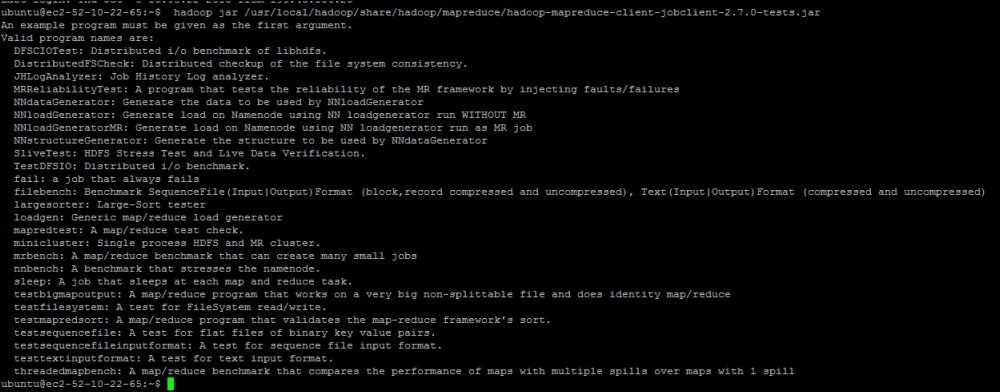
To know the list of all the supported tests, you can execute the following command:

hadoop jar /usr/local/hadoop/share/hadoop/mapreduce/hadoop-mapreduce-client-jobclient-2.7.0-tests.jar

The result of the command will be similar to what is shown in this screenshot:

How to do it...

TestDFSIO

This is one the major tests that you may want to do in order to see how DFS is performing. So, we are now going to take a look at how to use these tests to know how efficiently HDFS is able to write and read data.

As seen in the preceding screenshot, the library provides tools to test DFS through an option called TestDFSIO. Now, let's execute the write test in order to understand how efficiently HDFS is able to write big files. The following is the command to execute the write test:

hadoop jar /usr/local/hadoop/share/hadoop/mapreduce/hadoop-mapreduce-client-jobclient-2.7.0-tests.jar TestDFSIO -write -nrFiles 2 -fileSize 1GB -resFile /tmp/TestDFSIOwrite.txt

Once you initiate the preceding command, a map reduce job will start, which will write two files to HDFS that are 1GB in size . You can choose any numbers based on your cluster size. These tests create data in HDFS under the /benchmarks directory. Once the execution is complete, you will see these results:

15/10/08 11:37:23 INFO fs.TestDFSIO: ----- TestDFSIO ----- : write
15/10/08 11:37:23 INFO fs.TestDFSIO:            Date & time: Thu Oct 08 11:37:23 UTC 2015
15/10/08 11:37:23 INFO fs.TestDFSIO:        Number of files: 2
15/10/08 11:37:23 INFO fs.TestDFSIO: Total MBytes processed: 2048.0
15/10/08 11:37:23 INFO fs.TestDFSIO:      Throughput mb/sec: 26.637185406776354
15/10/08 11:37:23 INFO fs.TestDFSIO: Average IO rate mb/sec: 26.63718605041504
15/10/08 11:37:23 INFO fs.TestDFSIO:  IO rate std deviation: 0.00829867575568246
15/10/08 11:37:23 INFO fs.TestDFSIO:     Test exec time sec: 69.023

The preceding data is calculated from the RAW data generated by the Map Reduce program. You can also view the raw data as follows:

hdfs dfs -cat /benchmarks/TestDFSIO/io_read/part*
f:rate  53274.37
f:sqrate        1419079.2
l:size  2147483648
l:tasks 2
l:time  76885

Tip

The following formulae are used to calculate throughput, the average IO rate, and standard deviation.

Throughput = size * 1000/time * 1048576

Average IO rate = rate/1000/tasks

Standard deviation = square root of (absolute value(sqrate/1000/tasks – Average IO Rate * Average IO Rate))

Similarly, you can perform benchmarking of HDFS read operations as well:

hadoop jar /usr/local/hadoop/share/hadoop/mapreduce/hadoop-mapreduce-client-jobclient-2.7.0-tests.jar TestDFSIO -read -nrFiles 2 -fileSize 1GB -resFile /tmp/TestDFSIOread.txt

At the end of the execution, a reducer will collect the data from the RAW results, and you will see calculated numbers for the DFSIO reads:

15/10/08 11:41:01 INFO fs.TestDFSIO: ----- TestDFSIO ----- : read
15/10/08 11:41:01 INFO fs.TestDFSIO:            Date & time: Thu Oct 08 11:41:01 UTC 2015
15/10/08 11:41:01 INFO fs.TestDFSIO:        Number of files: 2
15/10/08 11:41:01 INFO fs.TestDFSIO: Total MBytes processed: 2048.0
15/10/08 11:41:01 INFO fs.TestDFSIO:      Throughput mb/sec: 33.96633220001659
15/10/08 11:41:01 INFO fs.TestDFSIO: Average IO rate mb/sec: 33.968116760253906
15/10/08 11:41:01 INFO fs.TestDFSIO:  IO rate std deviation: 0.24641533955938721
15/10/08 11:41:01 INFO fs.TestDFSIO:     Test exec time sec: 59.343

Here, we can take a look at the RAW data as well:

hdfs dfs -cat /benchmarks/TestDFSIO/io_read/part*
f:rate  67936.234
f:sqrate        2307787.2
l:size  2147483648
l:tasks 2
l:time  60295

The same formulae are used to calculate the throughput, average IO rate, and standard deviation.

This way, you can benchmark the DFSIO reads and writes.

NNBench

Similar to DFS IO, we can also perform benchmarking for NameNode:

hadoop jar /usr/local/hadoop/share/hadoop/mapreduce/hadoop-mapreduce-client-jobclient-2.7.0-tests.jar nnbench -operation create_write

MRBench

MRBench helps us understand the average time taken for a job to execute for a given number of mappers and reducers. The following is a sample command to execute MRBench with default parameters:

hadoop jar /usr/local/hadoop/share/hadoop/mapreduce/hadoop-mapreduce-client-jobclient-2.7.0-tests.jar mrbench

How it works...

Hadoop benchmark tests use the parameters and conditions provided by users. For every test, it executes a map reduce job and once complete, it displays the results on the screen. Generally, it is recommended that you run the benchmarking tests as soon as you have installed the Hadoop cluster in order to predict the performance of HDFS/Map Reduce and so on.

Most of the tests require a sequence in which they should be executed, for example, all write tests should be executed first, then read/delete, and so on.

Once the complete execution is done, make sure you clean up the data in the /benchmarks directory in HDFS.

Here is an example command to clean up the data generated by the TestDFSIO tests:

hadoop jar /usr/local/hadoop/share/hadoop/mapreduce/hadoop-mapreduce-client-jobclient-2.7.0-tests.jar TestDFSIO -clean
CONTINUE READING
83
Tech Concepts
36
Programming languages
73
Tech Tools
Icon Unlimited access to the largest independent learning library in tech of over 8,000 expert-authored tech books and videos.
Icon Innovative learning tools, including AI book assistants, code context explainers, and text-to-speech.
Icon 50+ new titles added per month and exclusive early access to books as they are being written.
Hadoop Real-World Solutions Cookbook- Second Edition
notes
bookmark Notes and Bookmarks search Search in title playlist Add to playlist font-size Font size

Change the font size

margin-width Margin width

Change margin width

day-mode Day/Sepia/Night Modes

Change background colour

Close icon Search
Country selected

Close icon Your notes and bookmarks

Confirmation

Modal Close icon
claim successful

Buy this book with your credits?

Modal Close icon
Are you sure you want to buy this book with one of your credits?
Close
YES, BUY

Submit Your Feedback

Modal Close icon
Modal Close icon
Modal Close icon