Sign In Start Free Trial
Account

Add to playlist

Create a Playlist

Modal Close icon
You need to login to use this feature.
  • Book Overview & Buying MySQL 8 for Big Data
  • Table Of Contents Toc
  • Feedback & Rating feedback
MySQL 8 for Big Data

MySQL 8 for Big Data

By : Challawala, Jaydip Lakhatariya, Mehta, Patel
5 (1)
close
close
MySQL 8 for Big Data

MySQL 8 for Big Data

5 (1)
By: Challawala, Jaydip Lakhatariya, Mehta, Patel

Overview of this book

With organizations handling large amounts of data on a regular basis, MySQL has become a popular solution to handle this structured Big Data. In this book, you will see how DBAs can use MySQL 8 to handle billions of records, and load and retrieve data with performance comparable or superior to commercial DB solutions with higher costs. Many organizations today depend on MySQL for their websites and a Big Data solution for their data archiving, storage, and analysis needs. However, integrating them can be challenging. This book will show you how to implement a successful Big Data strategy with Apache Hadoop and MySQL 8. It will cover real-time use case scenario to explain integration and achieve Big Data solutions using technologies such as Apache Hadoop, Apache Sqoop, and MySQL Applier. Also, the book includes case studies on Apache Sqoop and real-time event processing. By the end of this book, you will know how to efficiently use MySQL 8 to manage data for your Big Data applications.
Table of Contents (11 chapters)
close
close

Installing MySQL 8

Let's first see from where to download MySQL 8 and a basic understanding of package structures to choose which one is appropriate. We start by obtaining MySQL 8 and will then quickly glance through installation and verification.

Obtaining MySQL 8

Download the RPM package of the MySQL Community Server from its download page (https://dev.mysql.com/downloads/mysql/8.0.html). There are various variants available based on the operating system and its architecture version. It comes with different packages that can be described by the package name. The following syntax is followed by the package name:

packageName-version-distribution-archType.rpm

Package Name: Name of the package, like myql-community-server, mysql-community-client, mysql-community-libs

Version: Describes the version-particular package

Distribution: This says the package is intended for which Linux distribution based on its abbreviation

Abbreviation Linux distribution
el6, el7 Red Hat Enterprise Linux/Oracle Linux/CentOS 6, 7
fc24, fc25 Fedora 24 or 25
sles12 SUSE Linux Enterprise Server 12
solaris11 Oracle Solaris 11


Arch Type: Describes the processor type for which the package was built, like x86_64, i686, and so on

MySQL 8 installation

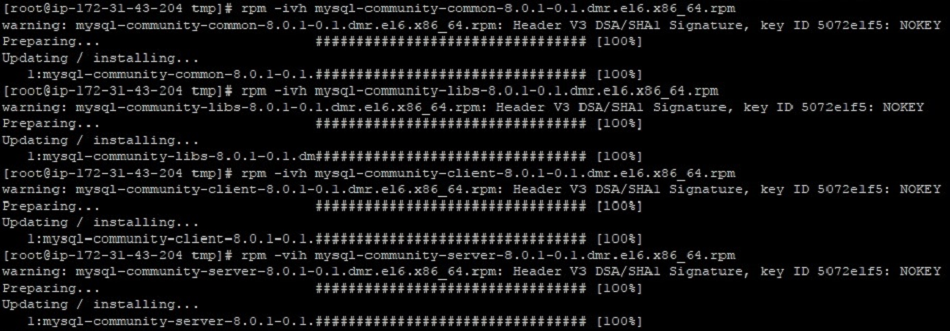
Once you have the RPM packages, just install it using the following command. This will place the required files and folder under the system directories:

rpm -vih <package-name>.rpm

For the standard installation, it requires only mysql-community-common, mysql-community-libs, mysql-community-client, and mysql-community-server packages. Look at the following screenshot for the installation process:

After the successful installation, just check its version to validate if it's installed properly and can be accessible:

The next step is to reset the temporary password during post-installation. MySQL will restrict you to use the database before changing this temporary password. A temporary password will be generated by MySQL and available in its log file. To retrieve a temporary password, you need to open the /var/log/mysql/mysqld.log file and search for the temporary password keyword.

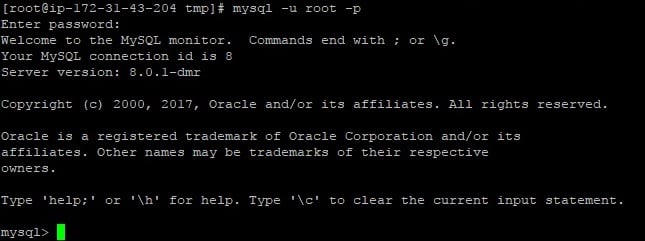
Copy this and try to connect to MySQL with the following command:

As shown in the preceding screenshot, you will land on a MySQL command prompt, where you can execute the following query to reset the password:

ALTER USER 'root'@'localhost' IDENTIFIED BY '<NEW_PASSWORD>';

MySQL service commands

Let's look at a few MySQL basic commands:

  • To start the MySQL service, perform the following command:
service mysqld start
  • To stop the MySQL service, perform the following command:
service mysqld stop
  • To check the status of MySQL service whether it is running or not, perform the following command:

service mysqld status
Visually different images
CONTINUE READING
83
Tech Concepts
36
Programming languages
73
Tech Tools
Icon Unlimited access to the largest independent learning library in tech of over 8,000 expert-authored tech books and videos.
Icon Innovative learning tools, including AI book assistants, code context explainers, and text-to-speech.
Icon 50+ new titles added per month and exclusive early access to books as they are being written.
MySQL 8 for Big Data
notes
bookmark Notes and Bookmarks search Search in title playlist Add to playlist download Download options font-size Font size

Change the font size

margin-width Margin width

Change margin width

day-mode Day/Sepia/Night Modes

Change background colour

Close icon Search
Country selected

Close icon Your notes and bookmarks

Confirmation

Modal Close icon
claim successful

Buy this book with your credits?

Modal Close icon
Are you sure you want to buy this book with one of your credits?
Close
YES, BUY

Submit Your Feedback

Modal Close icon
Modal Close icon
Modal Close icon