Sign In Start Free Trial
Account

Add to playlist

Create a Playlist

Modal Close icon
You need to login to use this feature.
  • Book Overview & Buying Keras Deep Learning Cookbook
  • Table Of Contents Toc
  • Feedback & Rating feedback
Keras Deep Learning Cookbook

Keras Deep Learning Cookbook

By : Dua, Sujit Pal, Ghotra
1 (1)
close
close
Keras Deep Learning Cookbook

Keras Deep Learning Cookbook

1 (1)
By: Dua, Sujit Pal, Ghotra

Overview of this book

Keras has quickly emerged as a popular deep learning library. Written in Python, it allows you to train convolutional as well as recurrent neural networks with speed and accuracy. The Keras Deep Learning Cookbook shows you how to tackle different problems encountered while training efficient deep learning models, with the help of the popular Keras library. Starting with installing and setting up Keras, the book demonstrates how you can perform deep learning with Keras in the TensorFlow. From loading data to fitting and evaluating your model for optimal performance, you will work through a step-by-step process to tackle every possible problem faced while training deep models. You will implement convolutional and recurrent neural networks, adversarial networks, and more with the help of this handy guide. In addition to this, you will learn how to train these models for real-world image and language processing tasks. By the end of this book, you will have a practical, hands-on understanding of how you can leverage the power of Python and Keras to perform effective deep learning
Table of Contents (12 chapters)
close
close

Installing Keras with Jupyter Notebook in a Docker image

In this recipe, we learn how to install and use a Docker container running Keras inside a container and access it using Jupyter.

Getting ready

How to do it...

In the following section, we will be learning how to install the Docker container.

Installing the Docker container 

  1. Execute the following command on the Terminal to run the container. The container image is available with the tag rajdeepd/jupyter-keras:
docker run -d -p 8888:8888 rajdeepd/jupyter-keras start-notebook.sh --NotebookApp.token=''
  1. This will install the Notebook locally and start it as well. You can execute the docker ps -a command and see the output in the Terminal, as follows:
CONTAINER ID        IMAGE                         COMMAND                  CREATED             STATUS                         PORTS                     NAMES
45998a5eea89 rajdeepd/jupyter-keras "tini -- start-not..." About an hour ago Up About an hour 0.0.0.0:8888->8888/tcp admiring_wing

Please note that the host port of 8888 is mapped to the container port of 8888.

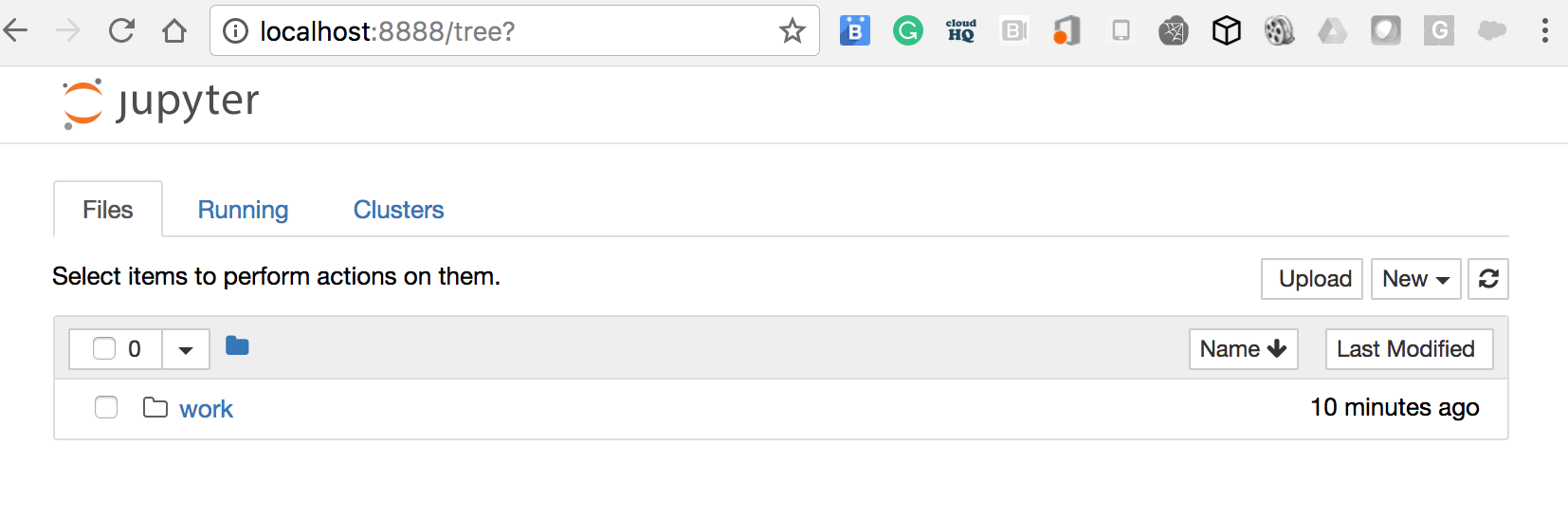
  1. Open the browser at the following URL http://localhost:8888:

You will notice that Jupyter is running. You can create a new Notebook and run Keras-specific code.

Installing the Docker container with the host volume mapped

In this section, we look at how to map the local volume $(pwd)/keras-samples to the work directory in the container.

  1. Execute the note -v flag command, which does the volume mapping:
docker run -d -v /$(pwd)/keras-samples:/home/jovyan/work \
-p 8888:8888 rajdeepd/jupyter-keras start-notebook.sh --NotebookApp.token=''

If you go to the URL, you will notice the sample page being displayed.

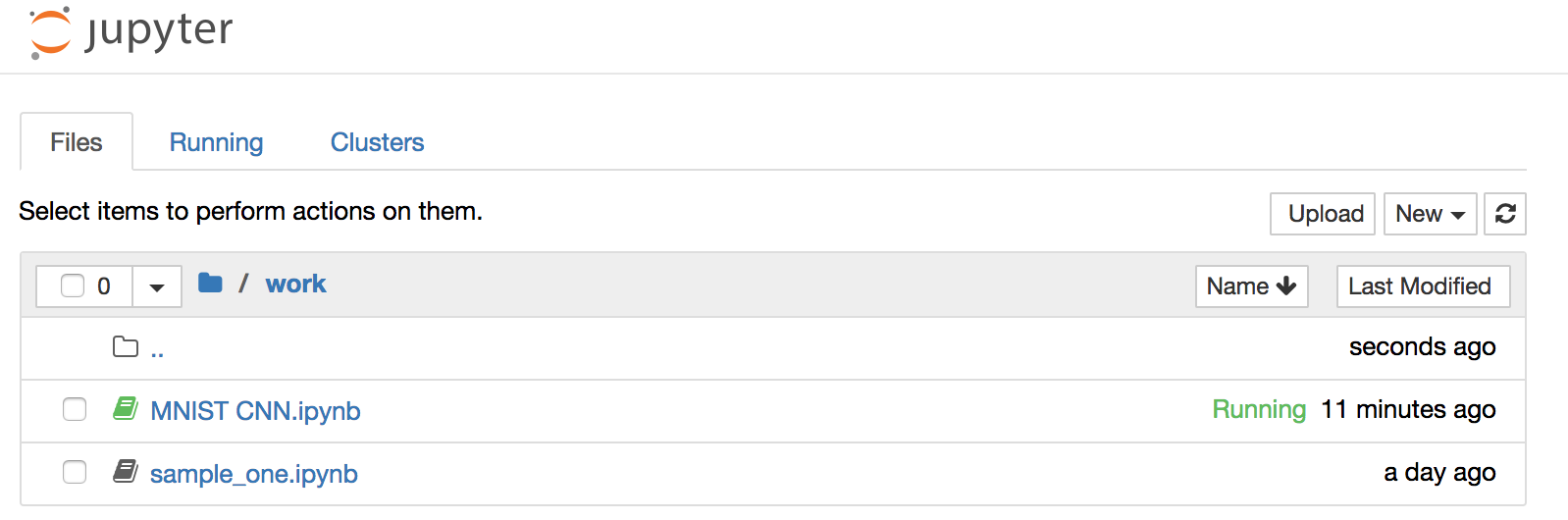
  1. If you got /$(pwd)/keras-samples, you will notice that the Notebooks are available in the host directory, and they also can be seen being loaded by Jupyter:
rdua1-ltm:keras-samples rdua$ pwd
/Users/rdua/personal/keras-samples
rdua1-ltm:keras-samples rdua$ ls
MNIST CNN.ipynb sample_one.ipynb

If you open MNIST CNN.ipynb, it is a Keras CNN sample, which we will learn more about in the subsequent chapters.

In this recipe, we used the Docker image rajdeepd/jupyter-keras to create a Keras environment and access it from Jupyter running in the host environment.

Visually different images
CONTINUE READING
83
Tech Concepts
36
Programming languages
73
Tech Tools
Icon Unlimited access to the largest independent learning library in tech of over 8,000 expert-authored tech books and videos.
Icon Innovative learning tools, including AI book assistants, code context explainers, and text-to-speech.
Icon 50+ new titles added per month and exclusive early access to books as they are being written.
Keras Deep Learning Cookbook
notes
bookmark Notes and Bookmarks search Search in title playlist Add to playlist download Download options font-size Font size

Change the font size

margin-width Margin width

Change margin width

day-mode Day/Sepia/Night Modes

Change background colour

Close icon Search
Country selected

Close icon Your notes and bookmarks

Confirmation

Modal Close icon
claim successful

Buy this book with your credits?

Modal Close icon
Are you sure you want to buy this book with one of your credits?
Close
YES, BUY

Submit Your Feedback

Modal Close icon
Modal Close icon
Modal Close icon