
Sign In Start Free Trial
Account

Add to playlist

Create a Playlist

Modal Close icon
You need to login to use this feature.
  • Book Overview & Buying Hands-On Financial Modeling with Microsoft Excel 2019
  • Table Of Contents Toc
Hands-On Financial Modeling with Microsoft Excel 2019

Hands-On Financial Modeling with Microsoft Excel 2019

By : Shmuel Oluwa
2.9 (8)
close
close
Hands-On Financial Modeling with Microsoft Excel 2019

Hands-On Financial Modeling with Microsoft Excel 2019

2.9 (8)
By: Shmuel Oluwa

Overview of this book

Financial modeling is a core skill required by anyone who wants to build a career in finance. Hands-On Financial Modeling with Microsoft Excel 2019 explores terminologies of financial modeling with the help of Excel. This book will provides you with an overview of the steps you should follow to build an integrated financial model. You will explore the design principles, functions, and techniques of building models in a practical manner. Starting with the key concepts of Excel, such as formulas and functions, you will learn about referencing frameworks and other advanced components for building financial models. Later chapters will help you understand your financial projects, build assumptions, and analyze historical data to develop data-driven models and functional growth drivers. The book takes an intuitive approach to model testing and covers best practices and practical use cases. By the end of this book, you will have examined the data from various use cases, and have the skills you need to build financial models to extract the information required to make informed business decisions.
Table of Contents (15 chapters)
close
close
Lock Free Chapter
1
Section 1: Financial Modeling - Overview
4
Section 2: The Use of Excel - Features and Functions for Financial Modeling
7
Section 3: Building an Integrated Financial Model

Implementing the referencing framework

Now that you are all caught up with the theory behind each type of referencing framework and know where to use each of them, let's apply that knowledge to a real-life scenario.

Assume that you are a teacher and that you have the marks of the students in an entire class, and you need to sort and divide the data into different groups, based on the following criteria:

  • Total marks scored by the student in all languages
  • Total marks scored by the student in all sciences
  • Overall marks scored

The referencing framework really comes into its own in such scenarios. We can sort our data using the required criteria by following these steps:

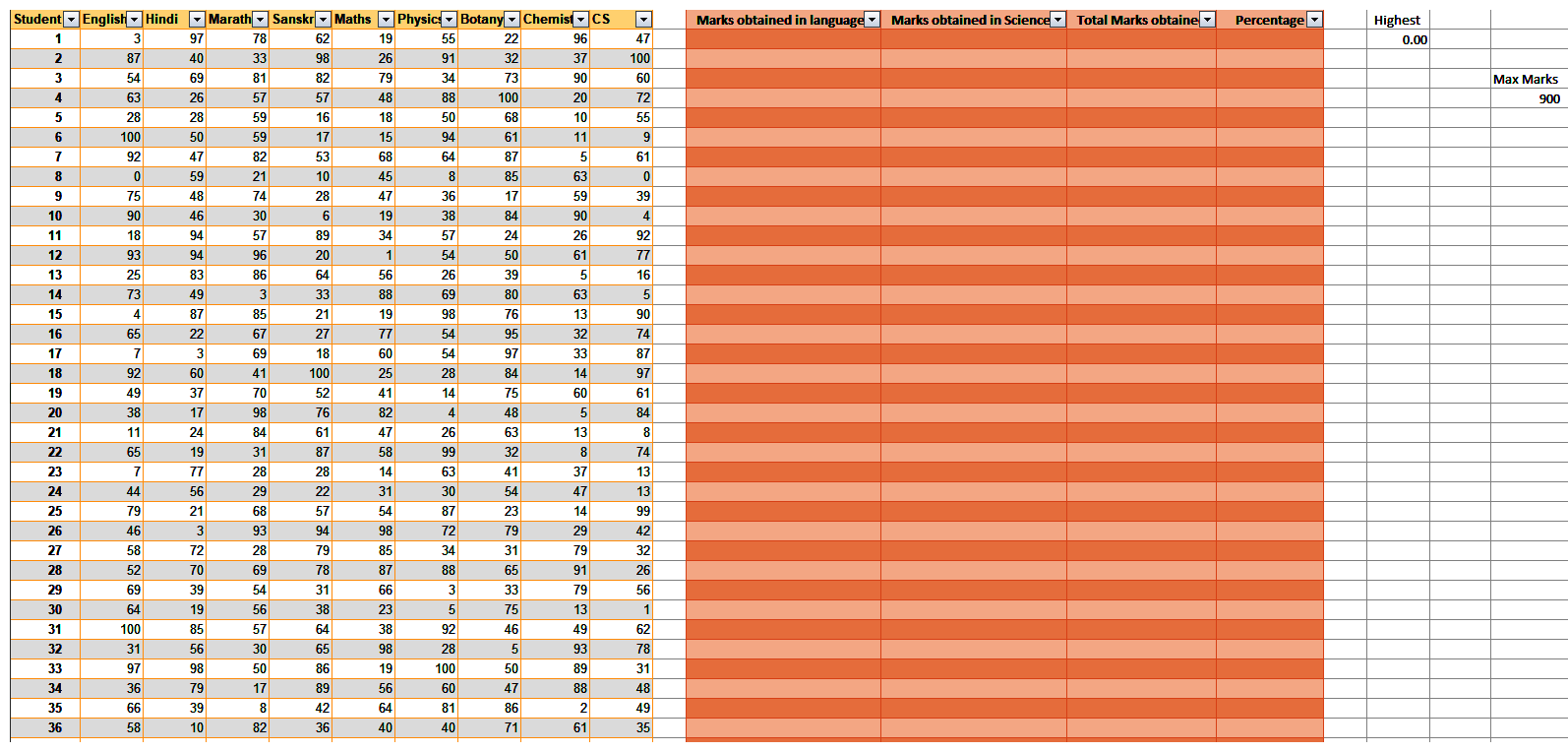
  1. Open the Marks.xlsx file provided to you, which contains the grades of 66 students who appeared for their midterms. The data will look similar to the following screenshot:
  1. Now, we will start sorting the...
CONTINUE READING
83
Tech Concepts
36
Programming languages
73
Tech Tools
Icon Unlimited access to the largest independent learning library in tech of over 8,000 expert-authored tech books and videos.
Icon Innovative learning tools, including AI book assistants, code context explainers, and text-to-speech.
Icon 50+ new titles added per month and exclusive early access to books as they are being written.
Hands-On Financial Modeling with Microsoft Excel 2019
notes
bookmark Notes and Bookmarks search Search in title playlist Add to playlist download Download options font-size Font size

Change the font size

margin-width Margin width

Change margin width

day-mode Day/Sepia/Night Modes

Change background colour

Close icon Search
Country selected

Close icon Your notes and bookmarks

Confirmation

Modal Close icon
claim successful

Buy this book with your credits?

Modal Close icon
Are you sure you want to buy this book with one of your credits?
Close
YES, BUY

Submit Your Feedback

Modal Close icon
Modal Close icon
Modal Close icon