Sign In Start Free Trial
Account

Add to playlist

Create a Playlist

Modal Close icon
You need to login to use this feature.
  • Book Overview & Buying Deep Learning with R Cookbook
  • Table Of Contents Toc
Deep Learning with R Cookbook

Deep Learning with R Cookbook

By : Gupta, Ansari, Sarkar
5 (3)
close
close
Deep Learning with R Cookbook

Deep Learning with R Cookbook

5 (3)
By: Gupta, Ansari, Sarkar

Overview of this book

Deep learning (DL) has evolved in recent years with developments such as generative adversarial networks (GANs), variational autoencoders (VAEs), and deep reinforcement learning. This book will get you up and running with R 3.5.x to help you implement DL techniques. The book starts with the various DL techniques that you can implement in your apps. A unique set of recipes will help you solve binomial and multinomial classification problems, and perform regression and hyperparameter optimization. To help you gain hands-on experience of concepts, the book features recipes for implementing convolutional neural networks (CNNs), recurrent neural networks (RNNs), and Long short-term memory (LSTMs) networks, as well as sequence-to-sequence models and reinforcement learning. You’ll then learn about high-performance computation using GPUs, along with learning about parallel computation capabilities in R. Later, you’ll explore libraries, such as MXNet, that are designed for GPU computing and state-of-the-art DL. Finally, you’ll discover how to solve different problems in NLP, object detection, and action identification, before understanding how to use pre-trained models in DL apps. By the end of this book, you’ll have comprehensive knowledge of DL and DL packages, and be able to develop effective solutions for different DL problems.
Table of Contents (11 chapters)
close
close

Implementing transfer learning

Transfer learning helps us solve a new problem using fewer examples by using information gained from solving other related tasks. It is a technique where we reuse a learned model trained on a different dataset to solve a similar but different problem. In transfer learning, we extend the learning of a pre-trained model in our network and build a new model to solve a new learning problem. The keras library in R provides many pre-trained models; we will be using one such model called as VGG16 to train our network.

Getting ready

We will start by importing the keras library into our environment:

library(keras)

In this example, we will work with a subset of the Dogs versus Cats dataset from Kaggle (https://www.kaggle.com/c/dogs-vs-cats), which contains images of dogs and cats in different sizes. This dataset was developed as a partnership between Petfinder and Microsoft. We have divided our data into train, test, and validation sets, each containing images of cats and dogs in their respective folders. Our train and test data has 1,000 pictures of cats and dogs each, and the test and validation set has 500 images each of dogs and cats.

Let's define the train, test, and validation paths of our data:

train_path <- "dogs_cats_small/train/"
test_path <- "dogs_cats_small/test/"
validation_path <- "dogs_cats_small/validation/"

We have set the paths of our dataset.

How to do it...

Now let's proceed to data processing:

  1. We start by defining a generator for the training and testing data. We will use these generators while loading data into our environment and perform real-time data augmentation:
# train generator
train_augmentor = image_data_generator(
rescale = 1/255,
rotation_range = 300,
width_shift_range = 0.15,
height_shift_range = 0.15,
shear_range = 0.2,
zoom_range = 0.2,
horizontal_flip = TRUE,
fill_mode = "nearest"
)

# test generator
test_augmentor <- image_data_generator(rescale = 1/255)

Now let's load the training, testing, and validation data into our environment:

# load train data
train_data <- flow_images_from_directory(
train_path,
train_augmentor,
target_size = c(150, 150),
batch_size = 20,
class_mode = "binary")

# load test data
test_data <- test_generator <- flow_images_from_directory(
test_path,
test_augmentor,
target_size = c(150, 150),
batch_size = 20,
class_mode = "binary")

# load validation data
validation_data <- flow_images_from_directory(
validation_path,
test_augmentor,
target_size = c(150, 150),
batch_size = 20,
class_mode = "binary"
)

We can print the shape of the rescaled image using the following code:

train_data$image_shape
  1. After loading our data, let's instantiate a pre-trained VGG16 model. Going further, we will refer to this model as the base model:
pre_trained_base <- application_vgg16(
weights = "imagenet",
include_top = FALSE,
input_shape = c(150, 150, 3)
)

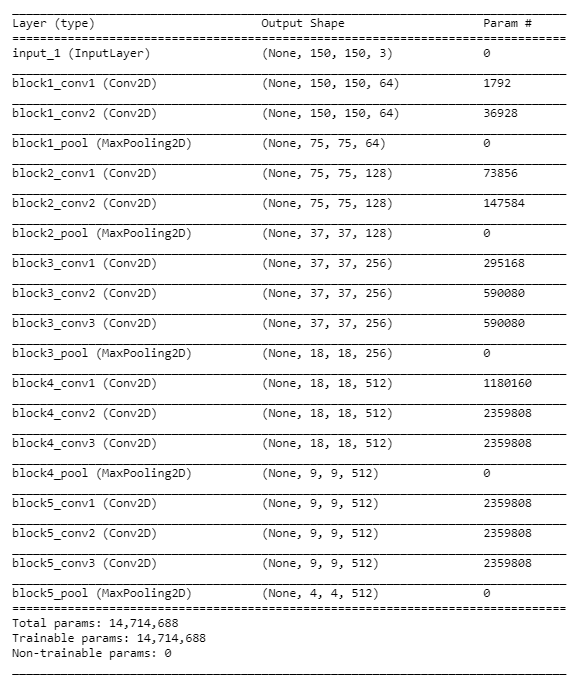
Let's now take a look at the summary of the base model:

summary(pre_trained_base)

Here is the description of the base model:

After instantiating the base model, we add dense layers to it and build a holistic model:

model_with_pretrained <- keras_model_sequential() %>% 
pre_trained_base %>%
layer_flatten() %>%
layer_dense(units = 8, activation = "relu") %>%
layer_dense(units = 16, activation = "relu") %>%
layer_dense(units = 1, activation = "sigmoid")

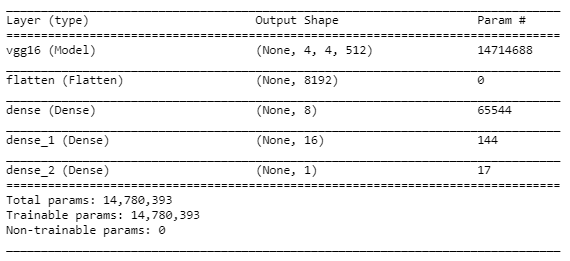
Now we visualize the summary of the model:

summary(model_with_pretrained)

The screenshot shows a summary of the holistic model:

We can print the number of trainable kernels and biases we have in our model using the following code:

length(model_with_pretrained$trainable_weights)

Let's freeze the pre-realized weights of the base model:

freeze_weights(pre_trained_base)

We can check how many trainable weights we have after freezing the base model by executing the following code:

length(model_with_pretrained$trainable_weights)
  1. After configuring the model, we then compile and train it.

Let's compile the model using binary cross-entropy as the loss function and RMSprop() as the optimizer:

model_with_pretrained %>% compile(
loss = "binary_crossentropy",
optimizer = optimizer_rmsprop(lr = 0.0001),
metrics = c('accuracy')
)

After compiling, we now train the model:

model_with_pretrained %>% fit_generator(generator = train_data,
steps_per_epoch = 20,
epochs = 10,
validation_data = validation_data)

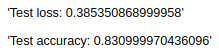
Next, we evaluate the performance of the trained model on the test data and print the evaluation metrics:

scores <- model_with_pretrained %>% evaluate_generator(generator = test_data,steps = 20)

# Output metrics
paste('Test loss:', scores[[1]], '\n')
paste('Test accuracy:', scores[[2]], '\n')

The screenshot shows the model performance on the test data:

The test accuracy is around 83%.

How it works...

In step 1, we defined our train and test generators to set the parameters for data augmentation. Then, we loaded the datasets into our environment and simultaneously performed real-time data augmentation while resizing the images to 150 × 150.

In the next step, we instantiated a pre-trained base model, VGG16, with weights trained on ImageNet data. ImageNet is a large visual database that contains images of 1,000 different classes. Note that we had set the value of include_top as FALSE. Setting it to false does not include the default densely connected layers of the VGG16 network, which correspond to 1,000 classes of the ImageNet data. Further, we defined a sequential Keras model that contains the base model along with a few custom dense layers to build a binary classifier. Next, we printed out a summary of our model and the number of kernels and biases in it. Then we froze the layers of the base model because we did not want to modify its weights while training on our dataset.

In the last step, we compiled our model with binary_crossentropy as the loss function and trained it using the RMSprop optimizer. Once we had trained our model, we printed its performance metrics on the test data.

There's more...

There are mainly three ways to implement transfer learning:

  • Use a pre-trained model with pre-realized weights and biases; that is, completely freeze the pre-trained model of your network and train on a new dataset.
  • Partially freeze a few layers of the pre-trained model of our network and train it on a new dataset.
  • Retain only the architecture of the pre-trained model and train your complete network for new weights and biases.

The following code snippet demonstrates how to partially freeze the pre-trained part of the network. Before we unfreeze selected layers of the pre-trained network, we must define the holistic model and freeze the pre-trained part:

unfreeze_weights(pre_trained_base, from = "block5_conv1", to = "block5_conv3")

The from and to arguments of the unfreeze_weights() function let us define the layers between which we want to unfreeze the weights. Please note that both the from and to layers are inclusive.

We should use a very low learning rate while we are tuning layers of a pre-trained model on a new dataset. A low learning rate is advised because, on the layers that we are fine-tuning, we should restrict the magnitude of the modifications we make to the representations.

See also

CONTINUE READING
83
Tech Concepts
36
Programming languages
73
Tech Tools
Icon Unlimited access to the largest independent learning library in tech of over 8,000 expert-authored tech books and videos.
Icon Innovative learning tools, including AI book assistants, code context explainers, and text-to-speech.
Icon 50+ new titles added per month and exclusive early access to books as they are being written.
Deep Learning with R Cookbook
notes
bookmark Notes and Bookmarks search Search in title playlist Add to playlist download Download options font-size Font size

Change the font size

margin-width Margin width

Change margin width

day-mode Day/Sepia/Night Modes

Change background colour

Close icon Search
Country selected

Close icon Your notes and bookmarks

Confirmation

Modal Close icon
claim successful

Buy this book with your credits?

Modal Close icon
Are you sure you want to buy this book with one of your credits?
Close
YES, BUY

Submit Your Feedback

Modal Close icon
Modal Close icon
Modal Close icon