Modern applications demand flexibility, speed, and intelligence, and MongoDB delivers all three. This mini guide wastes no time, offering a concise, practical introduction to handling data flexibly and efficiently with MongoDB. MongoDB Essentials helps developers, architects, database administrators, and decision makers get started quickly and confidently.
The book introduces MongoDB’s core principles, from the document data model to its distributed architecture, including replica sets and sharding. It then helps you build hands-on skills such as installing MongoDB, designing effective data schemas, performing CRUD operations, and working with the aggregation pipeline. You’ll discover performance tips along the way and learn how AI-enhanced tools like Atlas Search and Atlas Vector Search power intelligent application development.
With clear explanations and a practical approach, this book gives you the foundation and skills you need to start working with MongoDB right away.
*Email sign-up and proof of purchase required
To use MongoDB effectively, it helps to first understand how it works under the hood. This chapter introduces the core components that make MongoDB a flexible, powerful, and developer-friendly database. Whether you’re building a small app or scaling a large distributed system, the concepts covered here will form the foundation of your understanding.
This chapter will cover the following topics:
How MongoDB stores and organizes data using documents instead of rows
How MongoDB stores documents in collections instead of tables
The importance of indexes to support fast, efficient queries
MongoDB’s storage engine and query execution architecture
MongoDB’s JSON-based query language
The distributed design on MongoDB, including replica sets and sharding
An overview of client libraries and drivers for interacting with the database
By the end of this chapter, you’ll have a solid grasp of MongoDB’s core building blocks and be better equipped to make informed decisions about how to design and interact with your data.
Building blocks of MongoDB
Before we dive into queries, documents, or code, it’s worth taking a moment to step back and ask a bigger question: “What is MongoDB?”
If you’ve worked with relational database management systems (RDBMSs), many of the core ideas will feel familiar, such as rows, tables, and columns. But in MongoDB, these go by different names: documents, collections, and fields. However, MongoDB doesn’t just rename the parts, it redefines how data is stored and accessed, based on how modern applications operate. MongoDB emphasizes flexibility, scalability, and developer experience.
At its core, MongoDB offers a flexible alternative to traditional relational databases, while standing apart from other types of NoSQL systems. Key-value databases are often praised for their speed and simplicity, while relational databases offer powerful querying and transactional integrity. MongoDB brings the best of both: you get performance and a flexible schema with the querying depth and indexing power of traditional RDBMSs. This isn’t just about convenience, but architectural alignment with how developers build applications today.
Documents, not rows
Let’s start with the most important concept for understanding MongoDB: documents.
In MongoDB, data lives in JSON-like structures called documents, which are stored internally in a format known as Binary JSON (BSON). Documents are self-contained units of information, often representing a single object or entity in your app. You can think of documents as rows in a table, but with nested fields, arrays, and varying structures.
Here’s a simple example of a document representing a book in a bookstore catalog:
This isn’t a collection of references to other tables. It’s the entire book, with everything you need to render it in your app, all in one place.
Collections and indexes
In MongoDB, a collection is the next organizational structure after documents. Collections group related documents, much like a table in a relational database, but with an optional schema. You’re free to store documents of similar shapes in the same collection, which means MongoDB is ideal for evolving data structures. Collections live inside databases, which provide logical separation. A single MongoDB deployment can contain multiple databases, each isolated from the other.
While collections organize related documents, indexes optimize how efficiently MongoDB can retrieve those documents.
MongoDB supports powerful indexing capabilities, including the following:
A default _id index on every collection
Support for indexing any field, including nested fields and array values
A specialized B-tree-like structure for storing indexes, enabling fast lookups and efficient range queries, similar to relational systems
Behind the scenes, MongoDB’s ability to put indexes to work relies on the underlying architecture of the mongod process, which includes a sophisticated query engine and a high-performance storage engine. In the next section, we’ll take a look at those components.
Storage engine and query execution
Every MongoDB deployment is powered by a mongodprocess, the core server that stores your data, handles queries, and keeps the whole system running smoothly. Whether it’s running on your laptop or in a distributed production cluster, every mongod instance includes three critical architectural layers: the query planner, the execution engine, and the storage engine.
Let’s say your bookstore app needs to find all users based in California. When your app sends that query, rather than scanning the entire collection at random, MongoDB takes a more strategic approach. It first consults its query planner, which acts as an internal strategist. The query planner examines your query, checks what indexes are available, and picks the most efficient execution path. That path might use a single index, merge multiple indexes, or, in less ideal cases, scan the entire collection.
Once the plan is in place, MongoDB’s execution engine takes over. It scans through documents or index entries, applies filters, performs sorting if needed, and returns only the matching documents: nothing more, nothing less.
Underneath it all lies the storage engine. By default, MongoDB uses the WiredTiger storage engine, a high-performance engine tailored for modern workloads. WiredTiger is responsible for how data is written to and retrieved from a disk. It takes care of the following:
Compression to reduce storage size
Encryption at rest to keep data secure
A memory cache to speed up access to frequently used data
Journaling (via a write-ahead log) to ensure data isn’t lost during a crash or unexpected shutdown
This layered system, that is, the query planner, execution engine, and storage engine, means MongoDB can handle everything from simple reads to complex analytics. It gives you performance, reliability, and flexibility, whether you’re building a small bookstore app or a high-traffic global platform.
Distributed by design
MongoDB wasn’t retrofitted for scale; it was built for it from the start. From its earliest versions, MongoDB was designed to handle large volumes of data and the realities of distributed computing. That’s why features such as high availability and horizontal scaling aren’t optional add-ons, but rather baked into the architecture via replica sets and sharding.
Replica sets: Built-in high availability
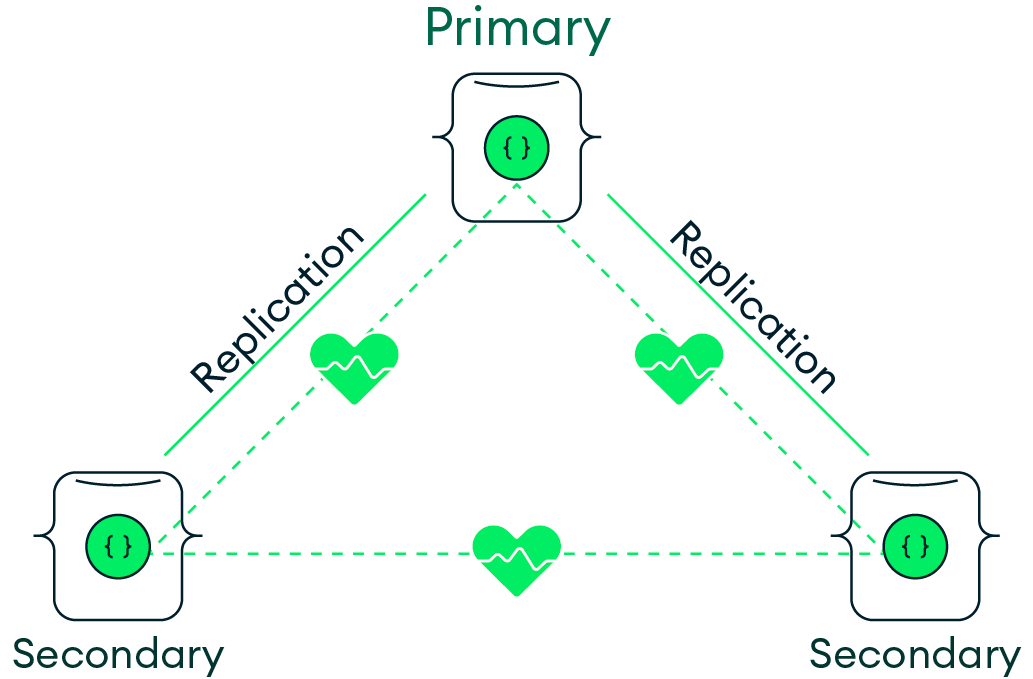
At the core of MongoDB’s resilience is the replica set. Picture a small team of servers working in harmony. One server, the primary, takes the lead, handling all write operations. The others, secondaries, continuously replicate their data, standing by in case something goes wrong.
Figure 1.1: A MongoDB replica set
If the primary server fails, MongoDB automatically promotes one of the secondary servers to take over. This process takes place without manual intervention, ensuring your application continues to run and your data remains protected. This automatic failover capability means your database cluster can recover independently, reducing the need for constant monitoring.
Sharding: Scaling horizontally
Imagine your bookstore app grows considerably. It’s no longer just a local favorite; it’s a global hit. Your catalog has ballooned to billions of books, reviews, orders, and users. At some point, one server simply won’t be able to keep up. That’s where sharding comes in.
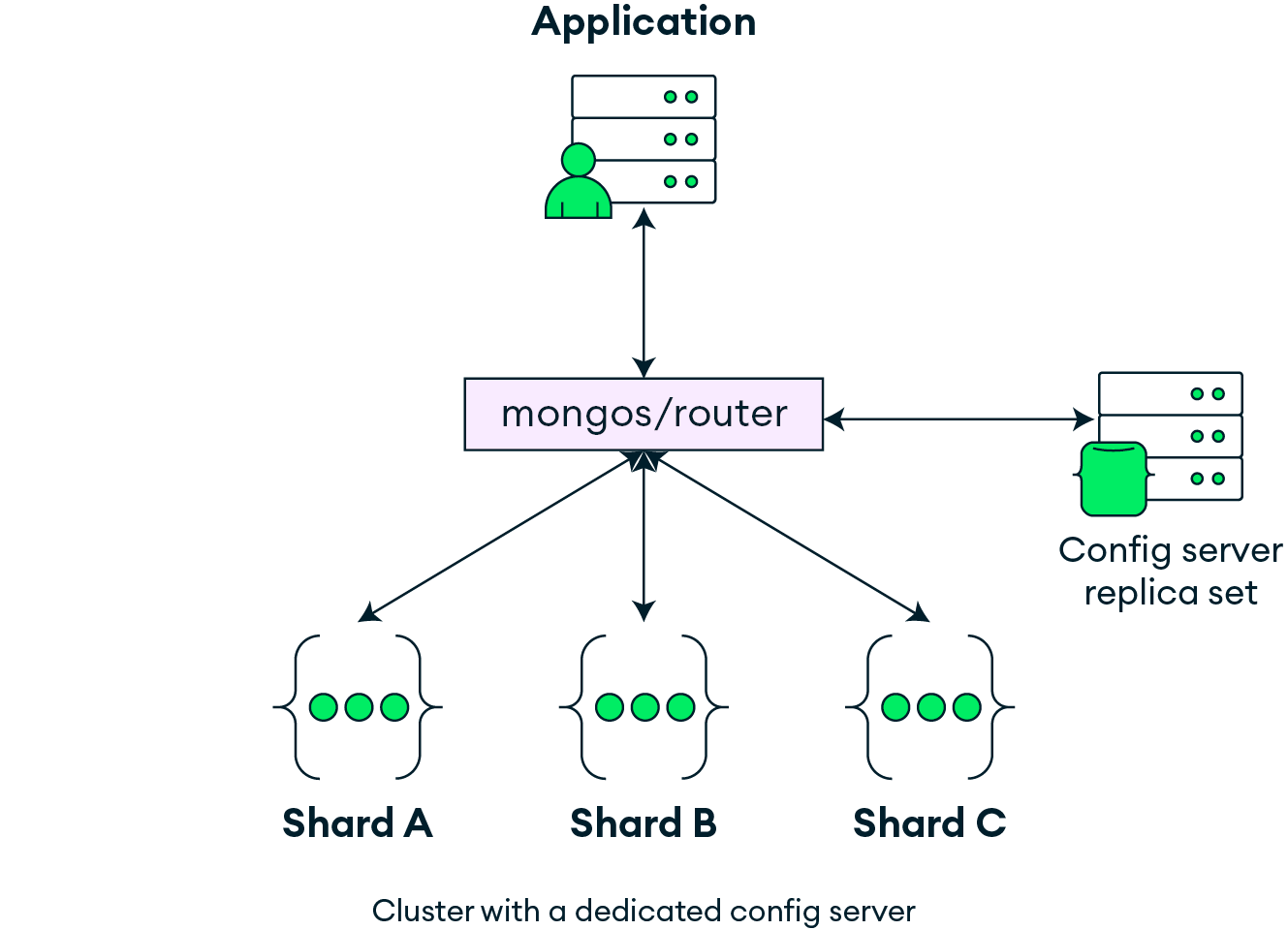
Sharding is MongoDB’s approach to horizontal scaling. It splits your data across multiple machines based on a shard key, a field that determines how documents are distributed. Each shard operates as its own replica set, giving you both scalability and redundancy in a single architecture.
Figure 1.2 highlights the main components of the sharding architecture: the application, the mongos router, the config server, and the shards. The application interacts with a sharded cluster through mongos, which receives queries and routes them to the appropriate shard(s). The config server stores the metadata about the sharded cluster, such as the shard key.
Figure 1.2: High-level architecture of a sharded MongoDB cluster
Your application interacts with MongoDB through a single, unified interface. MongoDB handles the complexity behind the scenes, routing queries, distributing data, and balancing the load.
Working with data in MongoDB
Working with data is at the core of nearly every application, and MongoDB is built to make that experience intuitive, flexible, and powerful. Whether you’re querying documents, writing code in your favorite language, or deploying in the cloud, MongoDB offers a developer-friendly approach to interacting with data. In this section, we’ll walk through how querying works, how client libraries simplify integration, and how Atlas brings MongoDB to the cloud with ease.
Operators: Expressive, JSON-based queries
At the heart of working with data is the simple act of retrieving the information you need.
If you’re familiar with SQL, you might think of queries as the MongoDB equivalent of SELECT ... WHERE. But in MongoDB, queries are expressed using JSON-style syntax, making them feel more like expressions in a programming language than traditional SQL clauses.
At the core of every MongoDB query is an operator, a JSON object that describes what you’re looking for.
Let’s say your books collection contains the following two documents:
To find all books, regardless of their content, you can use an empty filter by running the following query:
db.books.find({})
To find only the books that are currently in stock, use this query:
db.books.find({ inStock: true })
In this case, the filter criteria { inStock: true } is telling MongoDB, “Give me every document where theinStockfield is true.” Based on the sample data, the query will return the following document:
You can also query based on any other field. For example, to find all books written by Alice, you can run the following:
db.books.find({ author: "Alice" })
This query returns both documents, since they share the same author value.
We’ll dive into the full power of query operators in Chapter 4, CRUD Operations. For now, it’s enough to understand that MongoDB uses JSON-style syntax to express your intent, and that makes querying in MongoDB both powerful and intuitive.
Developer experience: Client libraries that speak your language
MongoDB provides official drivers for almost every language: Python, JavaScript, Go, Java, C#, Rust, and more. These drivers handle BSON encoding and decoding, manage connection pools and retry logic, and translate native syntax into the MongoDB wire protocol.
Here’s an example of using the Python driver to connect to the MongoDB server, access the books collection in a bookstore database, and insert a new book document:
from pymongo import MongoClient
client = MongoClient("mongodb://localhost:27017/")
db = client["bookstore"]
books = db["books"]
books.insert_one({
    "title": "Designing with Documents",
    "authors": [{"name": "Alex Kim"}],
    "publishedYear": 2024,
    "genres": ["Database", "Design"],
    "reviews": [
        {"reviewer": "Jamie", "rating": 5, "comment": "Clear and practical."}
    ]
})
MongoDB returns the document as a native Python dictionary; no object relational mapper (ORM) is required. For example, the query for retrieving a book might look like this:
result = books.find_one({"title": "Designing with Documents"})
print(result)
Everything you’ve read so far applies whether you’re running MongoDB locally or in the cloud. Atlas is MongoDB’s fully managed database service, designed to simplify deployment, scaling, and security. It also unlocks advanced capabilities such as Atlas Search and Atlas Vector Search.
Atlas makes it easy to spin up clusters, monitor performance, and manage backups without manual setup. For developers working locally or in automation workflows, the Atlas CLI provides full control of your cloud environments from the terminal, which is ideal for scripting and CI/CD pipelines.
We’ll explore Atlas-specific features and tools throughout this book.
Summary
In this chapter, you learned the fundamentals of MongoDB’s architecture, including the document model, indexes, mongod, operators, replica sets, and sharding. MongoDB doesn’t try to reinvent databases from scratch. Instead, it reimagines them to fit the realities of cloud-native, high-scale, iterative application development. MongoDB’s architecture makes it a unique hybrid offering: as powerful as relational systems, as flexible as NoSQL, and as intuitive as your application model.
In the next chapter, you’ll set up your local environment, connect to MongoDB using the shell, and run your first real commands.
To learn more about topics covered in this chapter, check out our relevant Skill Badges at MongoDB University and earn a credential:
Relational to Document Model
Understand the shift from relational databases to MongoDB’s document model.