Sign In Start Free Trial
Account

Add to playlist

Create a Playlist

Modal Close icon
You need to login to use this feature.
  • Book Overview & Buying Gamemaker Essentials
  • Table Of Contents Toc
Gamemaker Essentials

Gamemaker Essentials

3.8 (13)
close
close
Gamemaker Essentials

Gamemaker Essentials

3.8 (13)

Overview of this book

This book is for users experienced with game development who now want to learn how to develop games in GameMaker: Studio in a fast-paced way.
Table of Contents (11 chapters)
close
close

Programming the game


With our object created and ready to go, we are now also ready to program the game and make it work. All this will be done in the player object.

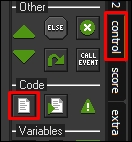
Add a Create event to the player object and then drag in a code block from the control tab on the right. You can actually change the default tab for objects in the GameMaker preferences.

The first thing we need to do is think about what variables we are going to need. We are going to make the game record the score, so we will need a variable for this. To make the code easier to edit, we can also create a variable for storing the maximum speed we want the player to move at. Finally, we can store our controls in variables to make the code easier to edit later on. The reason we store key controls in variables is so that if we want to change the controls later on, we can simply change the variable instead of changing every keyboard check.

Here is the code for our speed and control variables:

S=0; //score
max_spd=10;

key_right=vk_right...
CONTINUE READING
83
Tech Concepts
36
Programming languages
73
Tech Tools
Icon Unlimited access to the largest independent learning library in tech of over 8,000 expert-authored tech books and videos.
Icon Innovative learning tools, including AI book assistants, code context explainers, and text-to-speech.
Icon 50+ new titles added per month and exclusive early access to books as they are being written.
Gamemaker Essentials
notes
bookmark Notes and Bookmarks search Search in title playlist Add to playlist font-size Font size

Change the font size

margin-width Margin width

Change margin width

day-mode Day/Sepia/Night Modes

Change background colour

Close icon Search
Country selected

Close icon Your notes and bookmarks

Confirmation

Modal Close icon
claim successful

Buy this book with your credits?

Modal Close icon
Are you sure you want to buy this book with one of your credits?
Close
YES, BUY

Submit Your Feedback

Modal Close icon
Modal Close icon
Modal Close icon