Sign In Start Free Trial
Account

Add to playlist

Create a Playlist

Modal Close icon
You need to login to use this feature.
  • Book Overview & Buying Processing 2: Creative Programming Cookbook
  • Table Of Contents Toc
Processing 2: Creative Programming Cookbook

Processing 2: Creative Programming Cookbook

By : Jan Vantomme
4.3 (8)
close
close
Processing 2: Creative Programming Cookbook

Processing 2: Creative Programming Cookbook

4.3 (8)
By: Jan Vantomme

Overview of this book

Processing is probably the best known creative coding environment that helps you bridge the gap between programming and art. It enables designers, artists, architects, students and many others to explore graphics programming and computational art in an easy way, thus helping you boost your creativity. "Processing 2: Creative Programming Cookbook" will guide you to explore and experience the open source Processing language and environment, helping you discover advanced features and exciting possibilities with this programming environment like never before. You'll learn the basics of 2D and 3D graphics programming, and then quickly move up to advanced topics such as audio and video visualization, computer vision, and much more with this comprehensive guide. Since its birth in 2001, Processing has grown a lot. What started out as a project by Ben Fry and Casey Reas has now become a widely used graphics programming language. Processing 2 has a lot of new and exciting features. This cookbook will guide you to explore the completely new and cool graphics engine and video library. Using the recipes in this cookbook, you will be able to build interactive art for desktop computers, Internet, and even Android devices! You don't even have to use a keyboard or mouse to interact with the art you make. The book's next-gen technologies will teach you how to design interactions with a webcam or a microphone! Isn't that amazing? "Processing 2: Creative Programming Cookbook" will guide you to explore the Processing language and environment using practical and useful recipes.
Table of Contents (18 chapters)
close
close
Processing 2: Creative Programming Cookbook
Credits
About the Author
About the Reviewers
www.PacktPub.com
Preface
1
Index

Writing your first Processing sketch

In the previous recipes, you've learned all the boring stuff such as installing Processing and libraries. It's time to get your hands dirty now and write some code.

Getting ready

Create a new Processing sketch and save it as my_first_sketch to your sketch folder.

How to do it...

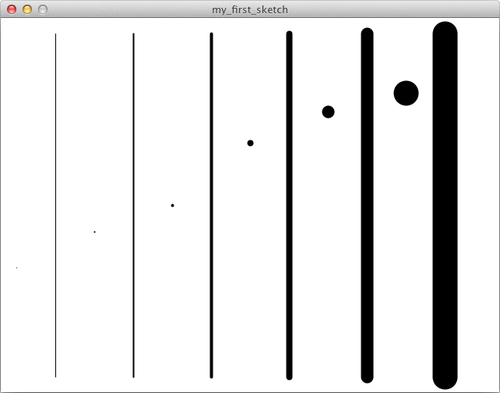
This is the full code for your first sketch. This sketch will draw some lines and points with varying stroke weights.

void setup()
{
  size( 640, 480 );
  smooth();
}

void draw()
{
  background(255);
  
  strokeWeight( 1 );
  point( 20, height/1.5 );
  line( 70, 20, 70, height - 20 );
  strokeWeight( 2 );
  point( 120, height/1.75 );
  line( 170, 20, 170, height - 20 );
  strokeWeight( 4 );
  point( 220, height/2 );
  line( 270, 20, 270, height - 20 );
  strokeWeight( 8 );
  point( 320, height/3 );
  line( 370, 20, 370, height - 20 );
  strokeWeight( 16 );
  point( 420, height/4 );
  line( 470, 20, 470, height - 20 );
  strokeWeight( 32 );
  point( 520, height/5 );
  line( 570, 20, 570, height - 20 );
}

Tip

Downloading the example code

You can download the example code files for all Packt books you have purchased from your account at http://www.PacktPub.com. If you purchased this book elsewhere, you can visit http://www.PacktPub.com/support and register to have the files e-mailed directly to you.

If you run the sketch, you'll see the results of your hard work. It will look as shown in the following screenshot:

How to do it...

How it works...

In this recipe, you've learned the most basic functions to create a simple Processing sketch. Let's take a deeper look at what these functions do:

  • The setup() function is called only once when you run your sketch. You'll use this function to set the size of your sketch, add values to some variables, load images, and so on.
  • The draw() function is called continuously, at a rate of 60 frames per second.
  • The size() function sets the size of your sketch window. You can use size( screenWidth, screenHeight ) to create a sketch with dimensions that match the resolution of your computer screen.
  • The smooth() function is used to enable anti-aliasing. This means that all your shapes will have a soft edge. If you don't use this function, the shapes will have a more jagged edge.
  • The point() function is used to draw a point on the screen. The first parameter is the x-coordinate, the second one is the y-coordinate of the point you want to draw.
  • The line() function is used to draw a line on the screen. To draw a line, you basically need two points to define that line, as you might remember from math class in high school. The first two parameters of this function are the x and y coordinates of the first point, the third and fourth parameters are the x and y coordinates of the second point.
  • The strokeWeight() function will change the appearance of the shape you'll draw to the screen. The parameter will set the width of the stroke. For example, you can use strokeWeight(4) to draw a line with a thickness of 4 pixels.

There's more...

Processing sketches have a specific folder structure. If you save your sketch as my_first_sketch, you'll find a folder with this name in your Processing sketchbook. Inside this folder, you'll find a file named my_first_sketch.pde. Processing uses this folder structure to keep everything it needs to run the sketch together. This will be very handy when you write more complicated sketches that use more code files, or other data such as images or fonts.

CONTINUE READING
83
Tech Concepts
36
Programming languages
73
Tech Tools
Icon Unlimited access to the largest independent learning library in tech of over 8,000 expert-authored tech books and videos.
Icon Innovative learning tools, including AI book assistants, code context explainers, and text-to-speech.
Icon 50+ new titles added per month and exclusive early access to books as they are being written.
Processing 2: Creative Programming Cookbook
notes
bookmark Notes and Bookmarks search Search in title playlist Add to playlist font-size Font size

Change the font size

margin-width Margin width

Change margin width

day-mode Day/Sepia/Night Modes

Change background colour

Close icon Search
Country selected

Close icon Your notes and bookmarks

Confirmation

Modal Close icon
claim successful

Buy this book with your credits?

Modal Close icon
Are you sure you want to buy this book with one of your credits?
Close
YES, BUY

Submit Your Feedback

Modal Close icon
Modal Close icon
Modal Close icon