Sign In Start Free Trial
Account

Add to playlist

Create a Playlist

Modal Close icon
You need to login to use this feature.
  • Book Overview & Buying Using Yocto Project with BeagleBone Black
  • Table Of Contents Toc
  • Feedback & Rating feedback
Using Yocto Project with BeagleBone Black

Using Yocto Project with BeagleBone Black

3.2 (6)
close
close
Using Yocto Project with BeagleBone Black

Using Yocto Project with BeagleBone Black

3.2 (6)

Overview of this book

This book is ideal for system developers with knowledge and experience of embedded systems. Knowledge of BeagleBone Black is assumed, while no knowledge of Yocto Project build system is necessary.
Table of Contents (10 chapters)
close
close
9
Index

Serial setup

BeagleBone Black uses a serial debug port to communicate with the host machine. We will use minicom as a serial terminal client to communicate over the serial port. To set up minicom, perform the following steps:

  1. Run this setup command as a privileged user:
    $  sudo minicom -s
    
    Serial setup

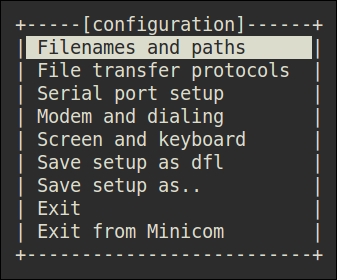
    Mmicom main configuration dialogue

    A menu will appear on the terminal with nine different options, as shown in the preceding screenshot. We won't be changing many of these. The up and down arrow keys can be used to select these options. We will select the third option, Serial port setup. Choose this option by pressing the Enter key. You will enter into another menu in which each option is listed, along with a corresponding key on the keyboard on the left-hand side to choose the option. Press the A key on the keyboard to set your serial device to /dev/ttyUSB0, and then press Enter. If you are not sure which device is created in your case, you could find this out by using the following command combination on another terminal:

    $  dmesg | grep "pl2303 converter"
    [37532.385583] pl2303 3-3:1.0: pl2303 converter detected
    [37532.386415] usb 3-3: pl2303 converter now attached to ttyUSB0
    
  2. Press E to set the baud rate. Use the A and B keys to navigate the baud rate values. A corresponds to next and B to previous. Keep pressing B till you get 115200 8N1. Then, press Enter to choose this setting and go back to the previous menu.
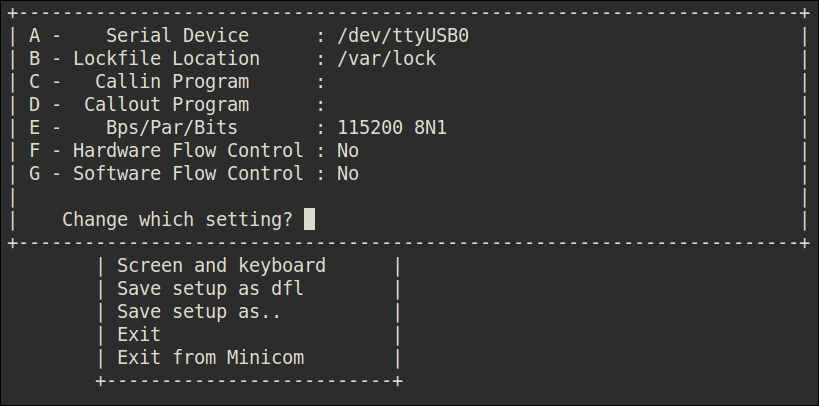
  3. Next, we need to press F and G to change enablement statuses of hardware flow control and software flow control. Both need to be set to No. Finally, the settings should look as shown in this screenshot:
    Serial setup

    Minicom Serial Port Setup dialogue

  4. Choose Save setup as dfl to avoid reconfiguring every time and choose Exit to go to minicom. Don't exit from it if you want to observe whether there is any activity on the serial port.
Visually different images
CONTINUE READING
83
Tech Concepts
36
Programming languages
73
Tech Tools
Icon Unlimited access to the largest independent learning library in tech of over 8,000 expert-authored tech books and videos.
Icon Innovative learning tools, including AI book assistants, code context explainers, and text-to-speech.
Icon 50+ new titles added per month and exclusive early access to books as they are being written.
Using Yocto Project with BeagleBone Black
notes
bookmark Notes and Bookmarks search Search in title playlist Add to playlist font-size Font size

Change the font size

margin-width Margin width

Change margin width

day-mode Day/Sepia/Night Modes

Change background colour

Close icon Search
Country selected

Close icon Your notes and bookmarks

Confirmation

Modal Close icon
claim successful

Buy this book with your credits?

Modal Close icon
Are you sure you want to buy this book with one of your credits?
Close
YES, BUY

Submit Your Feedback

Modal Close icon
Modal Close icon
Modal Close icon