
Sign In Start Free Trial
Account

Add to playlist

Create a Playlist

Modal Close icon
You need to login to use this feature.
  • Book Overview & Buying Internet of Things Projects with ESP32
  • Table Of Contents Toc
  • Feedback & Rating feedback
Internet of Things Projects with ESP32

Internet of Things Projects with ESP32

By : Kurniawan
2 (8)
close
close
Internet of Things Projects with ESP32

Internet of Things Projects with ESP32

2 (8)
By: Kurniawan

Overview of this book

ESP32 is a low-cost MCU with integrated Wi-Fi and BLE. Various modules and development boards-based on ESP32 are available for building IoT applications easily. Wi-Fi and BLE are a common network stack in the Internet of Things application. These network modules can leverage your business and projects needs for cost-effective benefits. This book will serve as a fundamental guide for developing an ESP32 program. We will start with GPIO programming involving some sensor devices. Then we will study ESP32 development by building a number of IoT projects, such as weather stations, sensor loggers, smart homes, Wi-Fi cams and Wi-Fi wardriving. Lastly, we will enable ESP32 boards to execute interactions with mobile applications and cloud servers such as AWS. By the end of this book, you will be up and running with various IoT project-based ESP32 chip.
Table of Contents (12 chapters)
close
close

Demo 2 - making an Arduino Sketch program with ESP32

In this section, we develop an Arduino program for ESP32 boards. We will use the previous demo, but we still use Arduino software. If you don't have experience with Arduino Sketch, I recommend learning Sketch programming on this site: https://www.arduino.cc/reference/en/. Since ESP32 has two cores (core 0 and core 1), our Arduino program runs one core. You don't need to worry which about core will be used by Arduino. You can verify which core is used with the xPortGetCoreID() function.

  1. We use the pinMode() function to set ESP32 GPIO pins as input or output. Then, we can write digital values using the digitalWrite() function. Using the previous demo, we can implement the demo using Sketch, as follows:
#define LED1 12
#define LED2 14
#define LED3 26
  1. Let's set the current_let to 1. That meant that later will start turning the LEDs with LED number 1.
int current_led = 1;
  1. Every program developed with the help of Arduino IDE will contain the setup() function. Code in setup function will run only on time at the beginning. For now let’s setup the pins that will drives our LEDS as output pins.
void setup() {
pinMode(LED1, OUTPUT);
pinMode(LED2, OUTPUT);
pinMode(LED3, OUTPUT);

}
  1. This is a helper function that will get a led number as parameter and will turn off all the LEDS and based on the value of the input parameter will turn on that LED by using the digitalWrite() function.
void turn_on_led(int led)
{
// turn off all leds
digitalWrite(LED1, LOW);
digitalWrite(LED2, LOW);
digitalWrite(LED3, LOW);

switch(led)
{
case 1:
digitalWrite(LED1, HIGH);
break;
case 2:
digitalWrite(LED2, HIGH);
break;
case 3:
digitalWrite(LED3, HIGH);
break;
}
}
  1. The code in the loop() function will run continuously like in a while(1). For now the code will turn on one LED every second. When the code reach the last LED then will go back to the first one and the process will run forever.
void loop() {
turn_on_led(current_led);
delay(1000);
current_led++;
if(current_led>3)
current_led = 1;
}
  1. Save the program.

Now, you can set the ESP32 board target and its port, as shown in the following screenshot:
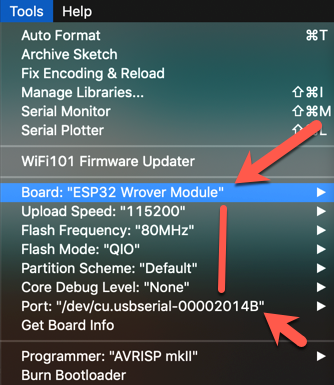
Configuring the ESP32 Wrover module

Now, you can compile and upload the Sketch program via Arduino software. If you succeed, you can see the program output as shown in the following screenshot:
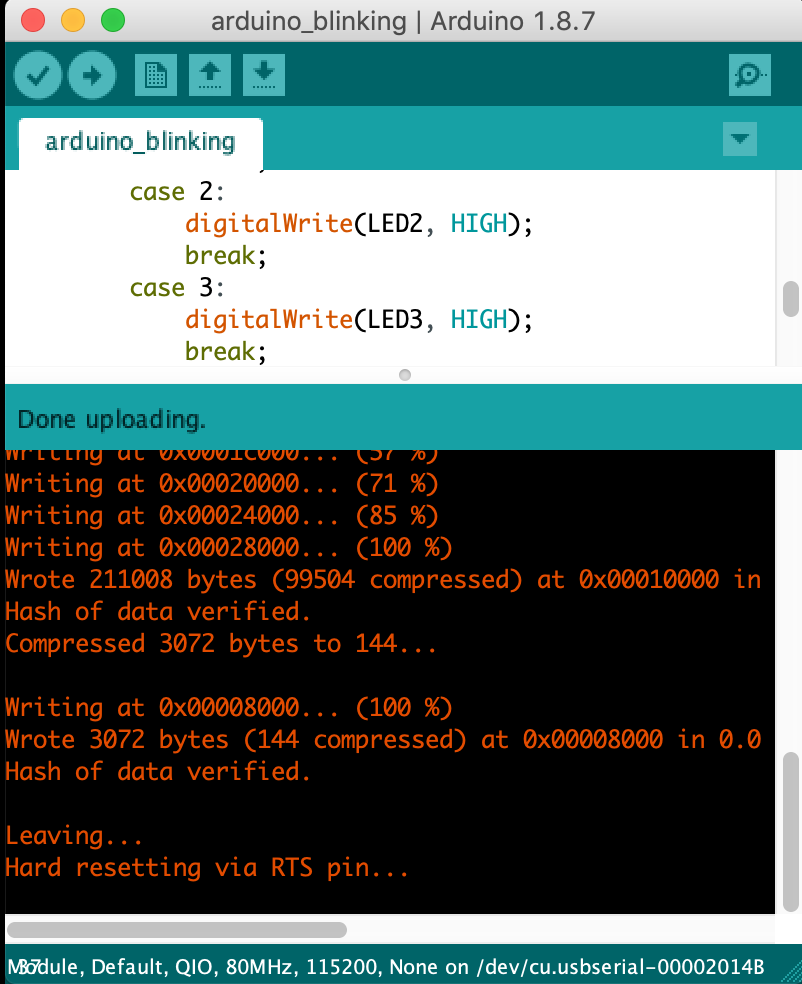
Uploading the Sketch program to the ESP32 board

If you still get errors, please verify your ESP32 board type and its serial port.

Visually different images
CONTINUE READING
83
Tech Concepts
36
Programming languages
73
Tech Tools
Icon Unlimited access to the largest independent learning library in tech of over 8,000 expert-authored tech books and videos.
Icon Innovative learning tools, including AI book assistants, code context explainers, and text-to-speech.
Icon 50+ new titles added per month and exclusive early access to books as they are being written.
Internet of Things Projects with ESP32
notes
bookmark Notes and Bookmarks search Search in title playlist Add to playlist download Download options font-size Font size

Change the font size

margin-width Margin width

Change margin width

day-mode Day/Sepia/Night Modes

Change background colour

Close icon Search
Country selected

Close icon Your notes and bookmarks

Confirmation

Modal Close icon
claim successful

Buy this book with your credits?

Modal Close icon
Are you sure you want to buy this book with one of your credits?
Close
YES, BUY

Submit Your Feedback

Modal Close icon
Modal Close icon
Modal Close icon