Sign In Start Free Trial
Account

Add to playlist

Create a Playlist

Modal Close icon
You need to login to use this feature.
  • Book Overview & Buying Windows Phone 7 Silverlight Cookbook
  • Table Of Contents Toc
Windows Phone 7 Silverlight Cookbook

Windows Phone 7 Silverlight Cookbook

By : Jonathan Marbutt, Robb Schiefer
4.3 (4)
close
close
Windows Phone 7 Silverlight Cookbook

Windows Phone 7 Silverlight Cookbook

4.3 (4)
By: Jonathan Marbutt, Robb Schiefer

Overview of this book

Silverlight has revolutionized development using Microsoft technologies. It is an excellent tool for mobile application development. The XAML-based markup and familiar C# code are the perfect combination for building apps efficiently and with minimum hassle.Packed full of recipes containing comprehensive instructions for the tasks required to build modern compelling smartphone apps using Silverlight.Starting with application design and architecture, you will quickly move on to more technical features and APIs you can implement to make your app stand out. You will use the Camera API to scan barcode, location services to pinpoint the user’s GPS coordinates and accelerometer to provide feedback based on movement of the phone. All of these features can be provided in a slick user interface through the power of Silverlight. Animations, behaviors and XAML provide all you need and more.
Table of Contents (18 chapters)
close
close
Windows Phone 7 Silverlight Cookbook
Credits
Foreword
About the Authors
About the Reviewers
www.PacktPub.com
Preface
1
Index

Using ViewStateManager to create simple animations


As we have seen in the previous chapter, ViewStateManager allows us to create some simple animations. Now we want to take things a lot further by adding various animations to one control. We will be adding some simple animations to a list box to provide a much customized look and feel.

We will also begin to customize various levels of templates on a few controls to create something that doesn't even look remotely like the standard control.

Getting ready

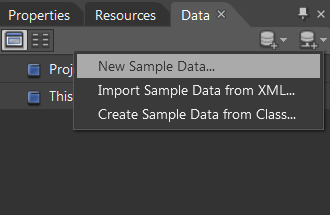
Let's start by opening Expression Blend and creating a new Windows Phone Application. The other thing we want to go ahead and do is create some sample data for the project to simulate this application actually having some real world data in it. You can do this by navigating to the Data tab, clicking the first button with the plus sign, and then selecting New Sample Data. When it prompts you for the Data Source Name, simply set it to MySampleData:

Once you have created your sample data source...

Visually different images
CONTINUE READING
83
Tech Concepts
36
Programming languages
73
Tech Tools
Icon Unlimited access to the largest independent learning library in tech of over 8,000 expert-authored tech books and videos.
Icon Innovative learning tools, including AI book assistants, code context explainers, and text-to-speech.
Icon 50+ new titles added per month and exclusive early access to books as they are being written.
Windows Phone 7 Silverlight Cookbook
notes
bookmark Notes and Bookmarks search Search in title playlist Add to playlist font-size Font size

Change the font size

margin-width Margin width

Change margin width

day-mode Day/Sepia/Night Modes

Change background colour

Close icon Search
Country selected

Close icon Your notes and bookmarks

Confirmation

Modal Close icon
claim successful

Buy this book with your credits?

Modal Close icon
Are you sure you want to buy this book with one of your credits?
Close
YES, BUY

Submit Your Feedback

Modal Close icon
Modal Close icon
Modal Close icon