Sign In Start Free Trial
Account

Add to playlist

Create a Playlist

Modal Close icon
You need to login to use this feature.
  • Book Overview & Buying Infusionsoft Cookbook
  • Table Of Contents Toc
  • Feedback & Rating feedback
Infusionsoft Cookbook

Infusionsoft Cookbook

By : Sokol
4.9 (11)
close
close
Infusionsoft Cookbook

Infusionsoft Cookbook

4.9 (11)
By: Sokol

Overview of this book

Infusionsoft is an all-in-one software-as-a-service (SaaS) for small business sales and marketing. It empowers businesses with the same level of automation and personalization that were previously only available to large corporate enterprises with deep pockets. You can easily manage customer relationships, target communications in an automated manner, and sell their products/services online effectively. Starting with recipes on the general setup and core competencies related to Infusionsoft, you will then learn about tools to enhance user experience. Further on, you'll dive deep into different strategies to attract, sell, and wow your customers. You’ll also explore different ways to manage administrative tasks and reporting, which are crucial to perform better workflow management. Later, you will become proficient in lead generation and lead management, referral management, report generation, and working with the campaign builder. Finally, the book closes with unsupported ninja hacks to take your business strategies into the stratosphere!
Table of Contents (12 chapters)
close
close
11
Index

Sending form submissions to different thank you pages based on custom fields

When campaign builder was introduced, it provided the ability to use merge fields on the form's thank you page.

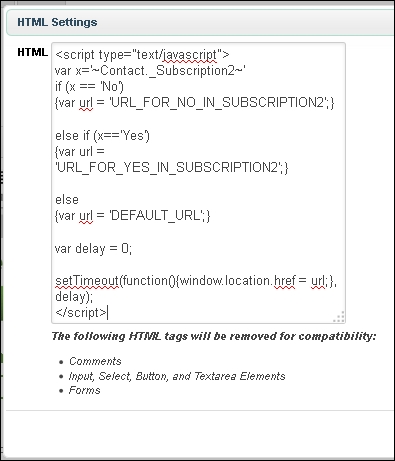
This hack uses a simple piece of JavaScript to pull information from a customer merge field and redirect based on the fixed possible values.

Getting ready

We need to be logged in to Infusionsoft, inside a specific account and a campaign with a web form or landing page. We also want to have:

  • A custom field created that has fixed values (dropdown, radio button, Yes/No, and so on) to control the redirect. In this example, we have a custom dropdown type called Subscription2 with two possible values: No and Yes.
  • A URL for each different thank you page.

How to do it...

  1. Open the web form or landing page and go to the Thank-you Page tab.
  2. Add an HTML snippet.
  3. In the HTML snippet, write the following and make sure to use the proper merge field value and page URLs. Click on Save:
    How to do it...

How it works...

This code is a simple...

Visually different images
CONTINUE READING
83
Tech Concepts
36
Programming languages
73
Tech Tools
Icon Unlimited access to the largest independent learning library in tech of over 8,000 expert-authored tech books and videos.
Icon Innovative learning tools, including AI book assistants, code context explainers, and text-to-speech.
Icon 50+ new titles added per month and exclusive early access to books as they are being written.
Infusionsoft Cookbook
notes
bookmark Notes and Bookmarks search Search in title playlist Add to playlist font-size Font size

Change the font size

margin-width Margin width

Change margin width

day-mode Day/Sepia/Night Modes

Change background colour

Close icon Search
Country selected

Close icon Your notes and bookmarks

Confirmation

Modal Close icon
claim successful

Buy this book with your credits?

Modal Close icon
Are you sure you want to buy this book with one of your credits?
Close
YES, BUY

Submit Your Feedback

Modal Close icon
Modal Close icon
Modal Close icon