-
Book Overview & Buying
-
Table Of Contents
-
Feedback & Rating
ArcGIS for Desktop Cookbook
By :
A feature dataset is a container for feature classes that have the same spatial reference, Coordinate Reference System (CRS), spatial domain, resolution, and tolerance. In the case of importing features with the same CRS, the feature dataset will accept only the features that have their coordinates between the minimum and maximum values defined for the x, y, z and m values of spatial domain extent. A feature dataset cannot contain other feature datasets or non-spatial tables.
For more details about the feature dataset, please refer to the online ArcGIS help (10.2) by navigating to Geodata | Data types | Feature datasets from http://resources.arcgis.com/en/help/main/10.2.
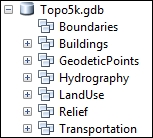
You will create seven feature datasets: Buildings, GeodeticPoints, Hydrography, LandUse, Relief, Transportation, and Boundaries. In your file geodatabase, Topo5k.gdb, all feature datasets will have the same CRS.
Follow these steps to create feature datasets in a file geodatabase using the ArcCatalog context menu:
<drive>:\PacktPublishing\Data\MyGeodatabase, and select Topo5k.gdb.Buildings. Click on Next. Navigate to Projected Coordinate Systems | National Grids | Europe | Pulkovo 1942 Adj 1958 Stereo 1970. Select the active yellow star Add To Favorites to add the selected projected coordinate system to the Favorites section. You will use this projected coordinate system later in this book.Buildings feature datasets and navigate to the Properties | Domain, Resolution and Tolerance tabs.GeodeticPoints, Hydrography, LandUse, Relief, and Transportation, as shown in the following screenshot:
After you have created a feature dataset, ArcCatalog allows you to change only the XY and Z coordinate system. If you take the decision to change the XY coordinate system for a feature dataset, you should know that you cannot modify the values for domain, resolution and tolerance. If you still need to change the CRS for a feature dataset, it will be more proper to create the feature dataset from the beginning. In conclusion, when you are thinking about a feature dataset, think twice and act once.
In ArcCatalog, you can use Copy and Paste from the context menu in the file geodatabase to duplicate the first feature dataset. In the Data Transfer window, you can change the name of the feature dataset by typing in the Target Name section. In this case, the newly resulted feature dataset will have the same coordinate reference system as the source feature dataset.
Change the font size
Change margin width
Change background colour