Sign In Start Free Trial
Account

Add to playlist

Create a Playlist

Modal Close icon
You need to login to use this feature.
  • Book Overview & Buying Beginning C# 7 Hands-On ?????? The Core Language
  • Table Of Contents Toc
Beginning C# 7 Hands-On ?????? The Core Language

Beginning C# 7 Hands-On ?????? The Core Language

By : Tom Owsiak
2 (2)
close
close
Beginning C# 7 Hands-On ?????? The Core Language

Beginning C# 7 Hands-On ?????? The Core Language

2 (2)
By: Tom Owsiak

Overview of this book

Beginning C# 7 Hands-On - The Core Language teaches you core C# language and syntax in a working Visual Studio environment. This book covers everything from core language through to more advanced features such as object-oriented programming techniques. This book is for C# 7 beginners who need a practical reference to core C# language features. You'll also gain a view of C# 7 through web programming with web forms, so you'll learn HTML, basic CSS, and how to use a variety of controls, such as buttons and drop-down lists. You'll start with the fundamentals of C# and Visual Studio, including defining variables, interacting with users, and understanding data types, data conversions, and constants. You'll move on to checking conditions using if/else blocks, and see how to use loops to do things such as repeat blocks of code. After covering various operators to evaluate and assign control structures, you'll see how to use arrays to store collections of data. By the time you’ve finished the book, you’ll know how to program the vital elements of the core C# language. These are the building blocks that you can then combine to build complex C# programs.

Table of Contents (60 chapters)
close
close
Lock Free Chapter
1
Why C# and How to Download and Install the Visual Studio Community Edition
chevron up
6
String Interpolation and Updating Visual Studio
12
Reacting to a Single Condition with If/Else Blocks
14
Repeating Blocks of Code with While Loops
15
Repeating Blocks of Code with For Loops
16
Iterating Over Collections with foreach Loops
17
Examining Multiple Variable Values with Switch Blocks
20
Operators That Evaluate and Assign in Place
21
Checking Two Conditions with the Logical AND Operator
22
Checking Two Conditions with the Logical OR Operator
28
Creating More Flexible Methods with the params Keyword
30
Combining the ref and out Keywords to Write Flexible Functions
33
Writing Easier Code with the Var and Dynamic Keywords
34
Creating a Class with a Constructor and a Function
41
Using Custom Types as Return Types
44
Using Interfaces to Express Common Behaviors
49
Overloading Operators to Perform Custom Operations
50
Using Enumerations to Represent Named Constants

Why C# and How to Download and Install the Visual Studio Community Edition

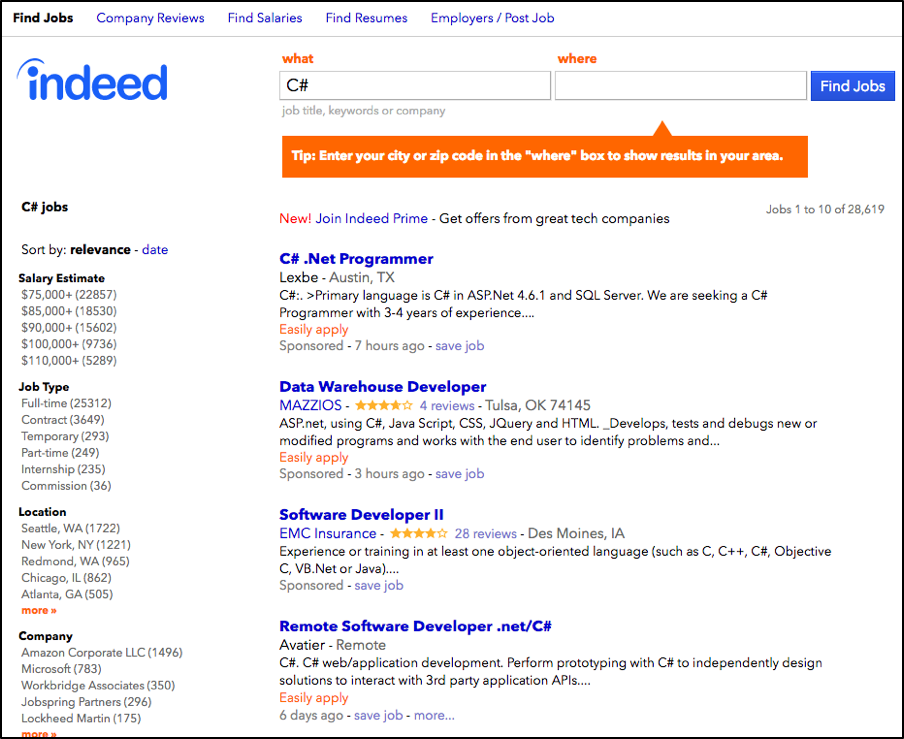
If you visit a page like indeed.com and enter C# in the what box, you'll get results that show that there are many jobs in this field, as shown in Figure 1.1.1. This shows that C# is a very valuable skill to master. Perhaps you just like to tinker, and C# is great for that as well:

Figure 1.1.1: The many job listings for C# programmers
Visually different images
CONTINUE READING
83
Tech Concepts
36
Programming languages
73
Tech Tools
Icon Unlimited access to the largest independent learning library in tech of over 8,000 expert-authored tech books and videos.
Icon Innovative learning tools, including AI book assistants, code context explainers, and text-to-speech.
Icon 50+ new titles added per month and exclusive early access to books as they are being written.
Beginning C# 7 Hands-On ?????? The Core Language
notes
bookmark Notes and Bookmarks search Search in title playlist Add to playlist font-size Font size

Change the font size

margin-width Margin width

Change margin width

day-mode Day/Sepia/Night Modes

Change background colour

Close icon Search
Country selected

Close icon Your notes and bookmarks

Confirmation

Modal Close icon
claim successful

Buy this book with your credits?

Modal Close icon
Are you sure you want to buy this book with one of your credits?
Close
YES, BUY

Submit Your Feedback

Modal Close icon
Modal Close icon
Modal Close icon