Sign In Start Free Trial
Account

Add to playlist

Create a Playlist

Modal Close icon
You need to login to use this feature.
  • Book Overview & Buying JBoss AS 5 Performance Tuning
  • Table Of Contents Toc
JBoss AS 5 Performance Tuning

JBoss AS 5 Performance Tuning

4.6 (5)
close
close
JBoss AS 5 Performance Tuning

JBoss AS 5 Performance Tuning

4.6 (5)

Overview of this book

Today's organizations need to deliver faster services to a large set of people and businesses. In order to survive this challenge, enterprises need to optimize the performance of their application server along with its components and hardware. Writing faster applications is no longer just an option for your products; it's an imperative requirement, which you cannot ignore. JBoss AS 5 Performance Tuning will teach you how to deliver fast applications on the JBoss Application Server and Apache Tomcat, giving you a decisive competitive advantage over your competitors. You will learn how to optimize the hardware resources, meeting your application requirements with less expenditure.The performance of Java Enterprise applications is the sum of a set of components including the Java Virtual Machine configuration, the application server configuration (in our case, JBoss AS), the application code itself and ultimately the operating system. This book will show you how to apply the correct tuning methodology and use the tuning tools that will help you to monitor and address any performance issues. By looking more closely at the Java Virtual Machine, you will get a deeper understanding of what the available options are for your applications and how their performance will be affected. You will learn about thread pool tuning, EJB tuning, JMS tuning, Enterprise Java Beans, and the Java Messaging Service. The persistence layer and JBoss Clustering service each have a chapter dedicated to them as they are two of the most crucial elements to configure correctly in order to run a fast application. You will also learn how to tune your web server, enabling you to configure and develop web applications that get the most out of the embedded Tomcat web server.
Table of Contents (17 chapters)
close
close
JBoss AS 5 Performance Tuning
Credits
About the Author
About the Reviewers
www.PacktPub.com
Preface
1
A Tuned Mind
2
Index

What is performance?


The term "performance" commonly refers to how quickly an application can be executed. In terms of the user's perspective on performance, the definition is quite easy to grasp. For example, a fast website means one that is able to load web pages very quickly. From an administrator's point of view, the concept needs to be translated into meaningful numbers. As a matter of fact, the expert can distinguish two ways to measure the performance of an application:

  • Response Time

  • Throughput

The Response Time can be defined as the time it takes for one user to perform a task. For example, on a website, after the customer submits one e-commerce form, the time it takes to process the order and for rendering and displaying the result in a new page is the response time for this functionality. As you can see, the concept of performance is essentially the same as from the end user perspective, but it is translated into numbers.

In practice, as shown in the following image, the Response Time includes the network roundtrip to the application server, the time to execute the business logic in your middleware (including the time to contact external legacy systems) and the latency to return the response to the client.

At this point the concept of Response Time should be quite clear, but you might wonder if this measurement is a constant; actually it is not. The Response Time changes accordingly with the load on the application. A single operation cannot be indicative of the overall performance: you have to consider how long the procedure takes to be executed in a production environment, where you have a considerable amount of customers running.

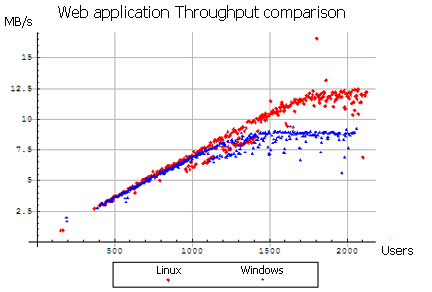
Another performance-related counter is Throughput. Throughput is the number of transactions that can occur in a given amount of time. This is a fundamental parameter that is used to evaluate not only the performance of a website, but also the commercial value of a software. The Throughput is usually measured in Transactions Per Second (TPS) and obviously an application that has a TPS higher than its competitors is also the one with higher commercial value—all other features standing equal.

The following image, depicts a Throughput comparison between a Linux Server and a Windows Server, as part of a complete benchmark (http://www.webperformanceinc.com/library/reports/windows_vs_linux_part1/index.html):

Visually different images
CONTINUE READING
83
Tech Concepts
36
Programming languages
73
Tech Tools
Icon Unlimited access to the largest independent learning library in tech of over 8,000 expert-authored tech books and videos.
Icon Innovative learning tools, including AI book assistants, code context explainers, and text-to-speech.
Icon 50+ new titles added per month and exclusive early access to books as they are being written.
JBoss AS 5 Performance Tuning
notes
bookmark Notes and Bookmarks search Search in title playlist Add to playlist font-size Font size

Change the font size

margin-width Margin width

Change margin width

day-mode Day/Sepia/Night Modes

Change background colour

Close icon Search
Country selected

Close icon Your notes and bookmarks

Confirmation

Modal Close icon
claim successful

Buy this book with your credits?

Modal Close icon
Are you sure you want to buy this book with one of your credits?
Close
YES, BUY

Submit Your Feedback

Modal Close icon
Modal Close icon
Modal Close icon