Sign In Start Free Trial
Account

Add to playlist

Create a Playlist

Modal Close icon
You need to login to use this feature.
  • Book Overview & Buying BPEL and Java Cookbook
  • Table Of Contents Toc
BPEL and Java Cookbook

BPEL and Java Cookbook

By : Laznik
close
close
BPEL and Java Cookbook

BPEL and Java Cookbook

By: Laznik

Overview of this book

The Business Process Execution Language (BPEL) has become the de-facto standard for orchestrating web services. BPEL and web services are both clamped into Service-oriented Architecture (SOA). Development of efficient SOA composites too often requires usage of other technologies or languages, like Java. This Cookbook explains through the use of examples how to efficiently integrate BPEL with custom Java functionality.If you need to use BPEL programming to develop web services in SOA development, this book is for you.BPEL and Java Cookbook will show you how to efficiently integrate custom Java functionality into BPEL processes. Based on practical examples, this book shows you the solutions to a number of issues developers come across when designing SOA composite applications. The integration between the two technologies is shown two-fold; the book focuses on the ways that Java utilizes the BPEL and vice-versa.With this book, you will take a journey through a number of recipes that solve particular problems with developing SOA composite applications. Each chapter works on a different set of recipes in a specific area. The recipes cover the whole lifecycle of developing SOA composites: from specification, through design, testing and deployment. BPEL and Java Cookbook starts off with recipes that cover initiation of BPEL from Java and vice-versa. It then moves on to logging and tracing facilities, validation and transformation of BPEL servers, embedding of third-party Java libraries into BPEL. It also covers manipulation with variables in BPEL different techniques of Java code wrapping for web service usage and utilization of XML fa?ßades. After reading BPEL and Java Cookbook you will be able to circumvent many of the issues that developers experience during SOA composite application development.  
Table of Contents (13 chapters)
close
close
12
Index

Mapping the results of a BPEL process

The applications that integrate with BPEL processes are most interested in the results. As we saw in the asynchronous scenario recipes, as a result, we receive SOAP Header and SOAP body within SOAP message. The XML presentation is not very useful for Java applications. The better solution would be to instead have Java applications consume the Java Bean classes. For that purpose, different tools exist that enable efficient XML to Java mapping.

In this recipe, we will examine how to map the results of a BPEL process to Java-based clients.

Getting ready

We will need to extend the client proxy from the Calling an asynchronous BPEL process recipe, so we need to have the asynchronous BPEL process deployed and the client proxy ready.

First, we will update the response of the asynchronous BPEL process to include more XSD schema elements as follows:

<element name = "processResponse">
  <complexType>
    <sequence>
      <element name = "result" type = "string"/>
      <element name = "postalcode" type = "int"/>
      <element name = "temperature" type = "double"/>
      <element name = "person">
        <complexType>
          <sequence>
            <element name = "name" type = "string"/>
            <element name = "lastname" type = "string"/>
          </sequence>
        </complexType>
      </element>
    </sequence>
  </complexType>
</element>

If we now call an asynchronous BPEL process, we will receive more information. Also, the information is nested in the response.

How to do it…

  1. We will start this recipe by generating the Java Bean class that corresponds to the body of the SOAP response message. We use the wsimport command as follows:
       C:\>wsimport -keep -p org.packt.async.generated -Xnocompile -d
       C:\Temp\gen\ http://medion:7001/soa-infra/services/default/HelloWordlAsync/helloworldasyncprocess
       _client_ep?WSDL
       parsing WSDL...
       generating code...
       C:\>

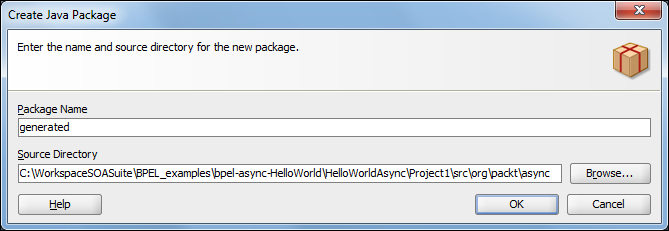
    In the directory C:\temp\gen, the skeleton classes of the corresponding WSDL document are now generated. If we check the content of the directory, we see that there are many more files in it. There are also request classes as well as a client proxy to initiate the BPEL process. For our recipe, we only need the ProcessResponse.java file, so we move only this file into our JDeveloper project. In JDeveloper, we create another Java package as shown in the following screenshot:

    How to do it…
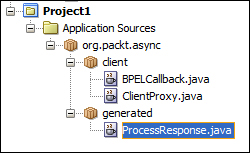
  2. We then copy the ProcessResponse.java file into the project. Now, our project layout consists of the following classes:
    How to do it…
  3. We now have to adapt the ClientProxy class in order to support the mapping of the result to our Java client. In the AXIS package, there is a utility class, BeanUtil, which is used for the deserialization of the XML content into Java classes. We start by preparing the variable of the result as follows:
    ProcessResponse responseBean;
  4. We then deserialize the XML content of SOAP message body element through the BeanUtil utility class as follows:
    try {
      responseBean = (ProcessResponse)BeanUtil.deserialize(ProcessResponse.class, msg.getFirstElement(), new DefaultObjectSupplier(), null);
      }
    catch (AxisFault e) {
      onError(e);
      }
  5. The XML content of the response from the asynchronous BPEL process is now accessible through the Java Bean as follows:
    <processResponse Process">
      <result>Hello Jurij</result>
      <postalcode>1430</postalcode>
      <temperature>37.5</temperature>
      <person>
        <name>Jurij</name>
        <lastname>Laznik</lastname>
      </person>
    </processResponse>

How it works…

The response from the BPEL process presents an XML document wrapped with the SOAP message. The XML format is not very friendly for programming in Java. That is why few implementations arise with the intent to simplify the transformation of XML to Java.

Implementation

Description

JAXB

Java Architecture for XML Binding. The essential tools of JAXB are as follows:

  • xjc: This is used to convert XSD schema types to their corresponding class representation
  • schemagen: This is used to convert the class representations to their respective XSD schema types

JAX-WS

Java API for XML Web Services. The important tools of JAX-WS are as follows:

  • wsimport: This supports the top-down approach of developing JAX-WS web services
  • wsgen: This supports the bottom-up approach of developing JAX-WS web services

JAX-RPC

Obsolete: replaced by JAX-WS

All the implementations mentioned here work with the same basic concept of serialization, deserialization, marshalling, and unmarshalling. In general, serialization and deserialization presents a way of transforming the data structures in a way that we can store them or transfer them between applications or over a network. The synonym for serialization, when we transform Java objects, is marshalling. Consequently, the synonym for the opposite operation, that is deserialization, is called unmarshalling.

The following mapping is used when we convert from XSD schema types to corresponding Java data types:

XML Schema Type

Java Data Type

xsd:string

java.lang.String

xsd:integer

java.math.BigInteger

xsd:int

int

xsd.long

long

xsd:short

short

xsd:decimal

java.math.BigDecimal

xsd:float

float

xsd:double

double

xsd:boolean

boolean

xsd:byte

byte

xsd:QName

javax.xml.namespace.QName

xsd:dateTime

javax.xml.datatype.XMLGregorianCalendar

xsd:base64Binary

byte[]

xsd:hexBinary

byte[]

xsd:unsignedInt

long

xsd:unsignedShort

int

xsd:unsignedByte

short

xsd:time

javax.xml.datatype.XMLGregorianCalendar

xsd:date

javax.xml.datatype.XMLGregorianCalendar

xsd:anySimpleType

java.lang.Object

xsd:duration

javax.xml.datatype.Duration

xsd:NOTATION

javax.xml.namespace.QName

While the preceding table shows the default mapping between XML data types and Java data types, it is also possible to customize the mapping, usually through the configuration mapping file.

There's more…

Applications written in Java usually do not operate with XML documents. If we want to call a BPEL process, we must also create a request. Until now, we used to build the request with the help of the XML document builder as follows:

OMFactory fac = OMAbstractFactory.getOMFactory();
OMNamespace omNs = fac.createOMNamespace("http://xmlns.oracle.com/HelloWorldAsync/HelloWordlAsync/HelloWorldAsyncProcess", "");
OMElement method = fac.createOMElement("process", omNs);
OMElement value = fac.createOMElement("input", omNs);
method.addChild(value);
//value.setText("Jurij");
value.setText("FAULT");

In the request, we have to know all the information, such as namespace, names of the XML tags, and, of course, the data itself.

To simplify the creation of a request, we can utilize the JAXB tools. First, we will take the Process.java class that we created with the wsimport tool. We include the class into the JDeveloper project. We need to add namespace info to the annotations in the class file as follows:

@XmlRootElement(name = "process", namespace = "http://xmlns.oracle.com/HelloWorldAsync/HelloWordlAsync/HelloWorldAsyncProcess")
@XmlElement(required = true, namespace = "http://xmlns.oracle.com/HelloWorldAsync/HelloWordlAsync/HelloWorldAsyncProcess")

We can now also change the createPayLoad() method in the ClientProxy.java class. We create an XML document from the DocumentBuilderFactory class as follows:

DocumentBuilderFactory dbf = DocumentBuilderFactory.newInstance();
dbf.setNamespaceAware(true);
Document doc = dbf.newDocumentBuilder().newDocument();

Then, we create a JAXB context with the following:

JAXBContext jc = JAXBContext.newInstance(Process.class);

Finally, we create marshaller and serialize the request class as follows:

Marshaller marshaller = jc.createMarshaller();
marshaller.setProperty(Marshaller.JAXB_FORMATTED_OUTPUT, false);
marshaller.marshal(req, doc);

The difference between the previous version of createPayLoad() and the newer version is that the previous version lacks transparency and clarity in the code. We can now fill the request data in the following way:

Process req = new Process();
req.setInput("JURIJ");

And call it as follows:

createPayLoad(req)

See also

CONTINUE READING
83
Tech Concepts
36
Programming languages
73
Tech Tools
Icon Unlimited access to the largest independent learning library in tech of over 8,000 expert-authored tech books and videos.
Icon Innovative learning tools, including AI book assistants, code context explainers, and text-to-speech.
Icon 50+ new titles added per month and exclusive early access to books as they are being written.
BPEL and Java Cookbook
notes
bookmark Notes and Bookmarks search Search in title playlist Add to playlist font-size Font size

Change the font size

margin-width Margin width

Change margin width

day-mode Day/Sepia/Night Modes

Change background colour

Close icon Search
Country selected

Close icon Your notes and bookmarks

Confirmation

Modal Close icon
claim successful

Buy this book with your credits?

Modal Close icon
Are you sure you want to buy this book with one of your credits?
Close
YES, BUY

Submit Your Feedback

Modal Close icon
Modal Close icon
Modal Close icon