Sign In Start Free Trial
Account

Add to playlist

Create a Playlist

Modal Close icon
You need to login to use this feature.
  • Book Overview & Buying Learning zANTI2  for Android Pentesting
  • Table Of Contents Toc
  • Feedback & Rating feedback
Learning zANTI2  for Android Pentesting

Learning zANTI2 for Android Pentesting

By : Vitula
5 (1)
close
close
Learning zANTI2  for Android Pentesting

Learning zANTI2 for Android Pentesting

5 (1)
By: Vitula

Overview of this book

A penetration test is one of the most important methods to secure a network or any individual machine. Having knowledge of these methods can enable a user to protect himself/herself from any kinds of attacks. Penetration tests can also be used to discover flaws or loop holes in one's security system, which if not fixed, can be exploited by an unwanted entity. This book starts off with an introduction to what penetration testing is, and how it can be performed on Android using zANTI2. Once you are aware of the basics, we move on to teach you the different types of scans that can be performed to search for targets. You will then learn how to connect to open ports and intrude into an unsecured computer. From here you will explore vulnerabilities and their usage, including ShellShock and SSL Poodle vulnerability. When connected to an open network, a user is susceptible to password and session hijacking, and a number of other cyber attacks. The book therefore ends with one of the main aspects of cyber security: the Man in the Middle attack. You will get to know everything about the MITM attack, how it works, and how one can be protected against it.
Table of Contents (7 chapters)
close
close

Scan types

In some cases, you are looking to determine whether the host is up, and in some cases, you want to really dig deep and find out as much information as possible from the target. Sometimes, you want to detect if the OS target is running, so you can determine whether there are any possible exploits on it. Nmap offers a fine amount of scan types, which let you investigate and find the exact information just the way you want. Let's have a look at the ones available through zANTI2:

Scan types

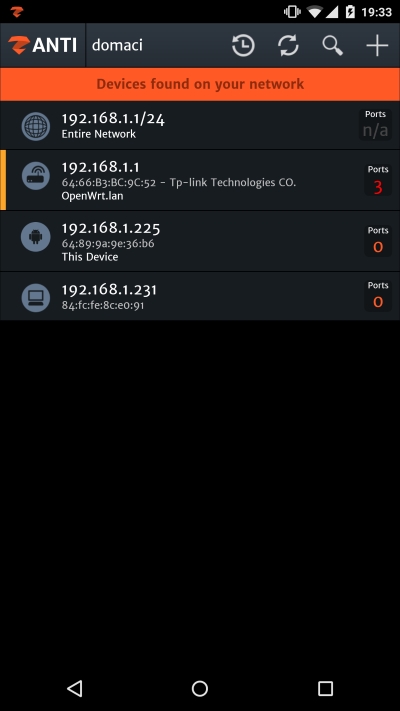
In zANTI2, the advanced scanning can be triggered for individual targets only. After you're done with network mapping, choose one of the targets and select Scan to perform advanced scanning on target, as the app says.

Scan types

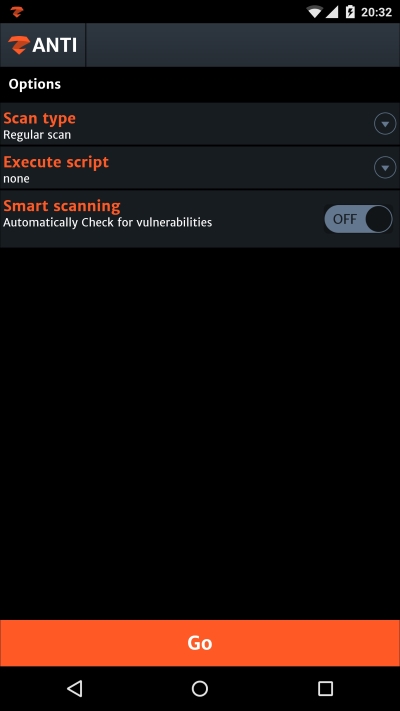
You'll find yourself in a new activity window with these three options. The first option, Scan type, lets you choose the type of scan triggered on the target. There are many scan types including regular, intense, or ping that you will get to know more about in a jiffy. The Execute...

Visually different images
CONTINUE READING
83
Tech Concepts
36
Programming languages
73
Tech Tools
Icon Unlimited access to the largest independent learning library in tech of over 8,000 expert-authored tech books and videos.
Icon Innovative learning tools, including AI book assistants, code context explainers, and text-to-speech.
Icon 50+ new titles added per month and exclusive early access to books as they are being written.
Learning zANTI2  for Android Pentesting
notes
bookmark Notes and Bookmarks search Search in title playlist Add to playlist font-size Font size

Change the font size

margin-width Margin width

Change margin width

day-mode Day/Sepia/Night Modes

Change background colour

Close icon Search
Country selected

Close icon Your notes and bookmarks

Confirmation

Modal Close icon
claim successful

Buy this book with your credits?

Modal Close icon
Are you sure you want to buy this book with one of your credits?
Close
YES, BUY

Submit Your Feedback

Modal Close icon
Modal Close icon
Modal Close icon