Sign In Start Free Trial
Account

Add to playlist

Create a Playlist

Modal Close icon
You need to login to use this feature.
  • Book Overview & Buying Learning Puppet Security
  • Table Of Contents Toc
  • Feedback & Rating feedback
Learning Puppet Security

Learning Puppet Security

By : Slagle
4 (3)
close
close
Learning Puppet Security

Learning Puppet Security

4 (3)
By: Slagle

Overview of this book

If you are a security professional whose workload is increasing, or a Puppet professional looking to increase your knowledge of security, or even an experienced systems administrator, then this book is for you. This book will take you to the next level of security automation using Puppet. The book requires no prior knowledge of Puppet to get started.
Table of Contents (12 chapters)
close
close
11
Index

Installing and configuring Puppet

Puppet can be installed in a variety of ways. Since this book is focused on the security-related aspects of Puppet and is not a beginner's guide, we will cover the most common way it is installed on our target system. There are many good reference books available for more in-depth information on installing Puppet, including Puppet 3: Beginner's Guide, John Arundel, Packt Publishing.

In our examples, we'll be using CentOS 6 as our operating system. If you are using a different operating system and following along on your own, please see the installation instructions for your operating system at http://www.puppetlabs.com, or follow along using Vagrant as outlined later.

Since we will be using Vagrant for our examples, the base box we are using already has the Puppet repository installed on it as well as the Puppet agent. We'll provide instructions for the installation of these elements for those who wish to use CentOS without using Vagrant.

Installing the Puppet Labs Yum repository

The currently recommended way to install Puppet on CentOS machines is to use the Puppet Labs Yum repository. This repository, which can be found at https://yum.puppetlabs.com, contains all the Puppet Labs software as well as the dependencies required to install them, such as several Ruby gems not present in the main CentOS repository. On installation, Ruby and these dependencies will also be installed.

Adding this repository is relatively simple. Execute the following command as a root (or using sudo, as shown here):

sudo rpm -ivh https://yum.puppetlabs.com/puppetlabs-release-el-6.noarch.rpm

After running this command, you will see an output similar to this:

Retrieving https://yum.puppetlabs.com/puppetlabs-release-el-6.noarch.rpm
Preparing...                ########################################### [100%]
   1:puppetlabs-release     ########################################### [100%]

Once this is complete, you're done! The Puppet Labs repository is added and we can use it to install the current version of any of the Puppet Labs products.

Installing the Puppet Master

The next step is to install the Puppet Master. As mentioned earlier, this system acts as the controller that all of your client agents will then use to communicate with to receive catalog information. This package is normally installed on only a few systems that act as servers for configuration management information.

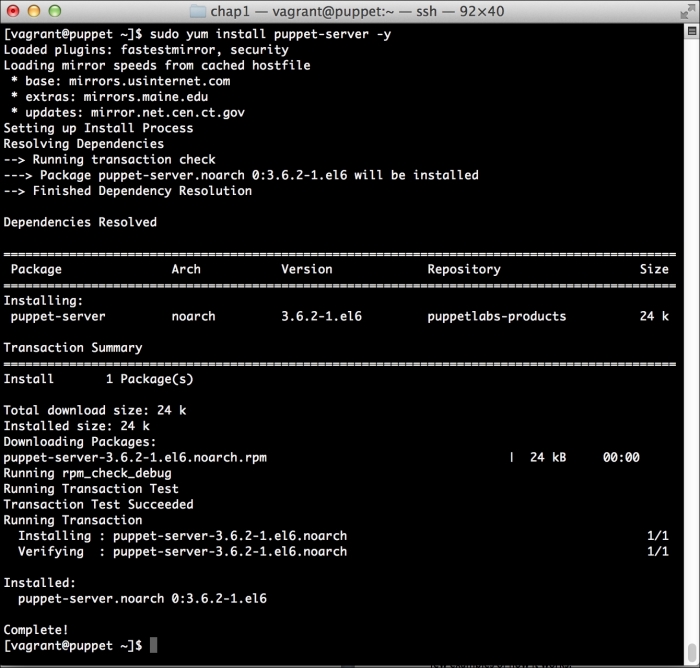
Installing the master with the repository is as easy as executing the following command:

sudo yum -y install puppet-server

This will instruct yum to install the Puppet server without confirmation. The output will be as follows:

Installing the Puppet Master

Installing the Puppet agent

On all the systems that we wish to manage by using Puppet, we'll need to install the Puppet agent. This agent is a piece of software that is responsible for communicating with the master and applying changes.

Installing the Puppet agent is very easy and similar to installing the master in the preceding section. You simply run the following:

sudo yum -y install puppet

After this is complete, you'll see that the the Puppet agent is installed on the local machine and is ready to talk to the master.

Configuring Puppet

Now that we have a perfectly working Puppet Master, we need to configure it. Installation of the packages will include a base level configuration. There are some changes we will want to make to the base Puppet configuration to enable some features that we'll use in the future. As we go through this book, we'll make changes to these files several times.

The main configuration files in use by Puppet are present in the /etc/puppet directory.

In this directory, there are a number of configuration files that control how Puppet behaves. Information on these files can be found at https://docs.puppetlabs.com/puppet/3.7/reference/config_about_settings.html. For now, we only need to concern ourselves with the Puppet configuration file.

Open the /etc/puppet/puppet.conf file with your favorite editor (make sure that you use sudo) and edit it to look similar to the following:

[main]
    # The Puppet log directory.
    # The default value is '$vardir/log'.
    logdir = /var/log/puppet

    # Where Puppet PID files are kept.
    # The default value is '$vardir/run'.
    rundir = /var/run/puppet

    # Where SSL certificates are kept.
    # The default value is '$confdir/ssl'.
    ssldir = $vardir/ssl

[agent]
    # The file in which puppetd stores a list of the classes
    # associated with the retrieved configuratiion.  Can be loaded in
    # the separate ``puppet`` executable using the ``--loadclasses``
    # option.
    # The default value is '$confdir/classes.txt'.
    classfile = $vardir/classes.txt

    # Where puppetd caches the local configuration.  An
    # extension indicating the cache format is added automatically.
    # The default value is '$confdir/localconfig'.
    localconfig = $vardir/localconfig
    report = true
    pluginsync = true
[master]
    reports = store

We've made a handful of changes to the file from the default version and will cover them here.

The first change is adding the report = true section to the agent configuration section. This will cause clients to send reports containing information about the Puppet run. We'll use these reports for later analysis in Chapter 4, Security Reporting with Puppet.

The second change is to add pluginsync = true to the agent section. While this has become the default in the more recent versions of Puppet, it does not hurt to add it in. This causes the clients to sync custom facts, providers, and other Puppet libraries from the master. We will see how this is used in later chapters.

The final change we have made is to add the master section and add reports = store. This causes the master to save reports to the local filesystem on the Puppet Master. We'll use this later to do analysis of our Puppet runs for security-related purposes.

Puppet services

Both the Puppet Master and the agent are usually run as services. This allows the agent to check its run frequency and apply any changes. We've not explicitly started the services here, although we'll need to start the master in order to use it from our agent. To do this, we run the following command:

sudo service puppetmaster start

In order for the Puppet Master to start at boot, we'll also issue the following command to enable it to autostart:

sudo chkconfig puppetmaster on

It's pretty common to use Puppet to manage Puppet, and in a later chapter, we'll do this to show how we can use Puppet to secure the Puppet Master.

Note

It's worth noting that Puppet running with a default web server configuration will not scale beyond a few dozen hosts. Scaling Puppet is outside the scope of this book. More information on scaling Puppet can be found at http://docs.puppetlabs.com/guides/scaling.html.

Visually different images
CONTINUE READING
83
Tech Concepts
36
Programming languages
73
Tech Tools
Icon Unlimited access to the largest independent learning library in tech of over 8,000 expert-authored tech books and videos.
Icon Innovative learning tools, including AI book assistants, code context explainers, and text-to-speech.
Icon 50+ new titles added per month and exclusive early access to books as they are being written.
Learning Puppet Security
notes
bookmark Notes and Bookmarks search Search in title playlist Add to playlist font-size Font size

Change the font size

margin-width Margin width

Change margin width

day-mode Day/Sepia/Night Modes

Change background colour

Close icon Search
Country selected

Close icon Your notes and bookmarks

Confirmation

Modal Close icon
claim successful

Buy this book with your credits?

Modal Close icon
Are you sure you want to buy this book with one of your credits?
Close
YES, BUY

Submit Your Feedback

Modal Close icon
Modal Close icon
Modal Close icon