Sign In Start Free Trial
Account

Add to playlist

Create a Playlist

Modal Close icon
You need to login to use this feature.
  • Book Overview & Buying Zed Attack Proxy Cookbook
  • Table Of Contents Toc
  • Feedback & Rating feedback
Zed Attack Proxy Cookbook

Zed Attack Proxy Cookbook

By : Ryan Soper, Nestor Torres, Ahmed Almoailu
4.7 (7)
close
close
Zed Attack Proxy Cookbook

Zed Attack Proxy Cookbook

4.7 (7)
By: Ryan Soper, Nestor Torres, Ahmed Almoailu

Overview of this book

Maintaining your cybersecurity posture in the ever-changing, fast-paced security landscape requires constant attention and advancements. This book will help you safeguard your organization using the free and open source OWASP Zed Attack Proxy (ZAP) tool, which allows you to test for vulnerabilities and exploits with the same functionality as a licensed tool. Zed Attack Proxy Cookbook contains a vast array of practical recipes to help you set up, configure, and use ZAP to protect your vital systems from various adversaries. If you're interested in cybersecurity or working as a cybersecurity professional, this book will help you master ZAP. You’ll start with an overview of ZAP and understand how to set up a basic lab environment for hands-on activities over the course of the book. As you progress, you'll go through a myriad of step-by-step recipes detailing various types of exploits and vulnerabilities in web applications, along with advanced techniques such as Java deserialization. By the end of this ZAP book, you’ll be able to install and deploy ZAP, conduct basic to advanced web application penetration attacks, use the tool for API testing, deploy an integrated BOAST server, and build ZAP into a continuous integration and continuous delivery (CI/CD) pipeline.
Table of Contents (14 chapters)
close
close

Encode/Decode/Hash dialog

In this recipe, we are going to go over how to perform encoding and decoding and hashing in ZAP Proxy.

Getting ready

For you to be able to go over this recipe, you will need to have ZAP installed on your computer and also have it started and running.

How to do it…

Encoding is the process of converting data from one form to another, whereas decoding is reversing this conversion. ZAP comes built with a feature to aid its users with a quick way to convert and divert data. In addition to this process, and contained within the same setting, is a feature that creates simple hashes of that data. To get started, select from the menu bar at the top tools, then a little over halfway down, select Encode/Decode/Hash.

Tip

For a shortcut hotkey, on a Windows system, press Ctrl + E. On a macOS system, press Command + E.

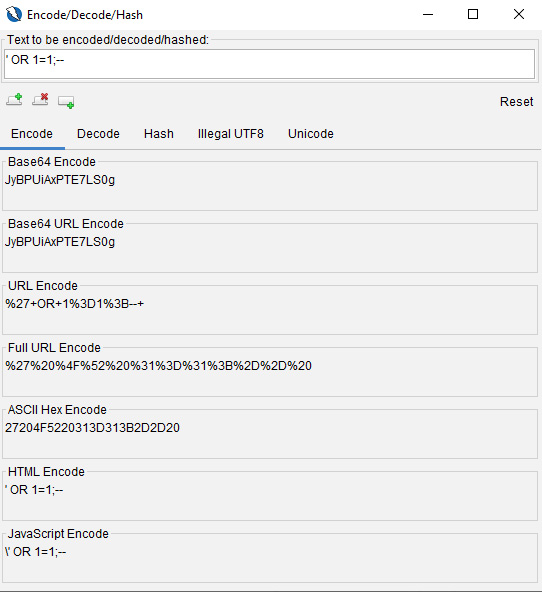
When the editor opens, the first thing to note is the input field, which you use to enter the text you wish to encode, decode, and hash, determine illegal UTF-8 bytes, or convert to Unicode. Once you enter the desired text, all the fields will automatically be converted for you.

Next, there is a toolbar that offers a few options. These are as follows:

  • Add new tab: Adds a new tab
  • Delete selected tab: Removes the currently selected tab
  • Add output panel: Adds an output panel to the current tab
  • Reset: Resets all the tabs to their default state
Figure 2.28 – The Encode/Decode/Hash dialog box

Figure 2.28 – The Encode/Decode/Hash dialog box

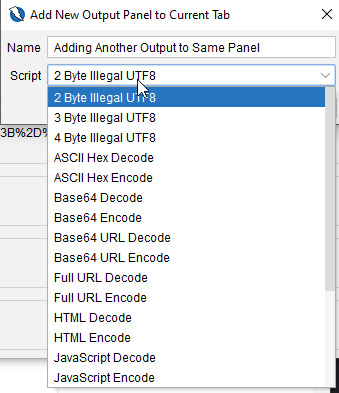
As indicated in the Script drop-down menu in the output panel in Figure 2.29, a user can add new fields for comparing data.

Figure 2.29 – The output panel

Figure 2.29 – The output panel

With your encoded or hashed script, we’ll move on to fuzzing and how to configure different options for optimizing your approach to web application penetration testing.

How it works…

Using this tool can quickly change operational use with wordlists used in fuzzing applications with attack vectors such as cross-site scripting, SQL injection, and so on. The ability to quickly get a list of different values can help in bypassing poorly implemented validation or encoding in web applications.

See also

For a tool with robust operations for encoding, decoding, and hashing strings, check out CyberChef: https://gchq.github.io/CyberChef/.

Visually different images
CONTINUE READING
83
Tech Concepts
36
Programming languages
73
Tech Tools
Icon Unlimited access to the largest independent learning library in tech of over 8,000 expert-authored tech books and videos.
Icon Innovative learning tools, including AI book assistants, code context explainers, and text-to-speech.
Icon 50+ new titles added per month and exclusive early access to books as they are being written.
Zed Attack Proxy Cookbook
notes
bookmark Notes and Bookmarks search Search in title playlist Add to playlist download Download options font-size Font size

Change the font size

margin-width Margin width

Change margin width

day-mode Day/Sepia/Night Modes

Change background colour

Close icon Search
Country selected

Close icon Your notes and bookmarks

Confirmation

Modal Close icon
claim successful

Buy this book with your credits?

Modal Close icon
Are you sure you want to buy this book with one of your credits?
Close
YES, BUY

Submit Your Feedback

Modal Close icon
Modal Close icon
Modal Close icon