Sign In Start Free Trial
Account

Add to playlist

Create a Playlist

Modal Close icon
You need to login to use this feature.
  • Book Overview & Buying Microsoft Identity Manager 2016 Handbook
  • Table Of Contents Toc
Microsoft Identity Manager 2016 Handbook

Microsoft Identity Manager 2016 Handbook

By : David Steadman, Ingalls
3.8 (5)
close
close
Microsoft Identity Manager 2016 Handbook

Microsoft Identity Manager 2016 Handbook

3.8 (5)
By: David Steadman, Ingalls

Overview of this book

Microsoft Identity Manager 2016 is Microsoft’s solution to identity management. When fully installed, the product utilizes SQL, SharePoint, IIS, web services, the .NET Framework, and SCSM to name a few, allowing it to be customized to meet nearly every business requirement. The book is divided into 15 chapters and begins with an overview of the product, what it does, and what it does not do. To better understand the concepts in MIM, we introduce a fictitious company and their problems and goals, then build an identity solutions to fit those goals. Over the course of this book, we cover topics such as MIM installation and configuration, user and group management options, self-service solutions, role-based access control, reducing security threats, and finally operational troubleshooting and best practices. By the end of this book, you will have gained the necessary skills to deploy, manage and operate Microsoft Identity Manager 2016 to meet your business requirements and solve real-world customer problems.
Table of Contents (17 chapters)
close
close
16
Index

Installing self-service password reset


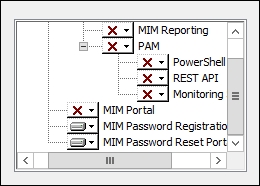
SSPR has two major components: the password registration portal, where answers to questions are registered by users, and the password reset portal, where those same answers need to be supplied in order for MIM to reset the password. We will install SSPR on a new server like many medium to large organizations do, although you can install the SSPR components on the same MIM portal server that we used in the previous chapters:

  1. Run the MIM Service and portal installation, select the MIM Password Registration and the MIM Password Reset Portal components, and click on Next:

  2. The next dialog box requires an account name, password, hostname, and port for the registration portal. We will use the service account TFC\SVC-MIMSSPR, the registration host name register.thefinancialcompany.net, with the standard port 80. Click on Next:

  3. You will receive a message that the deployment is not secure in its current configuration—essentially, telling us that we should use SSL...

CONTINUE READING
83
Tech Concepts
36
Programming languages
73
Tech Tools
Icon Unlimited access to the largest independent learning library in tech of over 8,000 expert-authored tech books and videos.
Icon Innovative learning tools, including AI book assistants, code context explainers, and text-to-speech.
Icon 50+ new titles added per month and exclusive early access to books as they are being written.
Microsoft Identity Manager 2016 Handbook
notes
bookmark Notes and Bookmarks search Search in title playlist Add to playlist font-size Font size

Change the font size

margin-width Margin width

Change margin width

day-mode Day/Sepia/Night Modes

Change background colour

Close icon Search
Country selected

Close icon Your notes and bookmarks

Confirmation

Modal Close icon
claim successful

Buy this book with your credits?

Modal Close icon
Are you sure you want to buy this book with one of your credits?
Close
YES, BUY

Submit Your Feedback

Modal Close icon
Modal Close icon
Modal Close icon