-
Book Overview & Buying
-
Table Of Contents
-
Feedback & Rating
ASP.NET jQuery Cookbook (Second Edition) - Second Edition
By :
So far, all examples have used the Empty template for the ASP.NET Web Application project. When using a non-empty built-in web application template, ASP.NET adds a reference to the jQuery library in the Master Page using the ScriptManager control. This recipe walks you through the important details of this mapping.
Here are the steps to create an ASP.NET web application using the default web application template:
DemoWebApplication (or any other suitable name), and click on OK.
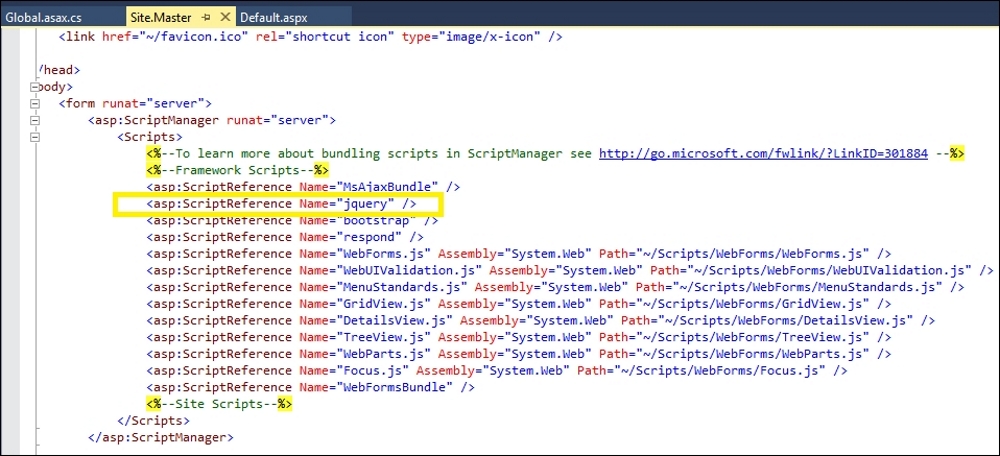
Site.Master Master Page in the Source mode, as shown in the following screenshot:
ScriptManager control that is added to the <form> element has the following reference to jQuery:<asp:ScriptReference Name="jquery" />
When you follow the preceding steps, this is how the web application is mapped to the jQuery library:
ScriptManager control switches the jQuery library between the development and release versions, depending on the debug attribute of the <compilation> element in web.config:<compilation debug="true"/>
debug attribute is true, the uncompressed version is used. When debug is false, the minified version is used.AspNet.ScriptManager.jQuery package. This package adds the following ScriptMappings to jQuery in the PreApplicationStart method of the application as follows:For C#, the code is as follows:
string str = "2.4.1";
ScriptManager.ScriptResourceMapping.AddDefinition("jquery", new ScriptResourceDefinition
{
Path = "~/Scripts/jquery-" + str + ".min.js",
DebugPath = "~/Scripts/jquery-" + str + ".js",
CdnPath = "http://ajax.aspnetcdn.com/ajax/jQuery/jquery-" + str + ".min.js",
CdnDebugPath = "http://ajax.aspnetcdn.com/ajax/jQuery/jquery-" + str + ".js",
CdnSupportsSecureConnection = true,
LoadSuccessExpression = "window.jQuery"
});The default Web Forms template adds the Microsoft CDN URL, as shown in the preceding code.
EnableCdn property of the ScriptManager control is set to true, CdnPath and CdnDebugPath are used in release and development modes, respectively, to serve scripts from the Microsoft CDN:<asp:ScriptManager runat="server" EnableCdn="true">
ScriptManager control will include a fallback mechanism to serve the local copy of jQuery, as shown in the following screenshot:
ScriptResourceMapping in the RegisterBundles method in BundleConfig, as shown in the following code. This module/class is located in the App_Start folder:For VB, the code is as follows:
ScriptManager.ScriptResourceMapping.AddDefinition("jquery", New ScriptResourceDefinition() With {
.Path = "~/Scripts/jquery-2.1.4.min.js",
.DebugPath = "~/Scripts/jquery-2.1.4.js",
.CdnPath = "https://ajax.googleapis.com/ajax/libs/jquery/2.1.4/jquery.min.js",
.CdnDebugPath = "https://ajax.googleapis.com/ajax/libs/jquery/2.1.4/jquery.js",
.CdnSupportsSecureConnection = True,
.LoadSuccessExpression = "window.jQuery"})For C#, the code is as follows:
ScriptManager.ScriptResourceMapping.AddDefinition("jquery", new ScriptResourceDefinition
{
Path = "~/Scripts/jquery-2.1.4.min.js",
DebugPath = "~/Scripts/jquery-2.1.4.js",
CdnPath = "https://ajax.googleapis.com/ajax/libs/jquery/2.1.4/jquery.min.js",
CdnDebugPath = "https://ajax.googleapis.com/ajax/libs/jquery/2.1.4/jquery.js",
CdnSupportsSecureConnection = true,
LoadSuccessExpression = "window.jQuery"
});
Global.asax page to view the registration of bundles in the Application_Start event handler as follows:For VB, the code is as follows:
BundleConfig.RegisterBundles(BundleTable.Bundles)
For C#, the code is as follows:
BundleConfig.RegisterBundles(BundleTable.Bundles);
The Adding jQuery to an empty ASP.NET web project using the ScriptManager control recipe
Change the font size
Change margin width
Change background colour