Sign In Start Free Trial
Account

Add to playlist

Create a Playlist

Modal Close icon
You need to login to use this feature.
  • Book Overview & Buying Moodle 2.5 Multimedia
  • Table Of Contents Toc
Moodle 2.5 Multimedia

Moodle 2.5 Multimedia - Second Edition

By : Joao Pedro Soares Fernandes
4.8 (4)
close
close
Moodle 2.5 Multimedia

Moodle 2.5 Multimedia

4.8 (4)
By: Joao Pedro Soares Fernandes

Overview of this book

Multimedia is a very old human endeavor. It has taken mankind almost 30,000 years since painting on cave walls to get a combination of text, image, sound, and video all working in the same medium, that is, in motion pictures. Finally, after thousands of years of human history, we can all (not just an elite few) create multimedia easily using Moodle. Moodle was built around an idea of learning that happens when a group of people construct things for one another, collaboratively creating a small culture of shared artifacts with shared meanings. A tutorial-based guide, with clear illustrations and examples of how to create, convert and add multimedia to Moodle using a range of free e-learning software tools and web applications. This book follows the design of resources and activities for the course “Music for everyday life”. The tasks presented are quick and easy to do for teachers and trainers with busy schedules. Giving readers an insight into the creation and integration of multimedia in Moodle courses. Starting with images you will learn to create photo collages, screenshots and comic strips. Then you will discover audio and how to extract audio from CDs to create a soundtrack for a movie and a podcast. Later, you will use video to produce a trailer for a movie, photo slideshows, online TVs and screencasts. Following that, you will develop an understanding of interactive elements and web communication, such as online maps, interactive timelines or web meetings. Finally, you will look at multimedia quizzes and assessment of multimedia assignments, ending with general issues on copyright, licensing and safety. A focus of the book is to show readers that using multimedia is not just about improving instruction, but also improving the ways in which students can can now create multimedia easily, and share it without great effort.. To make this easier, many of the moodle tutorials in the book will be based on activities designed for students to create, discuss and assess each other's multimedia works.
Table of Contents (10 chapters)
close
close
9
Index

Chapter 1. Getting Ready for Multimedia in Moodle

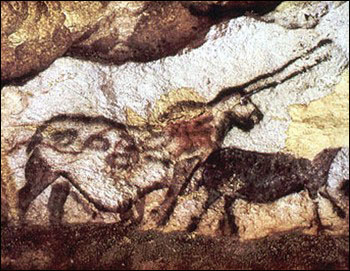
Multimedia is a very old human endeavor and curiously, it all started with images, more than 30,000 years ago, painted by prehistoric humans on cave walls.

The Chauvet and Lascaux caves in France have some of the oldest paintings known to man.

Getting Ready for Multimedia in Moodle

Source: Sacred destinations (2009). Lascaux cave painting. Retrieved on April 14, 2009 from http://www.sacred-destinations.com/france/lascaux-caves.htm (public domain)

This was the first technology invented to express and capture not only the world we experienced through our senses, but also our imagination and creativity in a medium that could be shared with others.

Compared to these paintings, written text is quite recent, and it marks the beginning of History, more than 9,000 years ago (that's the reason we call the period before it the prehistory). After stone, papyrus was used in ancient Egypt, then parchment, and later paper, invented in China and brought to Europe in the 12th century.

The 19th century saw great developments in multimedia. From photography to motion pictures, from mass production of paper to the new process of printing images and text on the same page, all of it was invented during this time.

Ironically, it took mankind almost all of the 30,000 years since the paintings on cave walls to get a combination of text, image, sound, and video, all working in the same medium. Motion pictures articulating all of these elements were first watched in the 1920s, with soundtracks, subtitles, and of course pictures—still or moving.

The real revolution started with the advent of computers and the Internet, and later on the World Wide Web in the beginning of the 90s, and economically accessible technology for the masses. And finally, after thousands of years of human history, we (not just an elite few) can now create multimedia easily and share it without great effort. In a way, it's a new era for human imagination, creativity, and expression.

This book is about exploring these new possibilities not only for teachers and educators but also for students and learners for teaching, learning, and imagining in new ways. And of course, we will be using Moodle for all of this.

In this chapter we will cover the following topics:

  • Knowing a little bit about the history of multimedia
  • Understanding some reasons for using multimedia in Moodle
  • Attaching a sound file to a Moodle forum post
  • Embedding an online video in a Moodle forum post
  • Inserting an image in a Moodle forum post
  • Choosing an equipment and software to start creating multimedia
Visually different images
CONTINUE READING
83
Tech Concepts
36
Programming languages
73
Tech Tools
Icon Unlimited access to the largest independent learning library in tech of over 8,000 expert-authored tech books and videos.
Icon Innovative learning tools, including AI book assistants, code context explainers, and text-to-speech.
Icon 50+ new titles added per month and exclusive early access to books as they are being written.
Moodle 2.5 Multimedia
notes
bookmark Notes and Bookmarks search Search in title playlist Add to playlist font-size Font size

Change the font size

margin-width Margin width

Change margin width

day-mode Day/Sepia/Night Modes

Change background colour

Close icon Search
Country selected

Close icon Your notes and bookmarks

Confirmation

Modal Close icon
claim successful

Buy this book with your credits?

Modal Close icon
Are you sure you want to buy this book with one of your credits?
Close
YES, BUY

Submit Your Feedback

Modal Close icon
Modal Close icon
Modal Close icon