Sign In Start Free Trial
Account

Add to playlist

Create a Playlist

Modal Close icon
You need to login to use this feature.
  • Book Overview & Buying Ember.js Cookbook
  • Table Of Contents Toc
Ember.js Cookbook

Ember.js Cookbook

By : Hanchett
4.6 (11)
close
close
Ember.js Cookbook

Ember.js Cookbook

4.6 (11)
By: Hanchett

Overview of this book

Ember.js is an open source JavaScript framework that will make you more productive. It uses common idioms and practices, making it simple to create amazing single-page applications. It also lets you create code in a modular way using the latest JavaScript features. Not only that, it has a great set of APIs to get any task done. The Ember.js community is welcoming newcomers and is ready to help you when needed. This book provides in-depth explanations on how to use the Ember.js framework to take you from beginner to expert. You’ll start with some basic topics and by the end of the book, you’ll know everything you need to know to build a fully operational Ember application. We’ll begin by explaining key points on how to use the Ember.js framework and the associated tools. You’ll learn how to effectively use Ember CLI and how to create and deploy your application. We’ll take a close look at the Ember object model and templates by examining bindings and observers. We’ll then move onto Ember components, models, and Ember Data. We’ll show you examples on how to connect to RESTful databases. Next we’ll get to grips with testing with integration and acceptance tests using QUnit. We will conclude by covering authentication, services, and Ember add-ons. We’ll explore advanced topics such as services and initializers, and how to use them together to build real-time applications.
Table of Contents (13 chapters)
close
close
12
Index

Working with application initializers


Application initializers can be used to configure your application as it boots. It's the primary place to set up dependency injections in your application.

In this example, we'll examine when an application initializer is run.

How to do it...

  1. In a new application, create initializer:

    $ ember g initializer application
    

    This will create a new application initializer. This will be run as soon as the application boots.

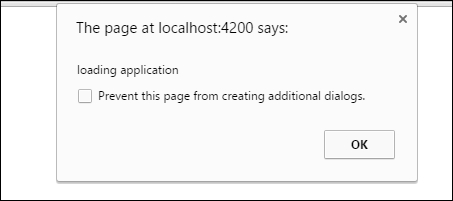
  2. Add an alert box to the initializer:

    // app/initializers/application.js
    export function initialize( application ) {
        alert('loading application');
    }
    
    export default {
        name: 'application',
        initialize
    };

    This will load an alert box as soon as the application loads.

  3. Run ember server and you should see an alert box displayed before the application is loaded:

    Nothing else has loaded in the application before this alert box is shown.

  4. If needed, we can also register or inject services in the initializer. It may look as follows:

    // app/initializer...
CONTINUE READING
83
Tech Concepts
36
Programming languages
73
Tech Tools
Icon Unlimited access to the largest independent learning library in tech of over 8,000 expert-authored tech books and videos.
Icon Innovative learning tools, including AI book assistants, code context explainers, and text-to-speech.
Icon 50+ new titles added per month and exclusive early access to books as they are being written.
Ember.js Cookbook
notes
bookmark Notes and Bookmarks search Search in title playlist Add to playlist font-size Font size

Change the font size

margin-width Margin width

Change margin width

day-mode Day/Sepia/Night Modes

Change background colour

Close icon Search
Country selected

Close icon Your notes and bookmarks

Confirmation

Modal Close icon
claim successful

Buy this book with your credits?

Modal Close icon
Are you sure you want to buy this book with one of your credits?
Close
YES, BUY

Submit Your Feedback

Modal Close icon
Modal Close icon
Modal Close icon