-
Book Overview & Buying
-
Table Of Contents
-
Feedback & Rating
Magento 2 Development Essentials
By :
Magento is an open source content management system for e-commerce websites. It's one of the most important e-commerce systems, which has grown fast since its launch in 2008.
Basically, Magento works with two different types of Magento: Community Edition (CE) and Enterprise Edition (EE). In this book, we will cover CE.
On a study provided by aheadWorks (https://aheadworks.com/) in October 2014, Magento CE has taken the leading position among examined e-commerce platforms.

Now, we have solid concepts about "where we are going". It's very important to have solids concepts about every aspect that you are working on in this moment. Globally, e-commerce shows a remarkable potential market and Magento professionals are welcome.
First of all, we need to create a user account on the Magento website (http://www.magento.com) to download Magento CE. Click on the top-menu link My Account and after clicking the button labeled Register, fill out the form and confirm your registration.
Once registered, you gain access to download Magento CE. You can access the Products | Open Source/CE and VIEW AVAILABLE DOWNLOADS menus.

On this page, we have three important options:
Choose the
Full Release with Sample Data (ZIP with sample data) option for downloading Magento. Extract the compressed files in the XAMPP htdocsfolder and rename the folder to packt.
Remember to start Apache and MySQL services on the XAMPP panel before the installation.
Before starting the Magento installation, we'll need to create a new MySQL database instance to store the Magento data. phpMyAdmin is a MySQL web app to manage your database and can be accessed at http://localhost/phpmyadmin/.
Click on the Databases menu and the Create database option to create the packt database.

Now, let's start our Magento installation. On your browser, access http://localhost/packt/setup.
By now, you will see this installation page on your browser:

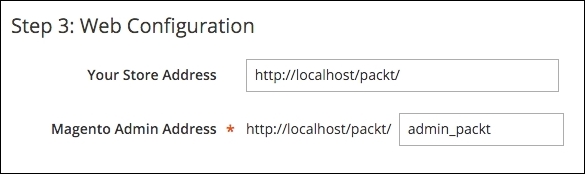
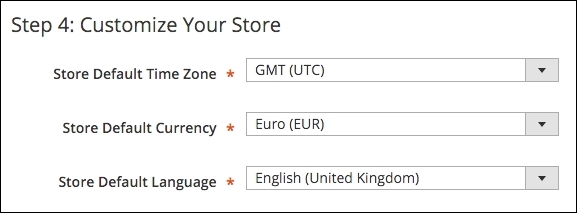
Let's start the Magento installation by following these steps:


packt-admin.After all these steps, we are done! Congratulations! We have our first Magento installation!
You can access your new site by accessing the URL at http://localhost/packt:

And you can access the admin area by accessing the URL at http://localhost/packt/admin-packt:

For more information about Magento installation, access http://devdocs.magento.com/guides/v2.0/install-gde/bk-install-guide.html.
MVC is an architectural software pattern that works with three different but interconnected parts. Its principal mission is to abstract the development work into interdependent layers providing the best practices to documentation and organization of software projects.
The Magento e-commerce solution is written with the PHP Zend framework, which is one of the most powerful PHP frameworks. For more information, access http://framework.zend.com/.
Magento is a configuration-based MVC System. For example, when you develop a module (we will check this in the next chapters), besides creating new files and classes to your module, you need to also create a config.xml file. This file contains all the configuration data for Magento module. These practices abstract some important information that you can easily edit to set the module as you need.

In this book, we will cover only the very basic Magento software architecture concepts, but it's highly recommended that you to study more software design patterns, especially in our case MVC software architecture needs to be understood well to best experience the field of software development.
Change the font size
Change margin width
Change background colour