Sign In Start Free Trial
Account

Add to playlist

Create a Playlist

Modal Close icon
You need to login to use this feature.
  • Book Overview & Buying Python Web Development with Sanic
  • Table Of Contents Toc
  • Feedback & Rating feedback
Python Web Development with Sanic

Python Web Development with Sanic

By : Stephen Sadowski, Adam Hopkins
4.2 (6)
close
close
Python Web Development with Sanic

Python Web Development with Sanic

4.2 (6)
By: Stephen Sadowski, Adam Hopkins

Overview of this book

Today’s developers need something more powerful and customizable when it comes to web app development. They require effective tools to build something unique to meet their specific needs, and not simply glue a bunch of things together built by others. This is where Sanic comes into the picture. Built to be unopinionated and scalable, Sanic is a next-generation Python framework and server tuned for high performance. This Sanic guide starts by helping you understand Sanic’s purpose, significance, and use cases. You’ll learn how to spot different issues when building web applications, and how to choose, create, and adapt the right solution to meet your requirements. As you progress, you’ll understand how to use listeners, middleware, and background tasks to customize your application. The book will also take you through real-world examples, so you will walk away with practical knowledge and not just code snippets. By the end of this web development book, you’ll have gained the knowledge you need to design, build, and deploy high-performance, scalable, and maintainable web applications with the Sanic framework.
Table of Contents (21 chapters)
close
close

Performing Troubleshooting Procedures

During and after configuring your devices on a network, it is best practice to verify the IP addresses on each device.

Table 2.2 shows the IP address scheme for the lab topology:

Device

Interface

IP Address

Subnet Mask

Default Gateway

Router

GigabitEthernet 0/1

192.168.1.1

255.255.255.0

N/A

GigabitEthernet 0/2

172.16.1.1

255.255.255.0

N/A

Switch 1

Interface VLAN 1

192.168.1.2

255.255.255.0

192.168.1.1

Switch 2

Interface VLAN 1

172.16.1.2

255.255.255.0

172.16.1.1

PC

FastEthernet 0

192.168.1.10

255.255.255.0

192.168.1.1

Server

FastEthernet 0

172.16.1.10

255.255.255.0

172.16.1.1

Table 2.2: IP addressing scheme

Up next, you will learn about various troubleshooting commands for both end devices and Cisco devices.

Verifying IP Configurations on End Devices

The following commands are commonly used by network professionals in their troubleshooting process to identify whether they’ve assigned the appropriate IP address on a host device:

  • ipconfig: A Windows-based command for displaying the IP address, subnet mask, and default gateway addresses of each interface
  • ipconfig /all: A Windows-based command that displays additional addressing such as the media access control (MAC) address and DNS server addresses on each interface
  • ifconfig: A Linux-based command for displaying the IP addresses and interfaces
  • ip address: A Linux-based command for displaying IP addresses and interfaces on Linux systems

Verifying IP Configurations on Cisco Devices

The following are useful Cisco IOS commands for verifying IP configurations on Cisco devices:

  • show ip interface brief: Displays a summary of all interfaces, their status, and assigned IP addresses
  • show ip interface [interface-ID]: Shows IP-related information for a specific interface
  • show interfaces [interface-ID]: Shows detailed information about a specific interface
  • show running-config: Displays the device’s current configurations, including the IP addresses that are configured on each interface

Verifying End-to-End Connectivity

The ping and traceroute utilities are software-based tools that are integrated into many operating systems, such as Windows, Linux, macOS, and even Cisco IOS. The ping utility leverages Internet Control Message Protocol (ICMP) for checking end-to-end connectivity between a sender and a destination host. ICMP is a Layer 3 network protocol that is integrated within the OSI and TCP/IP network model that sends error and operational messages to identify whether there is a failure or a successful connection between devices over a network. Additionally, the traceroute utility also leverages ICMP for checking each hop along the path from a sender to a destination host.

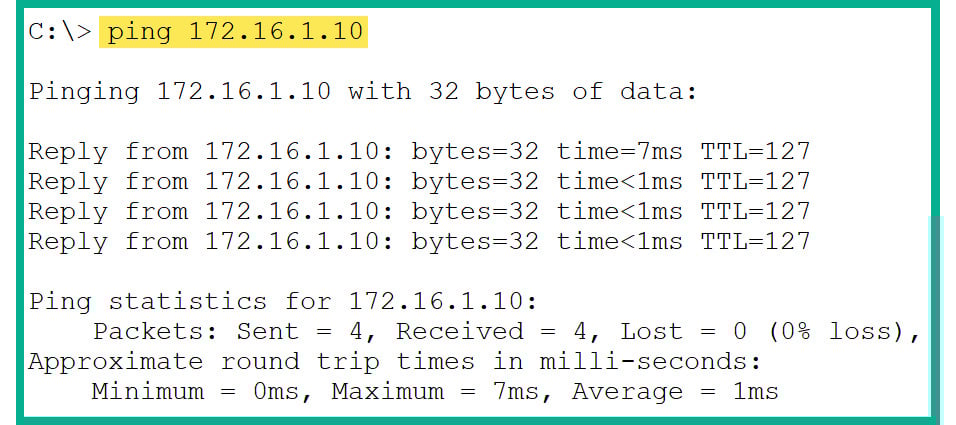
Figure 2.47 shows how to use the ping utility on a Windows-based system:

Figure 2.47: ping results on a Windows device

Figure 2.47: ping results on a Windows device

As shown in the preceding screenshot, the PC sent four ping requests to 172.16.1.10 (server) and got four ping replies, which indicates the destination host is online and has end-to-end connectivity.

Note

The ping [destination host] command is applicable to Windows, Linux, macOS, and Cisco IOS devices.

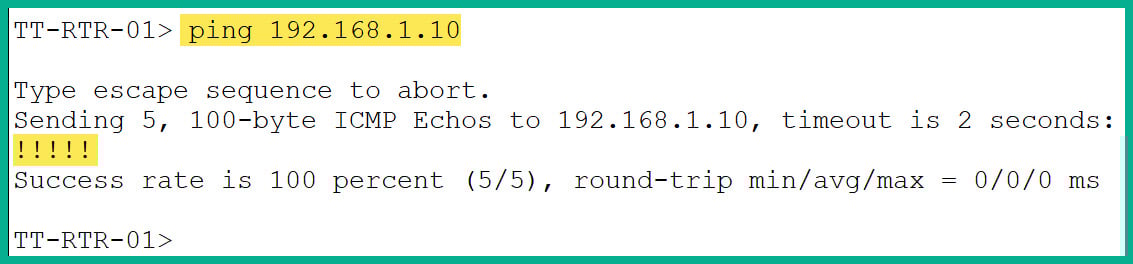
Figure 2.48 shows the ping output on a Cisco IOS router:

Figure 2.48: ping results on a Cisco device

Figure 2.48: ping results on a Cisco device

Cisco IOS does not provide a similar output to Windows or Linux operating systems – rather, it provides various symbols with different meanings, such as the following:

  • !: Successful – ping requests are sent and received.
  • .: Request timeout – the ping request is sent to the destination but no response is received. This is caused by a return path being missing from the destination host or ICMP responses being disabled on the recipient device.
  • U: Destination unreachable – the sender or default gateway does not have a route to the destination host or network. This is caused by a missing route from the routing table of the sender or default gateway.

Additional Troubleshooting Tips

The following are common troubleshooting tips:

  • Verify the destination device is powered on
  • Verify the cables are connected to the correct interfaces
  • Ensure the IP addresses are configured on the correct interfaces
  • Ensure the interfaces are administratively up

Having completed this section, you have learned about the fundamental checks to perform. As you progress further in this book, you will learn about more technologies and their troubleshooting procedures.

Visually different images
CONTINUE READING
83
Tech Concepts
36
Programming languages
73
Tech Tools
Icon Unlimited access to the largest independent learning library in tech of over 8,000 expert-authored tech books and videos.
Icon Innovative learning tools, including AI book assistants, code context explainers, and text-to-speech.
Icon 50+ new titles added per month and exclusive early access to books as they are being written.
Python Web Development with Sanic
notes
bookmark Notes and Bookmarks search Search in title playlist Add to playlist download Download options font-size Font size

Change the font size

margin-width Margin width

Change margin width

day-mode Day/Sepia/Night Modes

Change background colour

Close icon Search
Country selected

Close icon Your notes and bookmarks

Confirmation

Modal Close icon
claim successful

Buy this book with your credits?

Modal Close icon
Are you sure you want to buy this book with one of your credits?
Close
YES, BUY

Submit Your Feedback

Modal Close icon
Modal Close icon
Modal Close icon