-
Book Overview & Buying
-
Table Of Contents
Professional JavaScript
By :
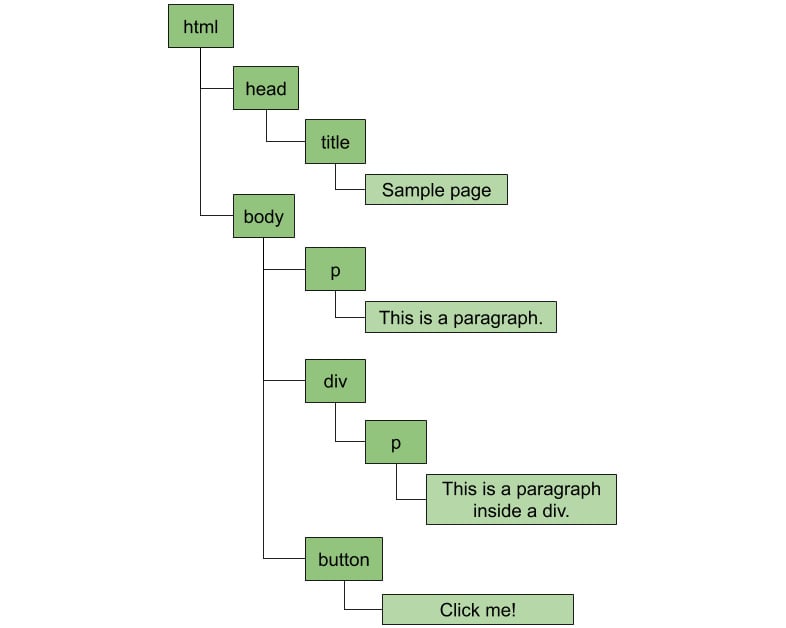
When a browser loads an HTML page, it creates a tree that represents that page. This tree is based on the DOM specification. It uses tags to determine where each node starts and ends.
Consider the following piece of HTML code:
<html> <head> <title>Sample Page</title> </head> <body> <p>This is a paragraph.</p> <div> <p>This is a paragraph inside a div.</p> </div> <button>Click me!</button> </body> </html>
The browser will create the following hierarchy of nodes:
Everything becomes a node. Texts, elements, and comments, all the way up to the root of the tree. This tree is used to match styles from CSS and render the page. It's also transformed into an object and made available to the JavaScript runtime.
But why is it called the DOM? Because HTML was originally designed to share documents and not to design the rich dynamic applications we have today. That means that every HTML DOM starts with a document element, to which all elements are attached. With that in mind, the previous illustration of the DOM tree actually becomes the following:
What does it mean when I say that the browser makes the DOM available to the JavaScript runtime? It means that if you write some JavaScript code in your HTML page, you can access that tree and do some pretty interesting things with it. For example, you can easily access the document root element and access all of the nodes on a page, which is what you're going to do in the next exercise.
In this exercise, we'll write JavaScript code to query the DOM to find a button and add an event listener to it so that we can execute some code when the user clicks on it. When the event happens, we'll query for all paragraph elements, count and store their content, then show an alert at the end.
The code files for this exercise can be found at https://github.com/TrainingByPackt/Professional-JavaScript/tree/master/Lesson01/Exercise01.
Perform the following steps to complete the exercise:
alert_paragraphs.html containing the sample HTML from the previous section (which can be found on GitHub: https://bit.ly/2maW0Sx):<html> <head> <title>Sample Page</title> </head> <body> <p>This is a paragraph.</p> <div> <p>This is a paragraph inside a div.</p> </div> <button>Click me!</button> </body> </html>
body element, add a script tag such that the last few lines look like the following:</div> <button>Click me!</button> <script> </script> </body> </html>
script tag, add an event listener for the click event of the button. To do that, you query the document object for all elements with the button tag, get the first one (there's only one button on the page), then call addEventListener:document.getElementsByTagName('button')[0].addEventListener('click', () => {});const allParagraphs = document.getElementsByTagName('p');let allContent = ""; let count = 0;
for (let i = 0; i < allParagraphs.length; i++) { const node = allParagraphs[i];
count++;
allContent += `${count} - ${node.textContent}\n`;
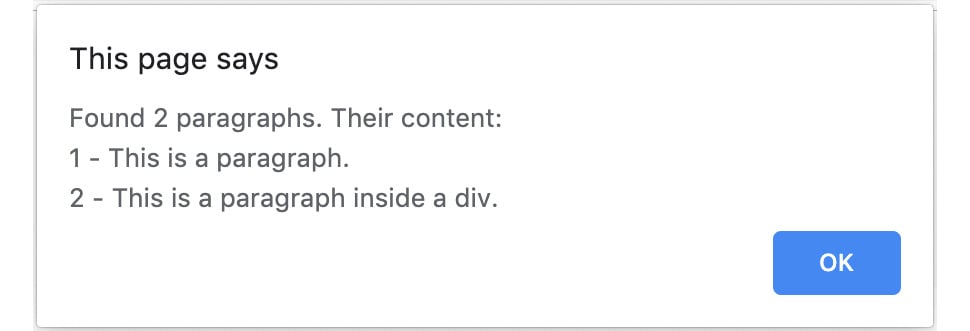
}alert(`Found ${count} paragraphs. Their content:\n${allContent}`);You can see how the final code should look here: https://github.com/TrainingByPackt/Professional-JavaScript/blob/master/Lesson01/Exercise01/alert_paragraphs.html.
Opening the HTML document in the browser and clicking the button, you should see the following alert:
In this exercise, we wrote some JavaScript code that queried the DOM for specific elements. We collected the contents of the elements to show them in an alert box.
We're going to explore other ways to query the DOM and iterate over nodes in later sections of this chapter. But from this exercise, you can already see how powerful this is and start imagining the possibilities this opens up. For example, I frequently use this to count things or extract data that I need from web pages all around the internet.
Change the font size
Change margin width
Change background colour