Sign In Start Free Trial
Account

Add to playlist

Create a Playlist

Modal Close icon
You need to login to use this feature.
  • Book Overview & Buying Building Websites with VB.NET and DotNetNuke 3.0
  • Table Of Contents Toc
Building Websites with VB.NET and DotNetNuke 3.0

Building Websites with VB.NET and DotNetNuke 3.0

By : Daniel N Egan
4.5 (13)
close
close
Building Websites with VB.NET and DotNetNuke 3.0

Building Websites with VB.NET and DotNetNuke 3.0

4.5 (13)
By: Daniel N Egan

Overview of this book

DotNetNukeDotNetNuke is a free, open source evolution of Microsoft's celebrated ASP.NET reference implementation, the IBuySpy Portal Solution Kit. DotNetNuke began life as a framework for constructing data-driven intranet and Internet portal applications. It has now developed into an advanced web content management system with tools to manage a dynamic and interactive data-driven website.If you work with ASP.NET and VB.NET, and want an interactive website, with forums, news and image management, where visitors can register, participate and contribute to your site, then DotNetNuke is the ideal solution for you. This book is your indispensable guide to creating content-rich websites with DotNetNuke 3.0, as quickly as possible.The first part of this book gives you a deep understanding of working with basic DotNetNuke sites, guiding you through the features and giving you the confidence to create and manage your own site. After that, you will journey to the heart of DotNetNuke, and learn about its core architecture. From there, you will learn how to customize DotNetNuke sites through skinning and creating custom modules. Enhancing your site with forums and ecommerce functionality, creating multiple sites and deploying your site round off the book. You will master each of these topics as you leap into the development of a DotNetNuke 3.0 site.
Table of Contents (18 chapters)
close
close
Lock Free Chapter
1
Table of Contents
2
Building Websites with VB.NET and DotNetNuke 3.0
3
Credits
4
About the Author
18
Index

Standard Modules

DotNetNuke comes prepackaged with nineteen standard modules for you to use on your portal. As we cover each module we will first give you the official description for the module as stated on the DotNetNuke main website. We will then discuss the modules in the following context:

  • Practical purposes
  • Administration and Modifications
  • Special features

Account Login Module

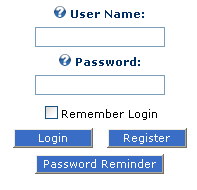
The Account Login module permits users to log in to your portal. It features a Register button that a user can use to become a registered user of your portal, and a Password Reminder button.

Account Login Module

Practical Purposes

The Account Login module is a unique standard module. It is used to allow user login for your site. The site will come pre-loaded with this module already working on the site.

The default login will appear on a page all by itself. You may find that you want to add other modules or images when a user is logging into the portal. To accomplish this you will need to use the Account Login module.

Administration and...

CONTINUE READING
83
Tech Concepts
36
Programming languages
73
Tech Tools
Icon Unlimited access to the largest independent learning library in tech of over 8,000 expert-authored tech books and videos.
Icon Innovative learning tools, including AI book assistants, code context explainers, and text-to-speech.
Icon 50+ new titles added per month and exclusive early access to books as they are being written.
Building Websites with VB.NET and DotNetNuke 3.0
notes
bookmark Notes and Bookmarks search Search in title playlist Add to playlist font-size Font size

Change the font size

margin-width Margin width

Change margin width

day-mode Day/Sepia/Night Modes

Change background colour

Close icon Search
Country selected

Close icon Your notes and bookmarks

Confirmation

Modal Close icon
claim successful

Buy this book with your credits?

Modal Close icon
Are you sure you want to buy this book with one of your credits?
Close
YES, BUY

Submit Your Feedback

Modal Close icon
Modal Close icon
Modal Close icon