Sign In Start Free Trial
Account

Add to playlist

Create a Playlist

Modal Close icon
You need to login to use this feature.
  • Book Overview & Buying Designing Hyper-V Solutions
  • Table Of Contents Toc
Designing Hyper-V Solutions

Designing Hyper-V Solutions

By : Grover, Goran Svetlecic
4 (1)
close
close
Designing Hyper-V Solutions

Designing Hyper-V Solutions

4 (1)
By: Grover, Goran Svetlecic

Overview of this book

The IT community has already experienced the benefits of server virtualization. However, they were limited to one option primarily until Microsoft released its flagship Hypervisor platform. Windows Server Hyper-V 2012 and R2 along with Hyper-V Server 2012 and R2 present a cost effective yet robust virtualization solution to enterprises who wish to consolidate their physical server workloads or migrate their pre-existing VMware workloads to Hyper-V. Hyper-V has proven to be a stable and an economical virtualization solution and with its high availability, live migration, and new network virtualization and storage enhancement features, enterprises will never feel the need to consider another alternative. This book is a practical, example-oriented tutorial that will guide you through the basics and architecture of the Hyper-V platform and thereafter help you understand how to build your Virtualization infrastructure from the ground up. The book then goes on to focus on scalability and high availability aspects and trains you in setting up highly available Hyper-V clusters and the live migration of virtual machines. You will also learn about the advancements in virtual networking and storage in Windows Server 2012. After the implementation guidance, the book then advises you on how to set up backup and recovery and how to prepare a disaster recovery plan via Hyper-V Replica. The book concludes with a good insight into Microsoft VDI implementation guidance.
Table of Contents (12 chapters)
close
close
11
Index

An insight into virtualization

Before we proceed further with the technical know-how about Windows Hyper-V 2012 R2 and the concepts of virtualization, it's necessary to know where it all started and how it grew into what we see today.

Virtualization – how did it begin?

The origin of virtualization dates back to the 1960s, when IBM was building its mainframes as a single-user system to run batch jobs. Thereafter, they moved their focus to designing time-sharing solutions in mainframes, and invested a lot of time and effort in developing these robust machines. Finally, they released the CP-67 system, which was the first commercial mainframe to support virtualization. The system employed a Control Program (CP) that was used to spawn virtual machines, utilizing resources based on the principle of time-sharing. Time-sharing is the shared use of system resources among users of a large group. The goal was to increase the efficiency of both the users and the expensive computer resources. This concept was a major breakthrough in the technology arena, and reduced the cost of providing computing capabilities.

The 1980s saw the debut of microprocessors and the beginning of the era of personal computers. The demerits of mainframes, primarily their maintenance cost and inflexibility, saw personal computers and small servers move into the main scene. The low cost of implementation, performance, and scalability with networked computers gave rise to the client-server model of computation and pushed virtualization to the backseat. During the 1990s, the cost of computing soared again, and remediating the rising costs made the IT industry come full circle and revisit virtualization. There were several disadvantages of client-server technology that showed up with time, primarily low infrastructure utilization, increasing IT management costs and physical infrastructure costs, and insufficient failover and disaster management.

The 1990s saw the rise of two major players in the virtualization history, namely Citrix and VMware. Citrix started off with desktop virtualization and brought in the concept of remote desktops along with Microsoft, then known as WinFrame. Even since it was released, WinFrame has evolved into MetaFrame and Presentation Server, and nowadays it is called XenApp. VMware introduced server virtualization for x86 systems and transformed them into shared hardware infrastructure, which allowed isolation and operating system choices for application workloads, as well as defined rules for their mobility.

Virtualization – the current times

The reasons for the return of virtualization to industry-standard computing were the same as they were perceived decades ago. The resource capacity of a single server is large nowadays, and it is never effectively used by the installed workloads. Virtualization has turned out to be the best way to improve resource utilization and simplify data center management simultaneously. This is how server virtualization evolved.

Virtualization has a broader scope nowadays and can be applied to different resource levels. The following are a few ideal forms of it:

  • Server virtualization
  • Storage virtualization
  • Network virtualization
  • Desktop virtualization
  • Application virtualization

Let's look at their purpose and meanings, though in this book, we will focus primarily on server virtualization, and towards the end the focus would shift to desktop virtualization.

Server virtualization

In an ideal situation, a role/application would be installed on a Windows-based server (or any other OS platform), which may have been a blade or a rack server. As and when there was a further requirement, the number of physical servers increased, which also raised the requirement of real estate, maintenance, electricity, and data center cooling. However, the workloads were mostly underutilized, thereby causing a higher OPEX (short for Operational Expenditure).

Server virtualization software, better known as a Hypervisor, allows the abstraction of physical hardware on a server/computer and creates a pool of resources consisting of compute, storage, memory, and network. The same resources are offered to end consumers as consolidated virtual machines. A virtual machine is an emulation of a physical computer, and it runs as an isolated operating system container (partition), serving as a physical machine. At any point in time, there could be one or more than one virtual machine (VM or guest machine) running on a physical machine (host). Its resources are allocated among the VMs as per their specified hardware profile. The hardware profile of a VM is similar to real-life hardware specifications of a physical computer. All running VMs are isolated from each other and the host; however, they can be placed on the same or different network segments.

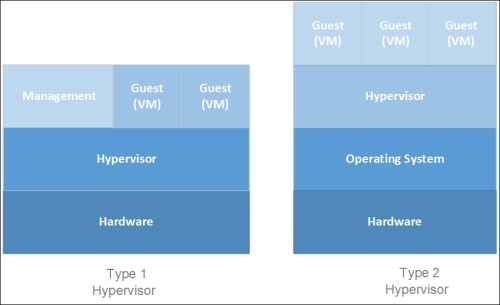
The equation for hosting the VMs is dealt with by the virtualization stack and the hypervisor. The hypervisor creates a platform on which VMs are created and hosted. The hypervisor ensures the capability of installing the same or different operating systems on the virtual machines, and sharing the resources that are deemed fit by hard profiles or dynamic scheduling. The hypervisor is classified into two types:

  • Type 1: This is also referred to as a bare-metal or a native hypervisor. The software runs directly on the hardware and has better control over the hardware. Also, since there's no layer between the hypervisor and the hardware, the hypervisor has direct access to the hardware. Type 1 is thin and optimized to have a minimal footprint. This allows us to give most of the physical resources to the hosted guest (VM). One more advantage is decreased security attack vectors; the system is harder to compromise. A few well-known names are Microsoft's Hyper-V, VMware's ESXi, and Citrix's XenServer.
  • Type 2: This is also referred to as a hosted hypervisor. It is more like an application installed on an operating system and not directly on the bare-metal. The hosted hypervisor is a handy tool for lab or testing purposes. There are many merits of the Type 2 head, given that it's very easy to use and the user does not have to worry about the underlying hardware—the OS on which it is installed controls the hardware access. However, this is not as robust and powerful as Type-1 heads. Popular examples are Microsoft Virtual Server, VMware Workstation, Microsoft Virtual PC, Linux KVM, Oracle Virtual Box, and a few others.

The following diagrams should illustrate these concepts better:

Server virtualization

Figure 1-1: Differentiating the Type 1 and Type 2 Hypervisors

Storage virtualization

Storage virtualization allows abstraction of the underlying operations of storage resources and presents it transparently to consumer applications, computers, or network resources. It also simplifies the management of storage resources and enhances the abilities of low-level storage systems.

In other words, it introduces a flexible procedure, wherein storage from multiple sources can be used as a single repository and managed minus knowing the underlying complexity. The virtualization's implementation can take place at multiple layers of a SAN, which assists in delivering a highly available storage solution or presenting a high-performing storage on demand, with both instances being transparent to the end consumer. One closest example is offered with Windows Server 2012 and 2012 R2, called Storage Spaces. Storage Spaces enables you to abstract numerous physical disks into one logical pool.

Note

For more information, refer to www.snia.org/education/storage_networking_primer/stor_virt (Storage Virtualization: The SNIA Technical Tutorial).

Network virtualization

Network virtualization is the youngest of the lot. Now, with network virtualization, it is possible to put all network services into the virtualization software layer. It introduced Software-defined networking (SDN), which uses virtual switches, logical routers, logical firewalls, and logical load balancers, and allows network provisioning without any disruption of the physical network while running traffic over it. So, it not only helps utilize the complete virtual network's feature set, from layer 2 to 7, but also provides isolation and multi-tenancy (yes, cloud!). This also allows VMs to retain their security properties when moved from one host server to another, which may be located on a different network. Network Virtualization using General Routing Encapsulation (NVGRE) is a network virtualization mechanism leveraged by Hyper-V Network Virtualization.

Desktop virtualization

Desktop virtualization is a software technology that separates a desktop environment and any associated application programs from the physical client device that is used to access it. Each user retains their own instance of the desktop operating system and applications, but that stack runs in a virtual machine on a server that is accessed through a low-cost thin client. The fundamentals are similar to those of mainframes, which were later inherited by Remote Desktop Services (RDS; also known as Terminal Services) and finally evolved into true desktop virtualization, called Virtual Desktop Infrastructure (VDI). In principle, VDI is different from a remote desktop, and it is expensive. In VDI, users get their own small VMs from the desktop pool (Windows 7 or 8), whereas in the case of using a remote desktop, it's a shared environment with desktop experience of a Windows Server. In RDS, users can't customize their user experience as with virtual machines or real desktops.

Application virtualization

Application virtualization allows applications to run seamlessly on unsupported platforms, or along with their own older or newer conflicting versions on the same device. There can be two variants for this, namely hosted or packaged:

  • In a hosted app virtualization, servers are used to host applications and allow users to connect to the server from their device. A good example of this is RemoteApp.
  • In a packaged app virtualization, as the name indicates, an application is packaged with a pre-created environment that assures the execution of the app on a different operating system from where it was packaged. In practice, you may run a Windows XP application on a Windows 7 or 8 desktop without having to customize the app as per the newer platform. A few contenders can be Microsoft App-V and VMware Thinapp (integrated with the VMware Horizon Suite). One more example is Citrix XenApp, but that has been discontinued by Citrix.
CONTINUE READING
83
Tech Concepts
36
Programming languages
73
Tech Tools
Icon Unlimited access to the largest independent learning library in tech of over 8,000 expert-authored tech books and videos.
Icon Innovative learning tools, including AI book assistants, code context explainers, and text-to-speech.
Icon 50+ new titles added per month and exclusive early access to books as they are being written.
Designing Hyper-V Solutions
notes
bookmark Notes and Bookmarks search Search in title playlist Add to playlist font-size Font size

Change the font size

margin-width Margin width

Change margin width

day-mode Day/Sepia/Night Modes

Change background colour

Close icon Search
Country selected

Close icon Your notes and bookmarks

Confirmation

Modal Close icon
claim successful

Buy this book with your credits?

Modal Close icon
Are you sure you want to buy this book with one of your credits?
Close
YES, BUY

Submit Your Feedback

Modal Close icon
Modal Close icon
Modal Close icon