Sign In Start Free Trial
Account

Add to playlist

Create a Playlist

Modal Close icon
You need to login to use this feature.
  • Book Overview & Buying Hyper-V Network Virtualization Cookbook
  • Table Of Contents Toc
Hyper-V Network Virtualization Cookbook

Hyper-V Network Virtualization Cookbook

By : Boud
4.7 (3)
close
close
Hyper-V Network Virtualization Cookbook

Hyper-V Network Virtualization Cookbook

4.7 (3)
By: Boud

Overview of this book

If you are a virtualization architect, engineer, or administrator who wants to leverage Hyper-V to create virtual networks (virtual data centers), this is the book for you. Prior knowledge of Hyper-V or a similar solution and a good understanding of the end goals of creating a virtual network is required.
Table of Contents (11 chapters)
close
close
10
Index

Creating the distributed key management container in Active Directory

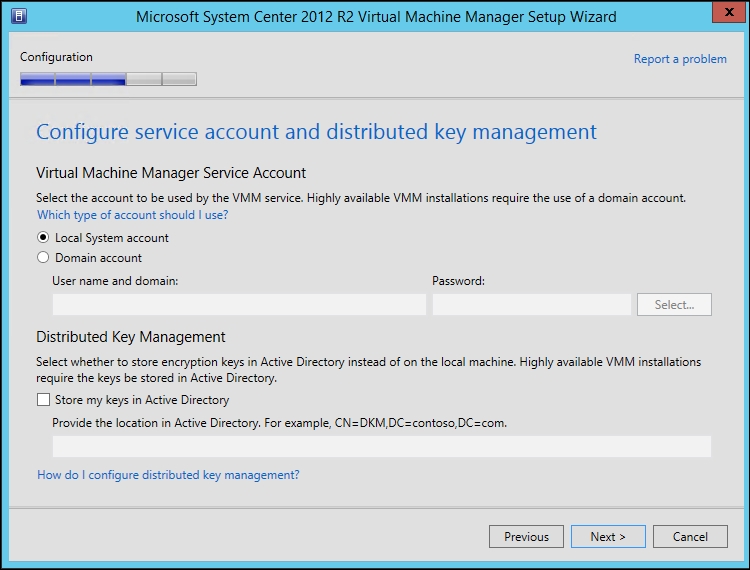
Some of the data stored by VMM needs to be held securely, so it cannot be compromised. For example, when you store user credentials in VMM for Run As accounts, the passwords for these are encrypted. When you install VMM, you are given the choice of where to store the encryption keys, as shown in the following screenshot:

Creating the distributed key management container in Active Directory

It is required to always store your encryption keys in Active Directory if you are going to deploy a highly available (clustered) installation of VMM.

The account used to install VMM must have full control over the container in Active Directory for the duration of the installation. During the installation, the installer program reconfigures the security of the container to ensure that only the correct security principles have access.

For a small scale installation, a single container in the root of Active Directory could be created to store the encryption keys. For a large-scale implementation where several different installations of VMM may be required due to the number of hosts and/or virtual machines, it is advisable to create a parent container in Active Directory and then have containers within the parent for each installation of VMM.

Getting ready

You will need to have sufficient access to Active Directory to create Container objects.

How to do it…

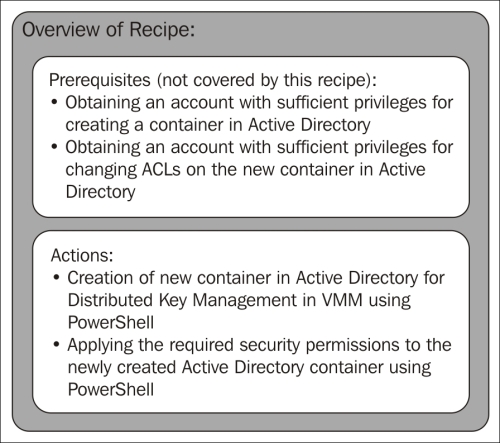
The following diagram shows you the high-level steps involved in this recipe and the tasks required to complete this recipe:

How to do it…

There are two possible methods of creating a container in Active Directory: one is using ADSI Edit and the other is via PowerShell. The method discussed here will be PowerShell-based:

  1. On a Domain Controller, or a machine where the Active Directory PowerShell Module is installed, open an elevated PowerShell console.
  2. The following PowerShell line will create a container called DKMVMM in the root of Active Directory:
    New-ADObject –Name DKMVMM –Type container –Path "DC=ad,DC=demo,DC=com"
  3. Once the container has been created, the user who will be installing VMM needs to have full control of the container and that permission must apply to the container and all descendant objects. The following PowerShell will perform this function:
    Set-PSDrive AD:
    
    $VMMInstallAccount = Get-ADUser -Identity Install_VMM
    
    $SID = New-Object System.Security.Principal.SecurityIdentifier $VMMInstallAccount.SID
    
    $DKMVMMacl = Get-Acl -Path "CN=DKMVMM,DC=ad,DC=demo,DC=com"
    
    $ObjectGuid = New-Object Guid 00000000-0000-0000-0000-000000000000                           
    
    $newACL = New-Object System.DirectoryServices.ActiveDirectoryAccessRule $SID,"GenericAll","Allow",$objectguid,"All"
    
    $DKMVMMacl.AddAccessRule($newACL)
    
    Set-Acl -AclObject $DKMVMMacl -Path "CN=DKMVMM,DC=ad,DC=demo,DC=com"

This recipe is complete and the Distributed Key Management container is now ready to be used by DEMO\Install_VMM during installation.

How it works…

When VMM is installed, it uses the Distributed Key Management container to store its encryption keys and using the privileges granted to it previously, it will lock down the container to ensure that only the account running the VMM Management Service, the VMM Installation Account, and Domain Administrators have access to the container.

Visually different images
CONTINUE READING
83
Tech Concepts
36
Programming languages
73
Tech Tools
Icon Unlimited access to the largest independent learning library in tech of over 8,000 expert-authored tech books and videos.
Icon Innovative learning tools, including AI book assistants, code context explainers, and text-to-speech.
Icon 50+ new titles added per month and exclusive early access to books as they are being written.
Hyper-V Network Virtualization Cookbook
notes
bookmark Notes and Bookmarks search Search in title playlist Add to playlist font-size Font size

Change the font size

margin-width Margin width

Change margin width

day-mode Day/Sepia/Night Modes

Change background colour

Close icon Search
Country selected

Close icon Your notes and bookmarks

Confirmation

Modal Close icon
claim successful

Buy this book with your credits?

Modal Close icon
Are you sure you want to buy this book with one of your credits?
Close
YES, BUY

Submit Your Feedback

Modal Close icon
Modal Close icon
Modal Close icon