Sign In Start Free Trial
Account

Add to playlist

Create a Playlist

Modal Close icon
You need to login to use this feature.
  • Book Overview & Buying APACHE KARAF COOKBOOK
  • Table Of Contents Toc
  • Feedback & Rating feedback
APACHE KARAF COOKBOOK

APACHE KARAF COOKBOOK

By : Nierbeck, Jamie Goodyear
3.8 (4)
close
close
APACHE KARAF COOKBOOK

APACHE KARAF COOKBOOK

3.8 (4)
By: Nierbeck, Jamie Goodyear

Overview of this book

This book is intended for developers who have some familiarity with Apache Karaf and who want a quick reference for practical, proven tips on how to perform common tasks such as configuring Pax modules deployed in Apache Karaf, Extending HttpService with Apache Karaf. You should have working knowledge of Apache karaf, as the book provides a deeper understanding of the capabilities of Apache Karaf.
Table of Contents (12 chapters)
close
close
11
Index

Creating our own custom Karaf command using a Maven archetype

The Karaf console provides a multitude of useful commands to interact with the OSGi runtime and manage deployed applications. As a systems builder, you may want to develop custom commands that integrate directly into Karaf so that you can automate tasks or interact directly with your applications.

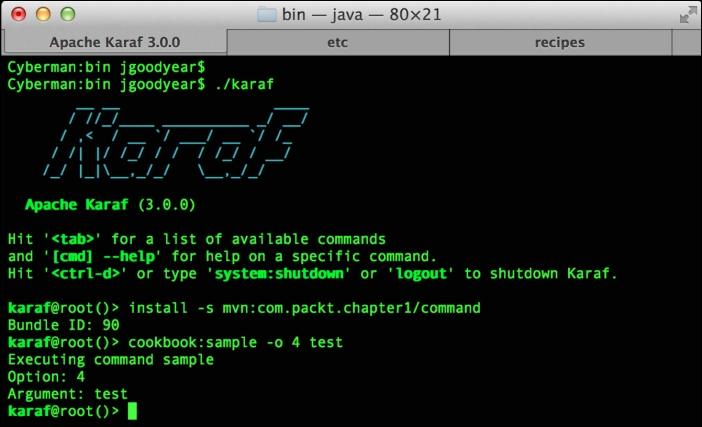
Custom Karaf commands will appear in your container as a fully integrated component of the console, as shown in the following screenshot:

Creating our own custom Karaf command using a Maven archetype

The previous screenshot illustrates our sample cookbook command accepting an option flag and an argument. Let's dive into building your own command.

Getting ready

The ingredients of this recipe include the Apache Karaf distribution kit, access to JDK, Maven, and a source code editor. The sample code for this recipe is available at https://github.com/jgoodyear/ApacheKarafCookbook/tree/master/chapter1/chapter1-recipe2.

How to do it…

  1. The first step is generating a template command project. To encourage building custom commands, the community has provided the following Maven archetype invocation to generate Karaf command projects:
    mvn archetype:generate \
      -DarchetypeGroupId=org.apache.karaf.archetypes \
      -DarchetypeArtifactId=karaf-command-archetype \
      -DarchetypeVersion=3.0.0 \
      -DgroupId=com.packt.chapter1 \
      -DartifactId=command \
    -Dversion=1.0.0-SNAPSHOT \
    -Dpackage=com.packt
    

    In the preceding archetype invocation, we supply the Maven project group and artifact names. The process will request you to supply a command name. Maven then generates a project template for your command.

  2. The next step is implementing your custom code. The custom command template project will supply you with a Maven POM file, Blueprint wiring (in the src/main/resources/OSGI-INF/blueprint directory), and custom command stub implementation (in the src/main/java/ directory). Edit these files as required to add your custom actions.
  3. The last step is building and deploying the custom command in Karaf. We build our command via the Maven invocation mvn install. Deploying it in Karaf only requires issuing a well-formed install command; to do this, invoke install –s mvn:groupId/artifactId in the Karaf console. Consider the following invocation:
    karaf@root()> install –s mvn:com.packt.chapter1/command
     Bundle ID: 88
    karaf@root()>
    

    The preceding invocation has the groupId value as com.packt.chapter1 and the artifactId value as command.

How it works…

The Maven archetype generates the POM build file, Java code, and Blueprint file for your custom command. Let's take a look at these key components.

The generated POM file contains all of the essential dependencies a Karaf command requires and sets up a basic Maven Bundle Plugin configuration. Edit this file to bring in additional libraries your command requires. Make sure that you update your bundle's build parameters accordingly. When this project is built, a bundle will be produced that can be installed directly into Karaf.

Our custom command logic resides in the generated Java source file, which will be named after the command name you supplied. The generated command extends Karaf's OSGICommandSupport class, which provides us with access to the underlying command session and OSGi environment. A Command annotation adorns our code. This provides the runtime with the scope, name, and description. Karaf provides the Argument and Option annotations to simplify adding a command-line argument and option processing.

The Blueprint container wires together our command implementation to the commands available in Karaf's console.

Tip

For more information on extending Karaf's console, see http://karaf.apache.org/manual/latest/developers-guide/extending.html.

There's more…

Thanks to Apache Karaf's SSHD service and remote client, your custom commands can be leveraged to provide external command and control of your applications. Just pass your command and its parameters to the remote client and monitor the returned results.

See also

  • The Branding the Apache Karaf console recipe
Visually different images
CONTINUE READING
83
Tech Concepts
36
Programming languages
73
Tech Tools
Icon Unlimited access to the largest independent learning library in tech of over 8,000 expert-authored tech books and videos.
Icon Innovative learning tools, including AI book assistants, code context explainers, and text-to-speech.
Icon 50+ new titles added per month and exclusive early access to books as they are being written.
APACHE KARAF COOKBOOK
notes
bookmark Notes and Bookmarks search Search in title playlist Add to playlist font-size Font size

Change the font size

margin-width Margin width

Change margin width

day-mode Day/Sepia/Night Modes

Change background colour

Close icon Search
Country selected

Close icon Your notes and bookmarks

Confirmation

Modal Close icon
claim successful

Buy this book with your credits?

Modal Close icon
Are you sure you want to buy this book with one of your credits?
Close
YES, BUY

Submit Your Feedback

Modal Close icon
Modal Close icon
Modal Close icon