Sign In Start Free Trial
Account

Add to playlist

Create a Playlist

Modal Close icon
You need to login to use this feature.
  • Book Overview & Buying Gephi Cookbook
  • Table Of Contents Toc
Gephi Cookbook

Gephi Cookbook

5 (1)
close
close
Gephi Cookbook

Gephi Cookbook

5 (1)

Overview of this book

If you want to learn network analysis and visualization along with graph concepts from scratch, then this book is for you. This is ideal for those of you with little or no understanding of Gephi and this domain, but will also be beneficial for those interested in expanding their knowledge and experience.
Table of Contents (12 chapters)
close
close
11
Index

Installing Gephi

This recipe discusses the minimum system configurations required in order to install Gephi and the installation process for different platforms.

Getting ready

Gephi, being a network analysis and visualization tool, requires a compatible graphics card to be installed on your system. It uses a built-in OpenGL engine for fast processing when dealing with very large networks. Hence, it requires OpenGL 1.2 installed on your system. Gephi also requires Java 6 or later. Make sure you have these two programs installed on your system before you go ahead with the installation process.

How to do it…

Follow these steps to install Gephi on Windows:

  1. Download the Gephi installer from the official website: https://gephi.github.io.
  2. Run the installer and hit Next:
    How to do it…
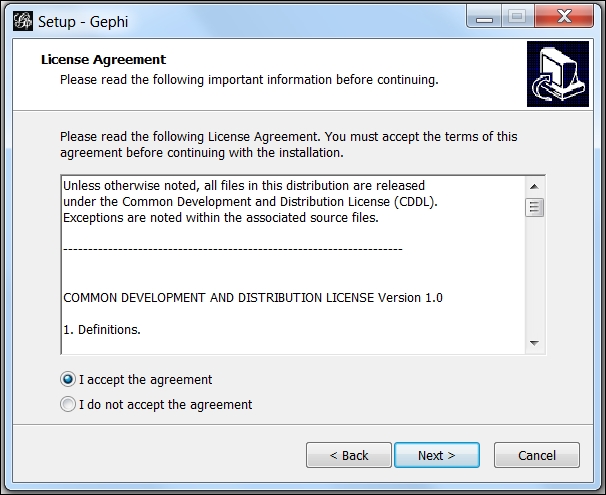
  3. Accept the license agreement and hit Next:
    How to do it…
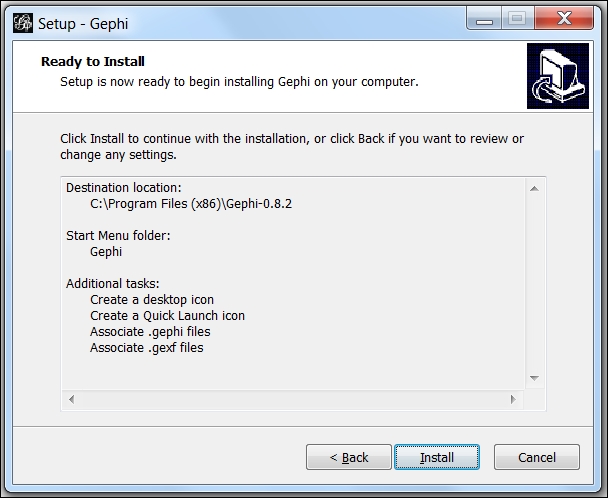
  4. Keep clicking on the Next button until you reach the following screen. Click on Install:
    How to do it…
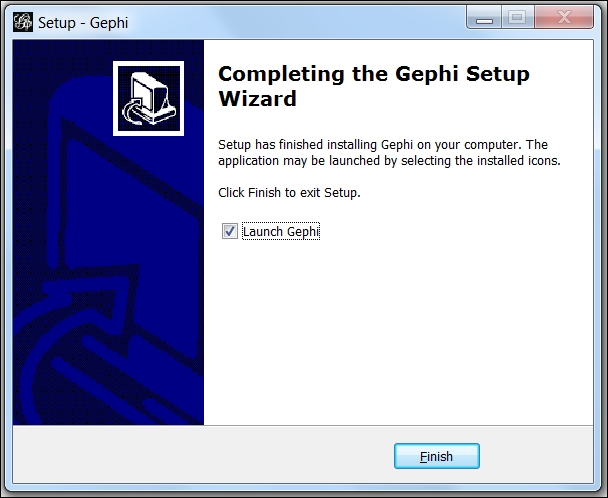
  5. The installation will begin and once it's over, the following screen is displayed. Hit Finish to complete the setup:
    How to do it…

To install Gephi on a Linux machine, follow these steps:

  1. From Gephi's official website (https://gephi.github.io), download the TAR installer file.
  2. Once the download has finished, untar the file and run Gephi by executing ./bin/gephi.
  3. Ubuntu users can make use of the daily build, available from Launchpad. First, run sudo apt-add-repository ppa:rockclimb/gephi-daily to your software sources.
  4. Then, run sudo apt-get update, followed by sudo apt-get install gephi, in order to install Gephi on your box.

The installation process for Mac OS X is pretty simple and straightforward:

  1. From Gephi's official website (https://gephi.github.io), download the installer.
  2. Once the download has finished, double-click on the DMG file to run the installer.
  3. Once the installation has finished, a new window will open. Double-click on the Gephi icon to run the application.

There's more…

As mentioned earlier, Gephi is a cross-platform tool and works on many more platforms than the ones described in this recipe. If the graphs on which you are going to work are very large, then a 64-bit version of Gephi will have to be installed if you are also using a 64-bit machine.

One might face some issues while installing Gephi, most of which are related to memory management in Java. To learn about fixing some of the most common ones, refer to the next recipe, Troubleshooting the Gephi installation.

See also

Visually different images
CONTINUE READING
83
Tech Concepts
36
Programming languages
73
Tech Tools
Icon Unlimited access to the largest independent learning library in tech of over 8,000 expert-authored tech books and videos.
Icon Innovative learning tools, including AI book assistants, code context explainers, and text-to-speech.
Icon 50+ new titles added per month and exclusive early access to books as they are being written.
Gephi Cookbook
notes
bookmark Notes and Bookmarks search Search in title playlist Add to playlist font-size Font size

Change the font size

margin-width Margin width

Change margin width

day-mode Day/Sepia/Night Modes

Change background colour

Close icon Search
Country selected

Close icon Your notes and bookmarks

Confirmation

Modal Close icon
claim successful

Buy this book with your credits?

Modal Close icon
Are you sure you want to buy this book with one of your credits?
Close
YES, BUY

Submit Your Feedback

Modal Close icon
Modal Close icon
Modal Close icon