Sign In Start Free Trial
Account

Add to playlist

Create a Playlist

Modal Close icon
You need to login to use this feature.
  • Book Overview & Buying Mastering Wireshark
  • Table Of Contents Toc
Mastering Wireshark

Mastering Wireshark

By : Mishra
3.5 (2)
close
close
Mastering Wireshark

Mastering Wireshark

3.5 (2)
By: Mishra

Overview of this book

Wireshark is a popular and powerful tool used to analyze the amount of bits and bytes that are flowing through a network. Wireshark deals with the second to seventh layer of network protocols, and the analysis made is presented in a human readable form. Mastering Wireshark will help you raise your knowledge to an expert level. At the start of the book, you will be taught how to install Wireshark, and will be introduced to its interface so you understand all its functionalities. Moving forward, you will discover different ways to create and use capture and display filters. Halfway through the book, you’ll be mastering the features of Wireshark, analyzing different layers of the network protocol, looking for any anomalies. As you reach to the end of the book, you will be taught how to use Wireshark for network security analysis and configure it for troubleshooting purposes.
Table of Contents (11 chapters)
close
close
10
Index

Searching for packets using the Find dialog

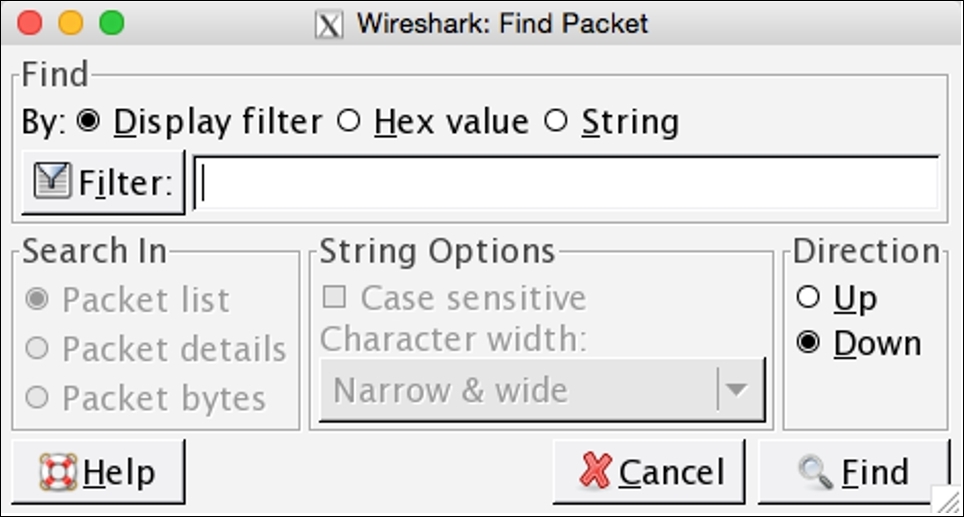
If you want to find a packet for a particular criterion, you can use the Find dialog. It has a couple of useful search techniques that can be applied easily and effectively on an already captured file or on a live running capture. You can access the Find utility by navigating to Edit | Find packets or using the shortcut Ctrl + F.

Searching for packets using the Find dialog

Figure 2.15: The Find Packet dialog

Let's see some more configurable options in it:

  • The display filter: After capturing the traffic, while analyzing whether you just want to see some specific packets based on a certain IP /Port/ Protocol, those packets that meet a certain criteria will be displayed in the list pane, for example:
    • The ip.addr == 192.168.1.1 (based on an IP address)
    • The port 8080 (based on a port number)
    • http (based on a protocol)
  • The Hex value: If you have the hex value for a certain packet that you are looking for, then this option can be selected. Just write the physical address separated by colons, for...
Visually different images
CONTINUE READING
83
Tech Concepts
36
Programming languages
73
Tech Tools
Icon Unlimited access to the largest independent learning library in tech of over 8,000 expert-authored tech books and videos.
Icon Innovative learning tools, including AI book assistants, code context explainers, and text-to-speech.
Icon 50+ new titles added per month and exclusive early access to books as they are being written.
Mastering Wireshark
notes
bookmark Notes and Bookmarks search Search in title playlist Add to playlist font-size Font size

Change the font size

margin-width Margin width

Change margin width

day-mode Day/Sepia/Night Modes

Change background colour

Close icon Search
Country selected

Close icon Your notes and bookmarks

Confirmation

Modal Close icon
claim successful

Buy this book with your credits?

Modal Close icon
Are you sure you want to buy this book with one of your credits?
Close
YES, BUY

Submit Your Feedback

Modal Close icon
Modal Close icon
Modal Close icon