Sign In Start Free Trial
Account

Add to playlist

Create a Playlist

Modal Close icon
You need to login to use this feature.
  • Book Overview & Buying Microsoft Hyper-V PowerShell Automation
  • Table Of Contents Toc
Microsoft Hyper-V PowerShell Automation

Microsoft Hyper-V PowerShell Automation

By : Vinith Menon
4.8 (4)
close
close
Microsoft Hyper-V PowerShell Automation

Microsoft Hyper-V PowerShell Automation

4.8 (4)
By: Vinith Menon

Overview of this book

This book is great for administrators who are new to automating Hyper-V administration tasks using PowerShell. If you are familiar with the PowerShell command line and have some experience with the Windows Server, this book is perfect for you.
Table of Contents (8 chapters)
close
close
7
Index

Installing and configuring Hyper-V using PowerShell

Before you proceed with the installation and configuration of Hyper-V, there are some prerequisites that need to be taken care of:

  • The user account that is used to install the Hyper-V role should have administrative privileges on the computer
  • There should be enough RAM on the server to run newly created virtual machines

Once the prerequisites have been taken care of, let's start with installing the Hyper-V role:

  1. Open a PowerShell prompt in Run as Administrator mode:
    Installing and configuring Hyper-V using PowerShell
  2. Type the following into the PowerShell prompt to install the Hyper-V role along with the management tools; once the installation is complete, the Hyper-V Server will reboot and the Hyper-V role will be successfully installed:
    Install-WindowsFeature –Name Hyper-V -IncludeManagementTools -Restart
    
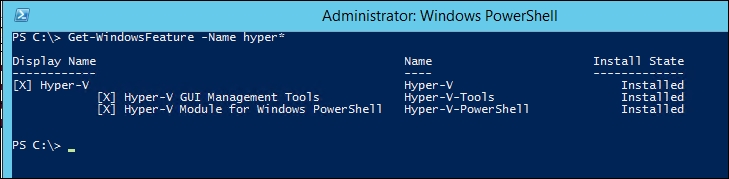
  3. Once the server boots up, verify the installation of Hyper-V using the Get-WindowsFeature cmdlet:
    Get-WindowsFeature -Name hyper*
    

    You will be able to see that the Hyper-V role, Hyper-V PowerShell management shell, and the GUI management tools are successfully installed:

    Installing and configuring Hyper-V using PowerShell
Visually different images
CONTINUE READING
83
Tech Concepts
36
Programming languages
73
Tech Tools
Icon Unlimited access to the largest independent learning library in tech of over 8,000 expert-authored tech books and videos.
Icon Innovative learning tools, including AI book assistants, code context explainers, and text-to-speech.
Icon 50+ new titles added per month and exclusive early access to books as they are being written.
Microsoft Hyper-V PowerShell Automation
notes
bookmark Notes and Bookmarks search Search in title playlist Add to playlist font-size Font size

Change the font size

margin-width Margin width

Change margin width

day-mode Day/Sepia/Night Modes

Change background colour

Close icon Search
Country selected

Close icon Your notes and bookmarks

Confirmation

Modal Close icon
claim successful

Buy this book with your credits?

Modal Close icon
Are you sure you want to buy this book with one of your credits?
Close
YES, BUY

Submit Your Feedback

Modal Close icon
Modal Close icon
Modal Close icon