Sign In Start Free Trial
Account

Add to playlist

Create a Playlist

Modal Close icon
You need to login to use this feature.
  • Book Overview & Buying Learning System Center App Controller
  • Table Of Contents Toc
Learning System Center App Controller

Learning System Center App Controller

By : Nasir Naeem
close
close
Learning System Center App Controller

Learning System Center App Controller

By: Nasir Naeem

Overview of this book

This book is intended for IT professionals working with Hyper-V, Azure cloud, VMM, and private cloud technologies who are looking for a quick way to get up and running with System Center 2012 R2 App Controller. To get the most out of this book, you should be familiar with Microsoft Hyper-V technology. Knowledge of Virtual Machine Manager is helpful but not mandatory.
Table of Contents (8 chapters)
close
close
7
Index

Installing the SCVMM console

In this section, we will install the System Center Virtual Machine Manager console on the App Controller server. Extract and copy SCVMM 2012 R2 Media to the App Controller server. Then perform the following steps:

  1. Browse to the folder where you copied the installation media. Right-click on the Setup.exe file and select Run as administrator.
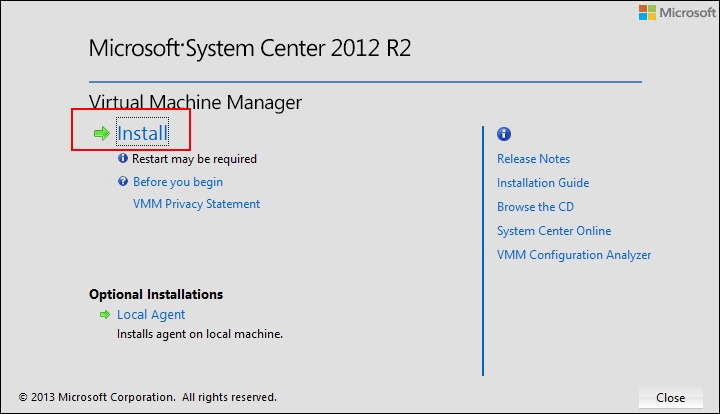
  2. Once the wizard launches, select the Install link, as shown in the following screenshot:
    Installing the SCVMM console
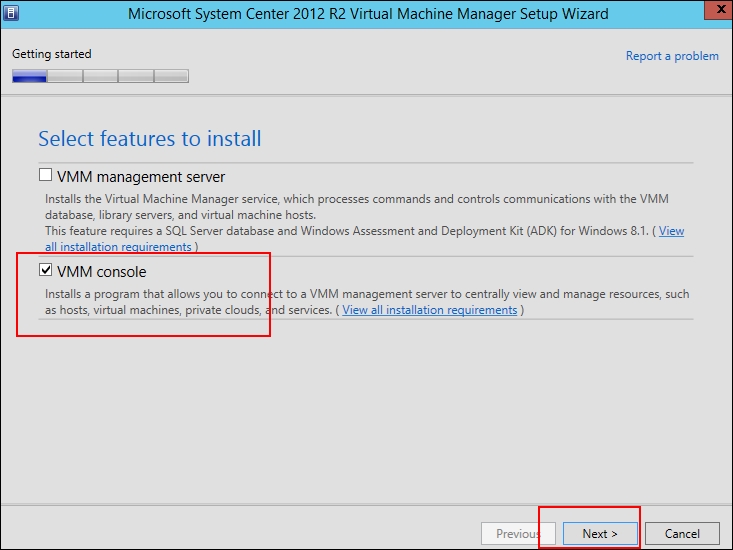
  3. Click on the checkbox next to VMM console, and then click on Next, as shown in this screenshot:
    Installing the SCVMM console
  4. Agree to the End User License Agreement terms and click on Next.
  5. At the Microsoft Update page, make a choice according to your corporate policies. Then click on Next.
  6. Leave the default installation path as it is and click on Next.
  7. Leave Default port settings for VMM console communication. The VMM console, by default, communicates using port 8100. Then click on Next.
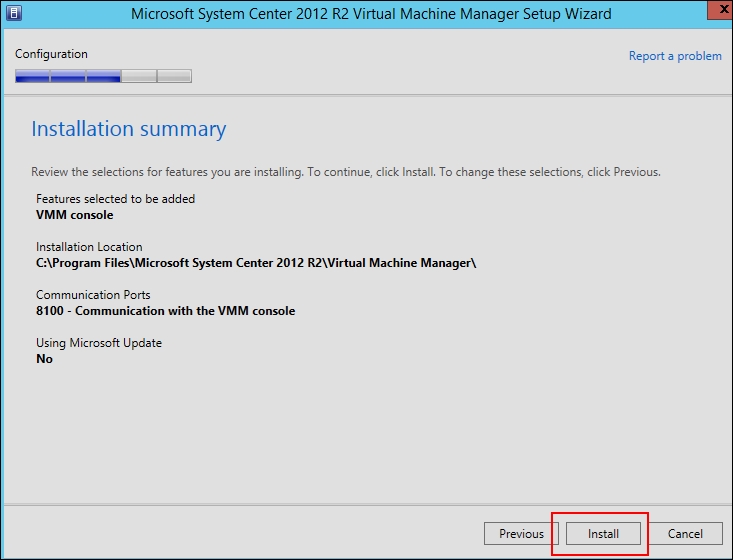
  8. Review the settings and click on Install, as shown in the following screenshot:
    Installing the SCVMM console
  9. After...
CONTINUE READING
83
Tech Concepts
36
Programming languages
73
Tech Tools
Icon Unlimited access to the largest independent learning library in tech of over 8,000 expert-authored tech books and videos.
Icon Innovative learning tools, including AI book assistants, code context explainers, and text-to-speech.
Icon 50+ new titles added per month and exclusive early access to books as they are being written.
Learning System Center App Controller
notes
bookmark Notes and Bookmarks search Search in title playlist Add to playlist font-size Font size

Change the font size

margin-width Margin width

Change margin width

day-mode Day/Sepia/Night Modes

Change background colour

Close icon Search
Country selected

Close icon Your notes and bookmarks

Confirmation

Modal Close icon
claim successful

Buy this book with your credits?

Modal Close icon
Are you sure you want to buy this book with one of your credits?
Close
YES, BUY

Submit Your Feedback

Modal Close icon
Modal Close icon
Modal Close icon