Sign In Start Free Trial
Account

Add to playlist

Create a Playlist

Modal Close icon
You need to login to use this feature.
  • Book Overview & Buying Optimizing Citrix® XenDesktop® for High Performance
  • Table Of Contents Toc
Optimizing Citrix® XenDesktop® for High Performance

Optimizing Citrix® XenDesktop® for High Performance

By : Craig Thomas Ellrod
close
close
Optimizing Citrix® XenDesktop® for High Performance

Optimizing Citrix® XenDesktop® for High Performance

By: Craig Thomas Ellrod

Overview of this book

Citrix XenDesktop is a suite of desktop virtualization tools designed to provide users with fast and convenient access to their Windows desktops and applications through any device. Virtual desktops mean that rather than setting up hundreds or thousands of individual computers in an enterprise, companies can instead opt to create servers with large amounts of memory, disk, and processing resources, and use virtualization to offer these resources to end users. The result of this is that users are provided with an experience that appears to be identical to having an individual desktop PC. Each user has some disk space, processor time, and memory allocated to them, as though it is present on their own physical machine, when in reality, the resources are physically present on a centralized server. This book starts by answering the basic questions you need to ask when considering XenDesktop, followed by methods of how you can properly size your server infrastructure for XenDesktop. You’ll discover how to optimize the virtual machines used in XenDesktop, how to optimize your network for XenDesktop, and how to optimize the hypervisor and the cloud. You’ll also learn how to monitor XenDesktop to maximize performance. By the end of the book, you will be able to plan, design, build, and deploy high performance XenDesktop Virtualization systems in enterprises. You will also know how to monitor and maintain your systems to ensure smooth operation.
Table of Contents (12 chapters)
close
close
11
Index

Architecture

Before we can start designing the XenDesktop infrastructure, we need to understand the core components that go into building it. XenDesktop can support all types of workers, from task workers that run Microsoft Office applications, to knowledge users that host business applications, to mobile workshifting users, to high-end 3D application users. XenDesktop scales from a small business supporting five to ten users up to large enterprises supporting thousands of users.

In the XenDesktop architecture, there are several sections called layers that are used to group certain functions together. Each layer is comprised of logical groupings of resources to help you better understand the roles each type of component plays.

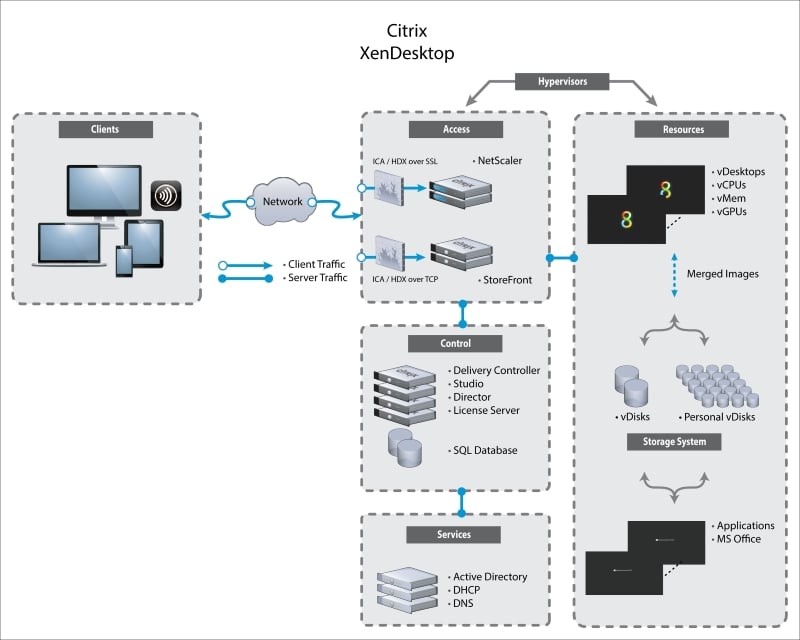
The following is a simple diagram to illustrate the components that make up the XenDesktop architecture:

Architecture

Referring to this diagram, you now have a visual representation of how a simple site will look when finished. Let's take a look at each individual component so you understand the role of each one.

The Clients layer

The Clients layer contains all the clients. It seems simple, and it is. Citrix Receiver is device-agnostic, so it will run on any device. You name it, and it will be capable of connecting to a XenDesktop.

The Network layer

One of the benefits of XenDesktop is that it creates a light network load for the client connections. However, we call out the Network layer because this is a potential pinch point in large XenDesktop deployments—a place where performance can be degraded or bottlenecked. The network layer is a general term and refers to every piece of the network, from the client device, through the wide area network, the cloud, and into the datacenter where XenDesktop is being hosted.

The Access layer

The Access layer is where you place the NetScaler to frontend your XenDesktop site. You can also place the StoreFront servers here. This layer contains resources that provide a portal for your clients to connect to the XenDesktop site. This layer is similar to DMZ computing in traditional network architectures.

Citrix NetScaler provides a SSL encryption frontend for XenDesktop. It is discussed at length in my companion book, Getting Started with XenDesktop® 7.x, Packt Publishing.

The Control layer

The Control layer contains all the components critical to controlling, managing, monitoring, storing, licensing, and delivering the desktops to the users.

The Services layer

The Services layer contains components that are not Citrix products but are essential to the deployment of the XenDesktop site; for example, the Microsoft Active Directory / Domain Controller, DHCP, and DNS.

The Resources layer

The Resources layer contains all the XenDesktop consumable resources such as desktops and applications. All the resources to power desktops and applications live here, including vCPUs, vMem, and storage for vDisks and PvDisks.

The Storage System layer

We call out the Storage System layer only because storage is increasingly being detached from the servers and could be a pinch point in itself. Conceptually, storage resources could be its own layer.

The Hypervisors layer

The Hypervisors layer is not really a layer, but you could refer to it as that. Some abstraction needs to be made regarding the hardware that all this stuff is running on top of. Each layer could conceptually be its own piece of hardware or server with a hypervisor running on top of it, with virtual machines to host XenDesktop components on top of that.

CONTINUE READING
83
Tech Concepts
36
Programming languages
73
Tech Tools
Icon Unlimited access to the largest independent learning library in tech of over 8,000 expert-authored tech books and videos.
Icon Innovative learning tools, including AI book assistants, code context explainers, and text-to-speech.
Icon 50+ new titles added per month and exclusive early access to books as they are being written.
Optimizing Citrix® XenDesktop® for High Performance
notes
bookmark Notes and Bookmarks search Search in title playlist Add to playlist font-size Font size

Change the font size

margin-width Margin width

Change margin width

day-mode Day/Sepia/Night Modes

Change background colour

Close icon Search
Country selected

Close icon Your notes and bookmarks

Confirmation

Modal Close icon
claim successful

Buy this book with your credits?

Modal Close icon
Are you sure you want to buy this book with one of your credits?
Close
YES, BUY

Submit Your Feedback

Modal Close icon
Modal Close icon
Modal Close icon