-
Book Overview & Buying
-
Table Of Contents

Getting Started with Microsoft System Center Operations Manager
By :


Getting Started with Microsoft System Center Operations Manager
By:
Overview of this book
Most modern IT environments comprise a heterogeneous mixture of servers, network devices, virtual hypervisors, storage solutions, cross-platform operating systems and applications. All this complexity brings a requirement to deliver a centralized monitoring and reporting solution that can help IT administrators quickly identify where the problems are and how best to resolve them.
Using System Center Operations Manager (OpsMgr), administrators get a full monitoring overview of the IT services they have responsibility for across the organization - along with some useful management capabilities to help them remediate any issues they've been alerted to.
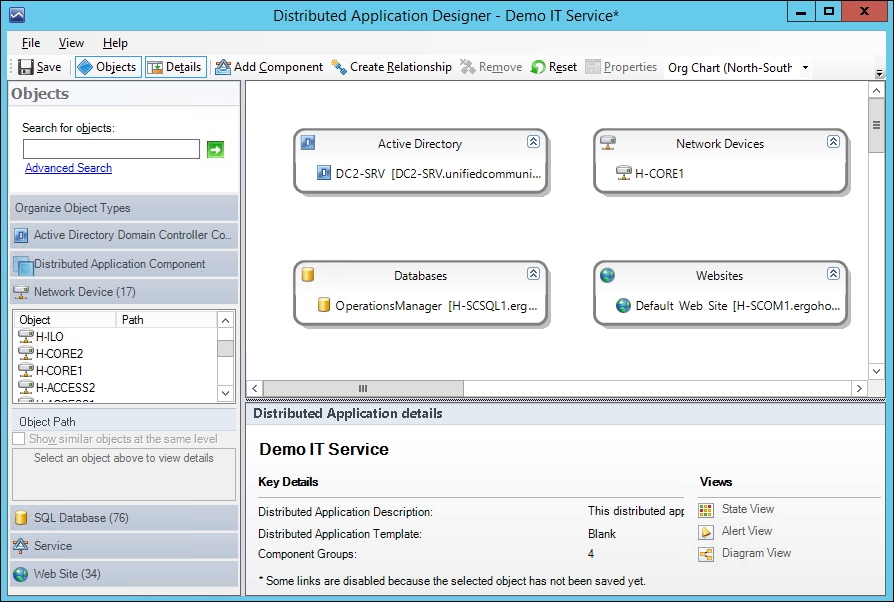
This book begins with an introduction to OpsMgr and its core concepts and then walks you through designing and deploying the various roles. After a chapter on exploring the consoles, you will learn how to deploy agents, work with management packs, configure network monitoring and model your IT services using distributed applications. There’s a chapter dedicated to alert tuning and another that demonstrates how to visualize your IT using dashboards. The final chapters in the book discuss how to create alert subscriptions, manage reports, backup and recover OpsMgr, perform maintenance and troubleshoot common problems.
Table of Contents (13 chapters)
Preface


 Free Chapter
1. Introduction to System Center Operations Manager
2. Installing System Center Operations Manager
3. Exploring the Consoles
4. Deploying Agents
5. Working with Management Packs
6. Managing Network Devices
7. Configuring Service Models with Distributed Applications

8. Alert Tuning the Easy Way
9. Visualizing Your IT with Dashboards
10. Creating Alert Subscriptions and Reports
11. Backing Up, Maintenance and Troubleshooting
Index