
Now you can start your first Docker container as shown here:
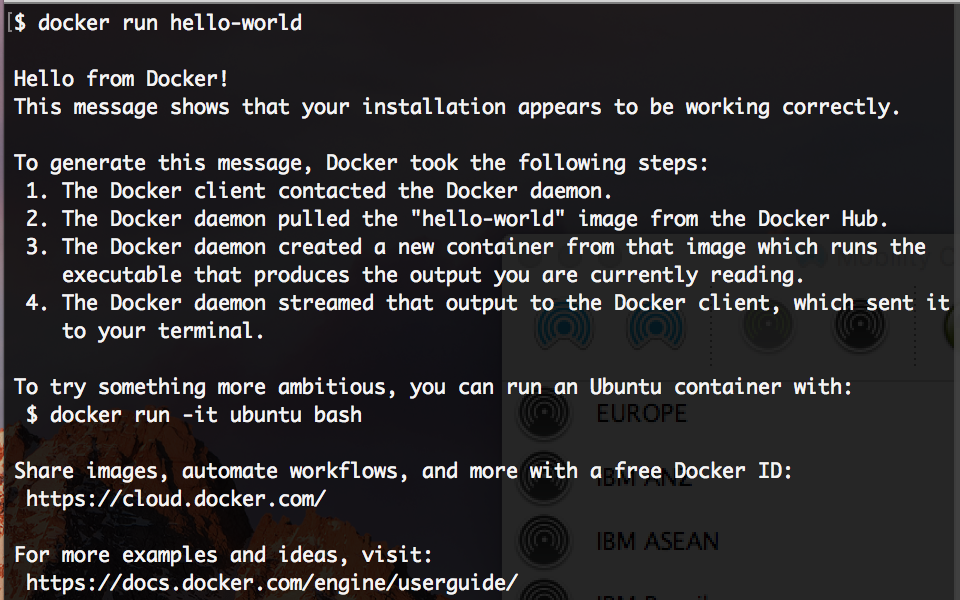
Cool, isn't it? You have set up your first Docker container in no time. In the preceding example, the docker run subcommand has been used to create a container from the hello-world image.
 Sign In
Start Free Trial
Sign In
Start Free Trial




 Free Chapter

Now you can start your first Docker container as shown here:
Cool, isn't it? You have set up your first Docker container in no time. In the preceding example, the docker run subcommand has been used to create a container from the hello-world image.
Most of the times you will not encounter any issues when installing Docker. However, unexpected failures might occur. Therefore, it is necessary to discuss the prominent troubleshooting techniques and tips. Let's begin by discussing troubleshooting know-how in this section. The first tip is that Docker's running status should be checked using the following command:
$ sudo service docker status
If the Docker service is up-and-running, the Active column (the third from the top) will list the status of the Docker service as active (running), as shown next:
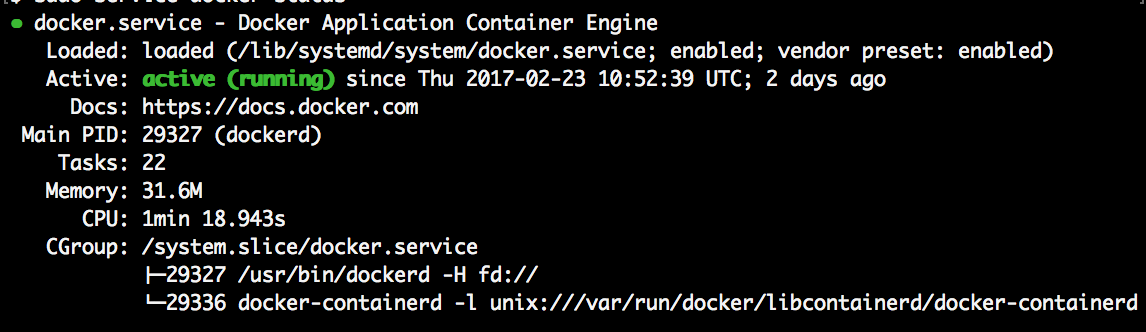
However, if the Active column shows inactive or maintenance as the status, your Docker service is not running. In such cases, restart the Docker service, as shown here:
$ sudo service docker restart
If you are still experiencing issues with the Docker setup, then you must extract the Docker log, using the journalctl -u docker command, for further investigation.
 Unlimited access to the largest independent learning library in tech of over 8,000 expert-authored tech books and videos.
Innovative learning tools, including AI book assistants, code context explainers, and text-to-speech.
50+ new titles added per month and exclusive early access to books as they are being written.
Unlimited access to the largest independent learning library in tech of over 8,000 expert-authored tech books and videos.
Innovative learning tools, including AI book assistants, code context explainers, and text-to-speech.
50+ new titles added per month and exclusive early access to books as they are being written.

 Notes and Bookmarks
 Search in title
 Add to playlist
 Font size
Change the font size
 Margin width
Change margin width
 Day/Sepia/Night Modes
Change background colour
Search
 Your notes and bookmarks