Sign In Start Free Trial
Account

Add to playlist

Create a Playlist

Modal Close icon
You need to login to use this feature.
  • Book Overview & Buying Mastering ServiceNow Scripting
  • Table Of Contents Toc
Mastering ServiceNow Scripting

Mastering ServiceNow Scripting

By : Kindred
3.4 (7)
close
close
Mastering ServiceNow Scripting

Mastering ServiceNow Scripting

3.4 (7)
By: Kindred

Overview of this book

Industry giants like RedHat and NetApp have adopted ServiceNow for their operational needs, and it is evolving as the number one platform choice for IT Service management. ServiceNow provides their clients with an add-on when it comes to baseline instances, where scripting can be used to customize and improve the performance of instances. It also provides inbuilt JavaScript API for scripting and improving your JavaScript instance. This book will initially cover the basics of ServiceNow scripting and the appropriate time to script in a ServiceNow environment. Then, we dig deeper into client-side and server-side scripting using JavaScipt API. We will also cover advance concepts like on-demand functions, script actions, and best practices. Mastering ServiceNow Scripting acts as an end-to-end guide for writing, testing, and debugging scripts of ServiceNow. We cover update sets for moving customizations between ServiceNow instances, jelly scripts for making custom pages, and best practices for all types of script in ServiceNow. By the end of this book, you will have hands-on experience in scripting ServiceNow using inbuilt JavaScript API.
Table of Contents (14 chapters)
close
close

Transferring update sets between instances


Once an update set has been completed, it is ready to be transferred to another instance.  Transferring update sets between instances takes a few steps, and once initially set up, it can be a quick process.

To start the process of moving an update set between two instances, we first need to log in to the instance we want to move the update set to, or the destination instance. Then we navigate to System Update Sets | Update Sources and click New.

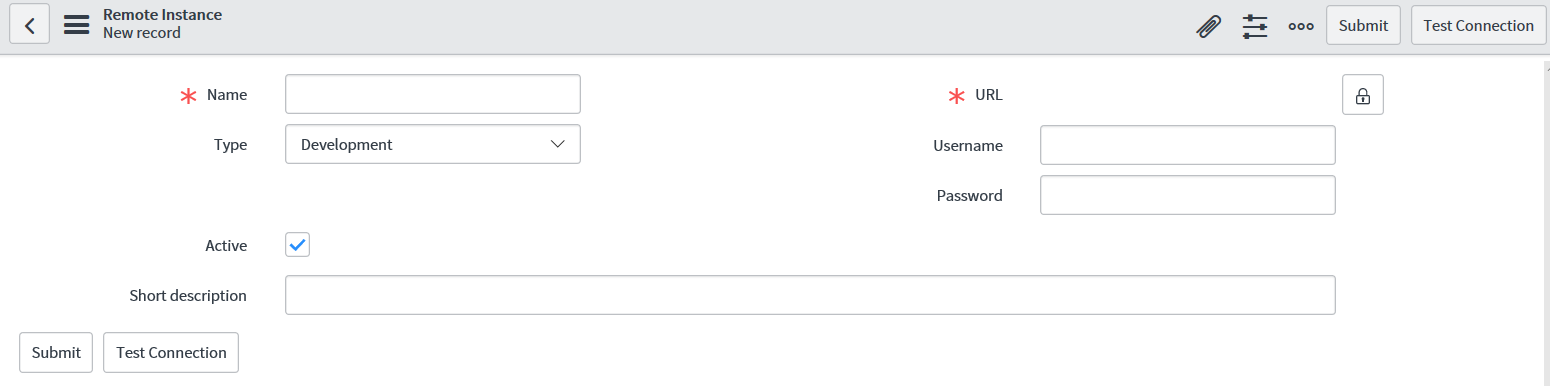
We can see the new update source screen in Figure 11.3:

Figure 11.3: New update source form

On this form, there are some key fields to fill in. Let's start with the mandatory fields first: Name and URL. The Name field is exactly that – a name to give to our update source so a system admin can easily recognize this update source. This is often the name of the instance we are taking the update set from, or the source instance. The URL field needs to be the URL of the source instance in the format <instance_name...

CONTINUE READING
83
Tech Concepts
36
Programming languages
73
Tech Tools
Icon Unlimited access to the largest independent learning library in tech of over 8,000 expert-authored tech books and videos.
Icon Innovative learning tools, including AI book assistants, code context explainers, and text-to-speech.
Icon 50+ new titles added per month and exclusive early access to books as they are being written.
Mastering ServiceNow Scripting
notes
bookmark Notes and Bookmarks search Search in title playlist Add to playlist download Download options font-size Font size

Change the font size

margin-width Margin width

Change margin width

day-mode Day/Sepia/Night Modes

Change background colour

Close icon Search
Country selected

Close icon Your notes and bookmarks

Confirmation

Modal Close icon
claim successful

Buy this book with your credits?

Modal Close icon
Are you sure you want to buy this book with one of your credits?
Close
YES, BUY

Submit Your Feedback

Modal Close icon
Modal Close icon
Modal Close icon