
Sign In Start Free Trial
Account

Add to playlist

Create a Playlist

Modal Close icon
You need to login to use this feature.
  • Book Overview & Buying Amazon Fargate Quick Start Guide
  • Table Of Contents Toc
Amazon Fargate Quick Start Guide

Amazon Fargate Quick Start Guide

By : Deepak Vohra
3.5 (6)
close
close
Amazon Fargate Quick Start Guide

Amazon Fargate Quick Start Guide

3.5 (6)
By: Deepak Vohra

Overview of this book

Amazon Fargate is new launch type for the Amazon Elastic Container Service (ECS). ECS is an AWS service for Docker container orchestration. Docker is the de facto containerization framework and has revolutionized packaging and deployment of software. The introduction of Fargate has made the ECS platform serverless. The book takes you through how Amazon Fargate runs ECS services composed of tasks and Docker containers and exposes the containers to the user. Fargate has simplified the ECS platform. We will learn how Fargate creates an Elastic Network Interface (ENI) for each task and how auto scaling can be enabled for ECS tasks. You will also learn about using an IAM policy to download Docker images and send logs to CloudWatch. Finally, by the end of this book, you will have learned about how to use ECS CLI to create an ECS cluster and deploy tasks with Docker Compose.
Table of Contents (9 chapters)
close
close

Logging in as the IAM user

Next, having created an IAM user, log in as the IAM user to use Amazon Fargate:

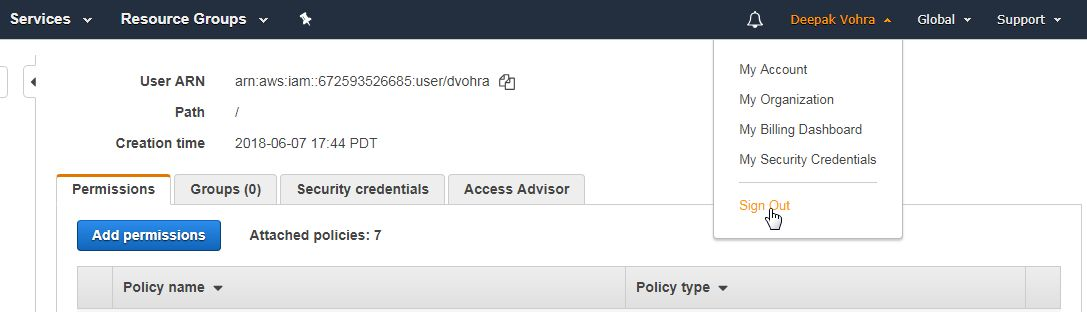
  • To be able to log in as the IAM user just created, first Sign Out as the root user:
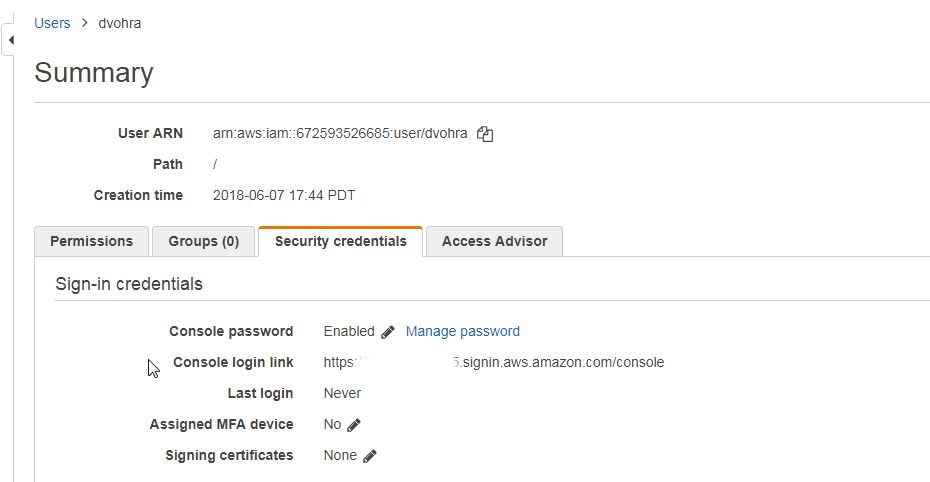
  • To sign in to the Console, copy the Console login link https://123456789.signin.aws.amazon.com/console, which would be different for different users, as shown here. The link listed is just an example link and cannot be used to log in:
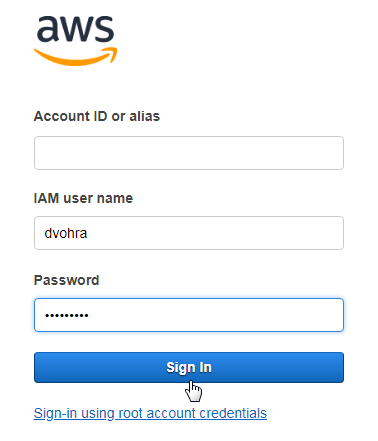
  • Open a web browser with the Console login link. The Account ID is pre-specified in the login form (not shown in following screenshot). Specify the IAM user name and password and click on Sign In, as shown in the following screenshot:
  • Next, the form to change the password is provided. Because the option to change the password at first login was selected, the IAM user must configure a new password. Click on Confirm password change. The IAM user gets...

Visually different images
CONTINUE READING
83
Tech Concepts
36
Programming languages
73
Tech Tools
Icon Unlimited access to the largest independent learning library in tech of over 8,000 expert-authored tech books and videos.
Icon Innovative learning tools, including AI book assistants, code context explainers, and text-to-speech.
Icon 50+ new titles added per month and exclusive early access to books as they are being written.
Amazon Fargate Quick Start Guide
notes
bookmark Notes and Bookmarks search Search in title playlist Add to playlist download Download options font-size Font size

Change the font size

margin-width Margin width

Change margin width

day-mode Day/Sepia/Night Modes

Change background colour

Close icon Search
Country selected

Close icon Your notes and bookmarks

Confirmation

Modal Close icon
claim successful

Buy this book with your credits?

Modal Close icon
Are you sure you want to buy this book with one of your credits?
Close
YES, BUY

Submit Your Feedback

Modal Close icon
Modal Close icon
Modal Close icon